What's new

Family shoot c&c only 3 photos

BlueEyes01

TPF Noob!
Joined
Aug 29, 2008
Messages
176
Reaction score
0
Location
Missouri
Can others edit my Photos
Photos NOT OK to edit
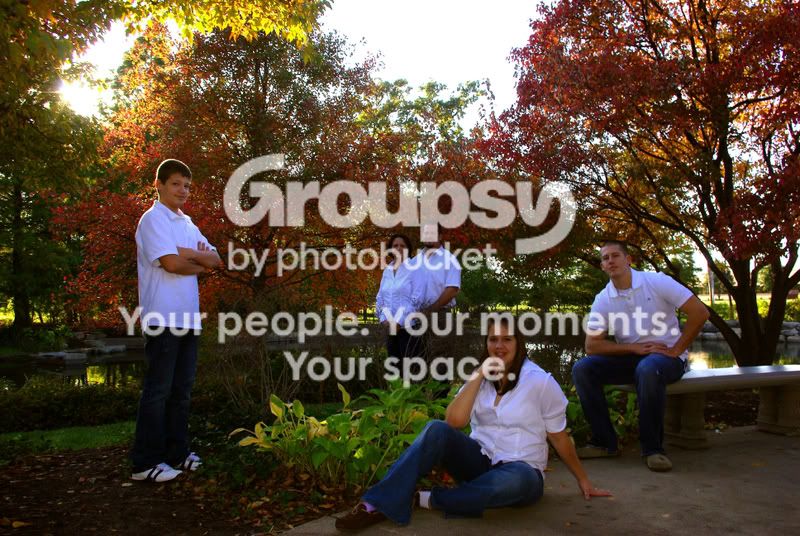
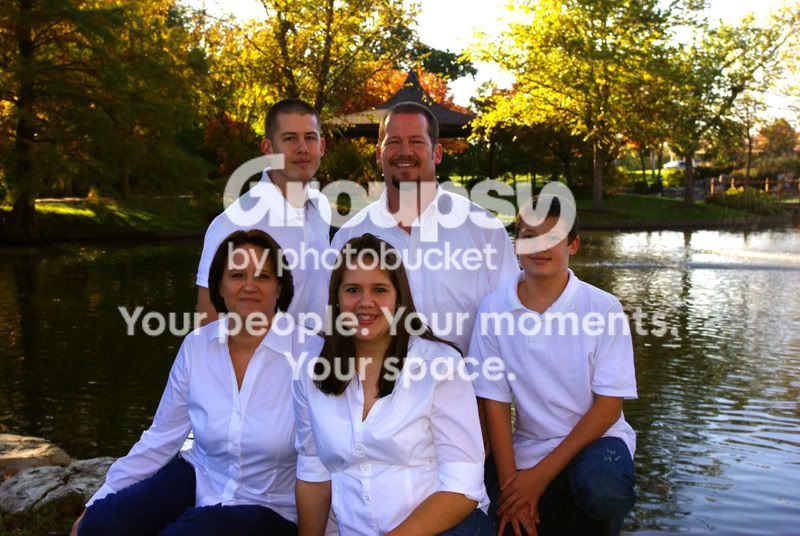
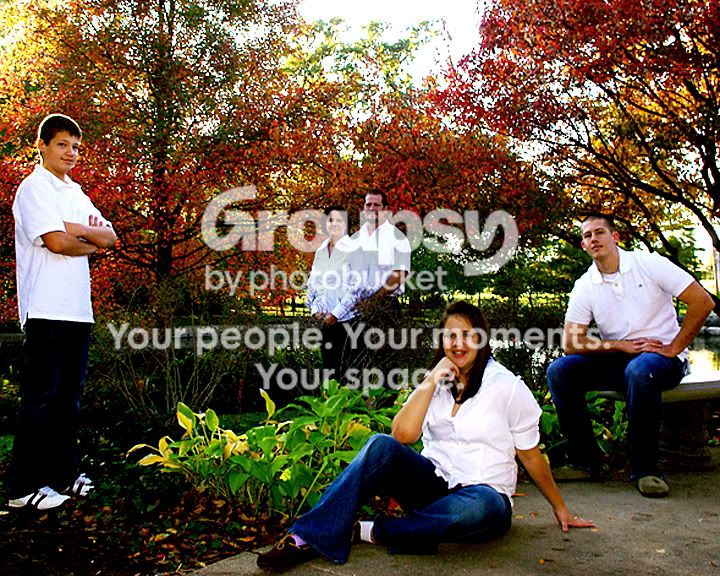
Hello, I did these for a co-worker, any suggestions, tips or opinions would be appreciated...

1
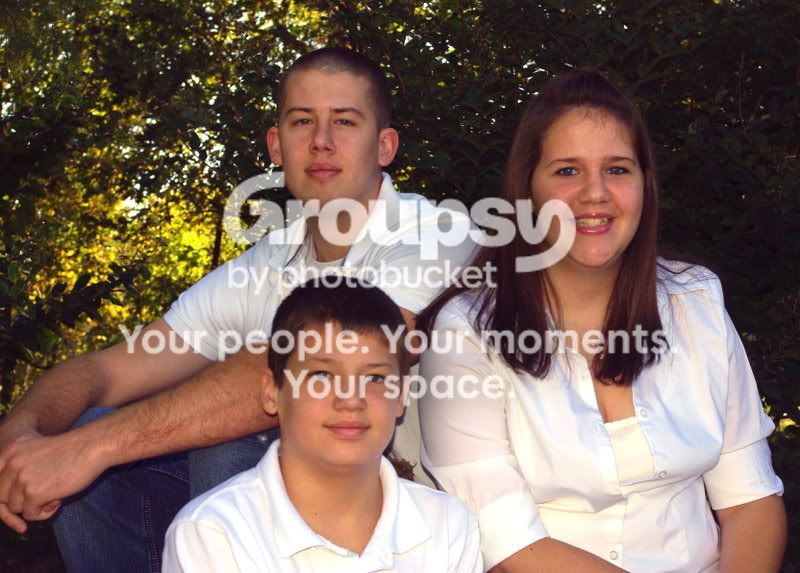
IMGP1494copy25x7.jpg


2
IMGP1565copy2.jpg


3
IMGP1573copy.jpg
 
underexposed due to white in frame and shooting towards the sun, compensate by 2 stops or so in future, otherwise poses fine and expressions too, try pp a bit more. quick edit belowH
IMGP1565copy2.jpg
 
Last edited:
The first photo you "cut" his hand out of the photo, next time don't do that, because it looks bad.
Second photo i kind of dislike the random positioning, but it's about taste and opinion.
The last one you should be careful what you have in the background. Because of the "house" in the background, looks like the dad has a chinese hat :)

@Flash Harry
I don;t like your edit, you were right that it was underexposed, but now looks overexposed. And i think you sharpened the image which now looks overdone.
 
The other things I would say are that to me (on an uncalibrated monitor at work) all of these look very red. I think fixing the white balance would help a lot.

#1, what drives me nuts is the lack of sharpness in the eyes. also, as was said, the hand is chopped up. The other thing is that the girl has a very awkward smile pasted on. I think if she could be loosened up a bit that would have helped the photo.

#2 Although obviously posed, the posing doesn't bother me much. However, I think the girl almost looks out of focus. If she and the parents were closer and you had the focusing in that would have also helped the shot. Beyond that you also run into a problem because the faces of the people in your photo kind of blend in to the background. I mean, they are not bright and thus clearly the opject of the photo, and they aren't dark in a light background either. Beyond that, the halo around the boy on the left is quite distracting.

#3 this one could be a pretty good shot, if you fix the white balance. They look extremely red, which in my opinion ruins the shot. (I am on an uncalibrated monitor so I may be wrong, but I'm pretty sure it's way off)

again this is just my $0.02 your mileage may vary :)
 
I really like the set up for the people in 2... nice idea!
 
kronos: "Flash Harry
I don;t like your edit, you were right that it was underexposed, but now looks overexposed. And i think you sharpened the image which now looks overdone."

I did say it was a quick edit, merely to brighten up a shot, I also cropped in closer and desaturated as that too was too much, anyone would know, on a shot such as the original which wasn't sharp to begin with the enlargement of the crop made it softer still, hence the oversharpen, so yes overdone, then again its not my shot. H
 
I agree about #3 being a good shot, fixing white balance, s-curve and some sharpening would be good.
 
Thanks for all of the comments!
I hadn't even noticed the building/hat look on #2. There were a lot of people at the park that day & a road in the distant background so I think my eyes were looking more for things like that then the hat but that is a good point!

Thanks for all of the advice! All of you make some good points.
 
I like the all-white shirts. It contrasts nicely with the all brown hair and eyes, but if the camera meters on on the white, it may have trouble getting the levels right.
 
in number one that boy at the front looks a bit too out of focus, try a higher aperture number
 
As far as cropping #1, I would have centered the three of them, which would have cut the hands off even more.
 

Create an account or login to comment

You must be a member in order to leave a comment

Create account

Create an account on our community. It's easy!

Log in

Already have an account? Log in here.

New Topics

Back
Top Bottom