What's new

Feedback

laurenivy

TPF Noob!
Joined
Jan 5, 2012
Messages
23
Reaction score
2
Location
Pennsylvania
Can others edit my Photos
Photos OK to edit
Hi All! I am brand new here, and a very amateur photographer. I joined this site because I would love to learn more about photography since I am really beginning to enjoy it! I have a nikon D90 and it came with photoshop elements 9. I love processing my photos after they are taken, but have no real knowledge on how the shots are "supposed' to look. (I think i have a horrible eye for white balance!!) Anyway, I wanted to post three photos of my son I have taken recently to see if I could get any feedback on how I can improve... (i.e composition, lighting, post processing... anything!) Thanks in advance!!
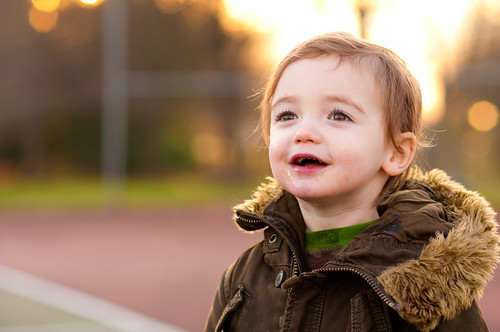
DSC_1209 by libst9, on Flickr
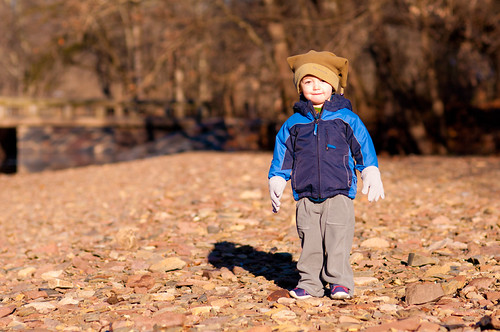

DSC_1105 by libst9, on Flickr


DSC_1741 by libst9, on Flickr
 
When shooting just one person, most of the time you will need to turn the camera 90° to the vertical or portrait frame orientation.

In #2 youe subject occupies about 1/15th of the image frame though child is obviously your intended main subject.

That's a big reason the frame is made to be a rectangle, to allow 2 framing modes.

In art they talk about the concept of 'visual weight'.
 
Last edited:
Welcome to the forum and photography!!!

Here are my thoughts:

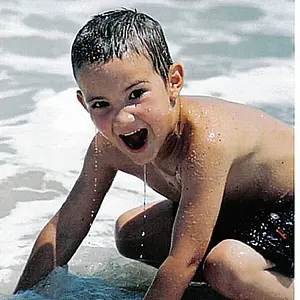
#1 I like your composition and your focus is right on. Part of your background is overexposed, though, and since it's blown out right behind your son's head, it's a big distraction. The drool isn't too pretty either ;)

#2 I agree with KmH here. But you can fix that.... just crop it up.

#3 He's cute and all, but the top of his head and his hands are chopped off!

Keep on shooting =)
 
Thank you! I appreciate the feedback. I actually just googled visual weight and I definitely see what you are referring to.
 
LOL @ the drool! ;) Thank you for your feedback also!! Any tips on how to properly expose the subject without over exposing the background? Or do I just have to be careful of the light I am shooting in?
 
I recommend you set your flickr account to upload larger images.

6644399317_d42c6032f0_b.jpg


6644399165_60f8ce44fe_b.jpg
 
LOL @ the drool! ;) Thank you for your feedback also!! Any tips on how to properly expose the subject without over exposing the background? Or do I just have to be careful of the light I am shooting in?

Both! If you have a flash you can meter your camera off the sky and properly expose the sky while the flash takes care of the subject's exposure. You could also just move your subject so that there are more trees behind his head and get rid of the bright sky. Personally, I'd go for the second option because I love the reflection in his eyes and this would be ruined with flash.
 
Ok, thanks! I never thought of metering the sky... I'll have to try that with a flash and experiment. KmH.. That actually looks pretty neat. ;)
 

Create an account or login to comment

You must be a member in order to leave a comment

Create account

Create an account on our community. It's easy!

Log in

Already have an account? Log in here.

Back
Top Bottom