What's new

Feeling completely defeated!

JRP

TPF Noob!
Joined
Mar 23, 2011
Messages
9
Reaction score
0
Location
Regina, SK
Can others edit my Photos
Photos OK to edit
I think I fudged up royally!

I am new to photography and have been really enjoying it so far.
I took some nice pictures, cropped, and processed them but I think I completely screwed up the image sizing and cropping.

I decided to see what the print quality was like, so I uploaded them to costco so I could pick them up tomorrow to get an idea..well a couple of them are going to get chopped off because I didn't crop?size them properly. I've been reading all night about pixels and aspect ratios and my head seriously hurts. I've played around with a few of the images but no matter what I do I'm going to end up chopping off part of my pictures...which isn't always the most flattering crop. I've also been reading that I should change from 72 dpi to 300 dpi but then I just read that there is no need for that!! I am SO confused!

Am I SOL and do I have to re-process and re-size all over again? Please tell me I can save my work!

I planned on giving a disc of the files for the lady to just print herself. I was hoping they could print between 4x6 and 8x10 but I'm thinking I can only send her files for one size, that one file won't print multiple sizes without some image loss. Am I right?

Please help!
 
No need to worry, your originals are still intact i presume?
 
Yup, I still have all the originals. I was hoping there was a way to fix the size part without having to re-do all the processing. No?
 
72 is fine for web viewing. If your printing you should go to 300
 
I found this. Crop & Maintain Aspect Ratio in Photoshop. - Photo.net Digital Darkroom Forum
I THINK it's what I need..seems to have given me more cropping freedom. I will play around with it more tomorrow...need sleep now!


Thanks RockStar, that's what I was doing at first..saving them at 300 for printing and using 72 for posting to the web but I kept reading conflicting opinions!
 
Welcome to the reality of digital era photography... Some of the better online printing labs, Mpix for example, provide Q&A and tutorial on their website to help you get all those acronyms (DPI, PPI, MCLMF) in order and relate them to what they actually mean for your printing needs. Mpix also, and probably others do as well, tells you what their equipment is capable of and will tell you what to set your photos at to optimize them for their print lab. Just pay attention to the info they provide and I'm sure you'll figure it out!
 
When i'm shooting and printing on site i always shoot wider so i can crop to any size i want
 
If whatever program you're using to crop will let you, just set the ratio (4X6, 8X10, whatever), and crop outside the lines. That is, push the cropping cursor beyond the picture's boundary if you have to, just get the whole picture in and leave a blank area. When the photo is printed, you'll have a white strip or two. Just trim them off. Obviously this isn't the solution if you're putting the picture in a pre-made frame, but it's fine for albums. If it has to be a set ratio, try some different sizes. 5X7, 4X6 and 8X10 aren't exactly the same ratios. You might find one close enough to fudge it.
 
Thanks for the advice. I will go check out those tutorials, I was searching last night but couldn't find exactly what I was looking for. Hard to know what to search when you don't know what you should be searching for!
 
Depending on the software you are using to crop, here's an easy way to do it.

Create a new image that is the size that you want the picture to be.
Copy the picture that you want to crop.
Paste it into the new image.
Use the move tool to move the picture around in the new image's view port until you're happy.
Save the new image.

It's like taking a piece of cardboard, cutting a hole in it, then moving a photograph behind it. Same principle.

But, it will only work in image editing software that supports it, like Photoshop.
 
I think I fudged up royally!

I am new to photography and have been really enjoying it so far.
I took some nice pictures, cropped, and processed them but I think I completely screwed up the image sizing and cropping.

I decided to see what the print quality was like, so I uploaded them to costco so I could pick them up tomorrow to get an idea..well a couple of them are going to get chopped off because I didn't crop?size them properly. I've been reading all night about pixels and aspect ratios and my head seriously hurts. I've played around with a few of the images but no matter what I do I'm going to end up chopping off part of my pictures...which isn't always the most flattering crop. I've also been reading that I should change from 72 dpi to 300 dpi but then I just read that there is no need for that!! I am SO confused!

Am I SOL and do I have to re-process and re-size all over again? Please tell me I can save my work!

I planned on giving a disc of the files for the lady to just print herself. I was hoping they could print between 4x6 and 8x10 but I'm thinking I can only send her files for one size, that one file won't print multiple sizes without some image loss. Am I right?

Please help!

If it makes you feel any better, I took a digital photography course 10 years ago from a guy who had, himself, had no idea how image size and resolution work together to create an optimal image. I'm afraid you're going to have to do a little studying to get it straight.

The short version is that most prints aren't improved at resolutions above 200 ppi or so. 75ppi is definitely too low, but 300ppi is also too high. It depends on the printer, so it helps to send images with different resolutions to your printer to see where the quality break is. After you've determined that, then you can figure out how to crop most effectively.
 
Here is the scoop:

Your camera out-puts images at certain maximum pixel dimensions (resolution), and at it's native aspect ratio. For DSLR cameras thast have an APS-C, or full frame image, sensor that aspect ratio is 3:2

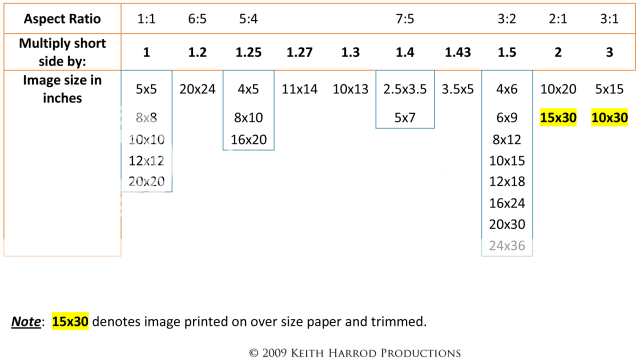
The 3:2 aspect ratio would produce uncropped images equivelent to - 3x2, 4x6, 6x9, 8x12, 10x15, 16x24, 20x30, etc....The key being long side of the photo is 1.5 times longer than the short side.

An 8x10 has a 5:4 aspect ratio. It is a different rectangular shape than a 3:2 image

A 5x7 has a 7:5 aspect ratio and is yet another shape.

Now, back to pixel dimensions (resolution). A Nikon D300 has max image pixel dimensions of 4288 x 2848 pixels, way bigger than most computer displays can handle at 1:1 (display pixel to image pixel).
So online, only the pixel dimensions determine the size of an electronically displayed image unless it is displayed at a smaller resolution so the entire image can be viewed on the display.

For prints, the size of the print is defined by how many pixels-per-inch (PPI, not DPI ) we specify.

For example the 4288 x 2848 pixel image from a D300, if printed at 100 PPI would be 42.88 inches by 28.48 inches. Pretty simple math - 4288px divided by 100PPI = 42.88"
At 200 PPI that same 4288 x 2848 px image would be 4288px / 200PPI = 21.44" and 2848px / 200PPI = 14.28". So each side of the 200 PPI print would be 1/2 the length of the 100 PPI print.

With basic algebra you can re-write the equation such that if you want to print a image's long side at 10 inches, and the long side has 4000 px the 4000px / 10 inches = 400 PPI.

By the same token, if you want the long side of an image to be 10 inches and you want to print at 250 PPI, you would need the long side of the image to have 3000 px.- 12 inches x 250 PPI = 3000 px.

AspectRatioChartv2.png
 
Last edited:
Super Simple- I tired that..I'm getting unflattering stretching doing it that way.

Slick Salmon- Makes me feel a bit better..lol thanks..I won't be teaching classes anytime soon.

KmH- see THAT makes my head hurts. Yes, it's simple math, but seeing ALL those numbers together at once just makes the room spin. I think I will figure it out eventually..

Now from the business side of it.. when I eventually start charging people for my work, I was planning on selling them the digital files..I suppose I can only sell them 4x6 images then and they have to figure it out if they want any enlargements? This is what a bunch of people have recommended I do but maybe that's not such a great idea?
 
Super Simple- I tired that..I'm getting unflattering stretching doing it that way.

...

Now from the business side of it.. when I eventually start charging people for my work, I was planning on selling them the digital files..I suppose I can only sell them 4x6 images then and they have to figure it out if they want any enlargements? This is what a bunch of people have recommended I do but maybe that's not such a great idea?

Stretching? That's very odd. If it's in Photoshop, depending on how you open the picture, you may need to resize it then press Enter to set the size. (Use the shift key to keep the aspect ratio.)

For selling photos, I don't actually sell, but I buy a lot. Usually pricing is cheaper for lower resolution with it scaling up across multiple resolutions that are increasingly more expensive. Seems like a good model.
 
It's just division... you learned that a long time ago. Now it's a matter of applying it.

If you want to print an 8x10, you need to make sure your image matches those dimensions. 8/10 is 0.8. So divide your image dimensions and see if you come up with 0.8 (or it's reciprocal 1.25, with is 10/8).
 

Create an account or login to comment

You must be a member in order to leave a comment

Create account

Create an account on our community. It's easy!

Log in

Already have an account? Log in here.

New Topics

Back
Top Bottom