What's new

Finally......Spring is here! CC please!

Jeanelle

TPF Noob!
Joined
Nov 25, 2010
Messages
147
Reaction score
1
Location
Kansas
Can others edit my Photos
Photos OK to edit
1.
_-90.jpg


2.
_-50.jpg


3.
_-39.jpg


Thanks in advance for all the great advice I am sure you will bestow upon me! :sexywink:
 
She is a cutie...definitely knows how to play to the camera. (future America's top model in the making?)...

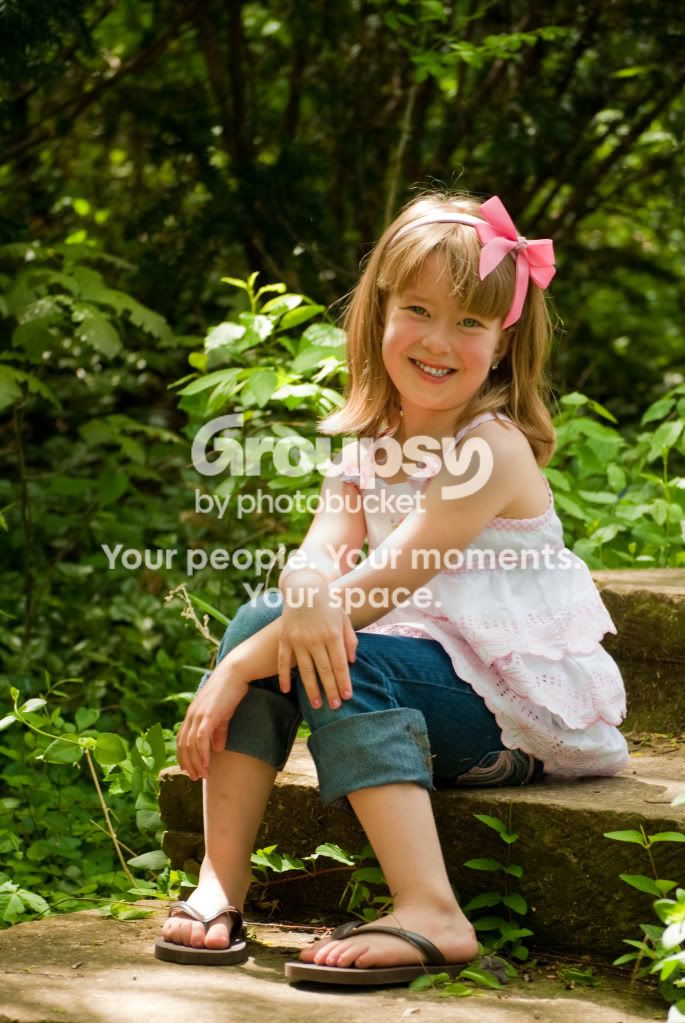
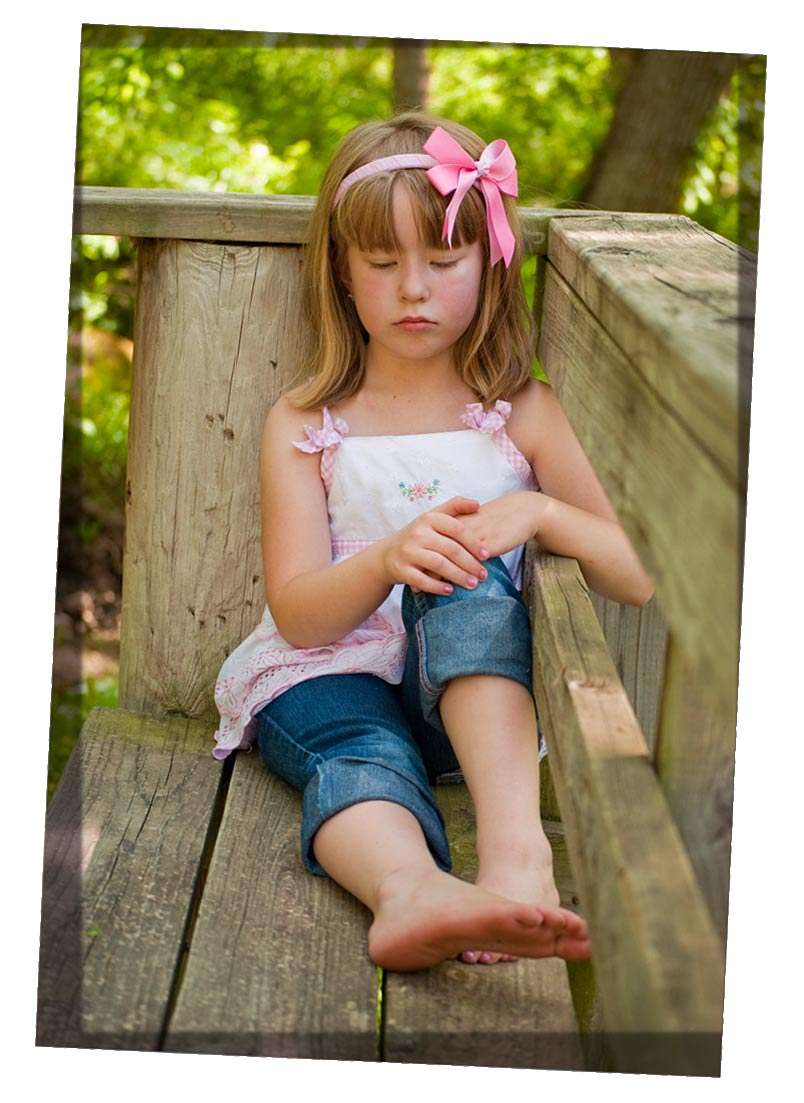
I really like the 2nd one, the bokeh is good, although I am not too crazy about the OOF part (railing) in the foreground - tends to be a bit distracting - I found my eye going back and forth from it to her face...No. 1 is okay, her left arm is a bit OOF, but not too distracting - just watch the background as she has a small tree growing out of her head. No. 3 is good - she has a nice smile and it would have been nice to have the background more out of focus, but it is still a nice, fun portrait. One over-riding aspect, make sure that her bangs are combed, I may be a bit fussy, but it tends to distract a bit from the image. Please remember that these comments represent only one person's thoughts and that others may have different ideas and to be quite honest they are really a bit nit picky, except for the tree growing out of her head in the first one. Keep up the good work and keep shooting...

Cheers,

WesternGuy
 
Thank you so much Westernguy! I love the nit picky, it makes me think harder every time that I go out. I appreciate you taking the time to cc my photos!
 
Thank you so much Westernguy! I love the nit picky, it makes me think harder every time that I go out. I appreciate you taking the time to cc my photos!

No problem...glad I could be of help...

Cheers,

WesternGuy
 
Excellent camera work! Nice poses, nice compositions, nice timing, all in all very high level of proficiency with the camera!

On the processing front, I would suggest trying to eliminate the greenish color cast that these have,and which is always such a PITA when working in the woods. While these are not too badly polluted, there is *some* excessive green that is contaminating the yellows. I think I might try opening the images up and going to Selective COlor, and clicking on the Yellows tab, and then adding some magenta, to counteract the green from the foliage which is affecting the yellows so much. Alternately, if you're not that familiar or comfortable with that method, you could try a photo filter effect, and try adding one of the orange, 85-series filters, which tend to help counteract that greenish tinge that a canopy of maple or fir or other green-leaved trees tends to produce.

 
Excellent camera work! Nice poses, nice compositions, nice timing, all in all very high level of proficiency with the camera!

On the processing front, I would suggest trying to eliminate the greenish color cast that these have,and which is always such a PITA when working in the woods. While these are not too badly polluted, there is *some* excessive green that is contaminating the yellows. I think I might try opening the images up and going to Selective COlor, and clicking on the Yellows tab, and then adding some magenta, to counteract the green from the foliage which is affecting the yellows so much. Alternately, if you're not that familiar or comfortable with that method, you could try a photo filter effect, and try adding one of the orange, 85-series filters, which tend to help counteract that greenish tinge that a canopy of maple or fir or other green-leaved trees tends to produce.

Thanks so much for the information, I am going to go try to work on them right now! I hadn't noticed it too much until you pointed it out and now it is really bugging me! This is why I love posting on here, it really helps me to learn what to watch for! Thanks!!!!!!
 
I agree with Derrel about the tint.
I love the first, it is less a pose than the others.
The only thing that bothers me (and you will think me either crazy or anal compulsive) is the slight tilt to her upper body. Her face is so symmetrical and her head is not cocked at an angle but her torso is leant just the tiniest bit that I think that rotating the image a bit looks good.
I might also darken the edges a bit to keep the eye in.

It is a beautiful shot

tilt.jpg
 

Create an account or login to comment

You must be a member in order to leave a comment

Create account

Create an account on our community. It's easy!

Log in

Already have an account? Log in here.

New Topics

Back
Top Bottom