What's new

first paying photos C&C please

cajunbandmom

TPF Noob!
Joined
May 1, 2010
Messages
34
Reaction score
0
Location
Louisiana
Can others edit my Photos
Photos OK to edit
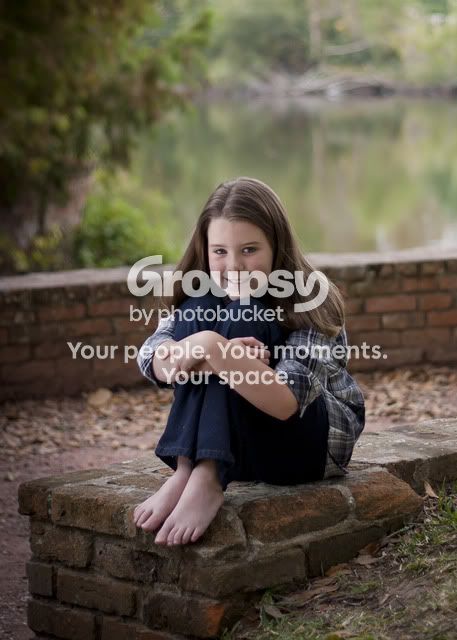
A friend has seen some of my work on my facebook page and asked if I would do a shoot for her and her children. So I agreed and here is what I got. She wanted to pay me the day of the shoot and I was oh no not to we see how I did lol. She loves them and infact has now asked me to do two more shoots.

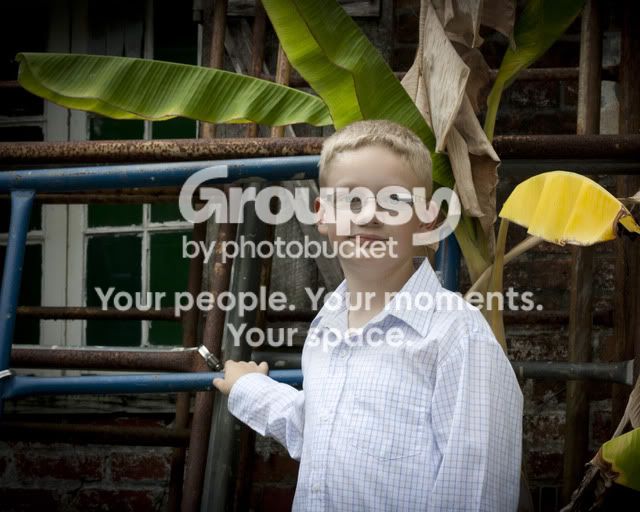
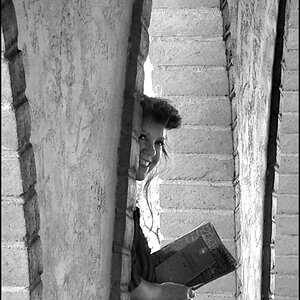
1.
_MG_1610.jpg


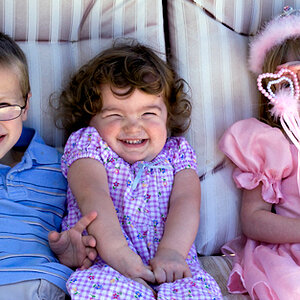
2.
_MG_1442.jpg


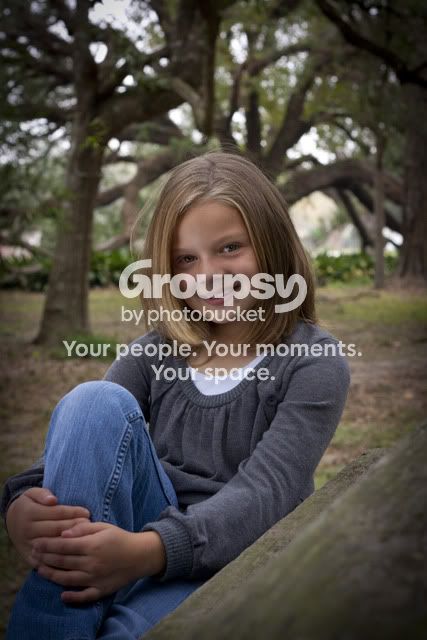
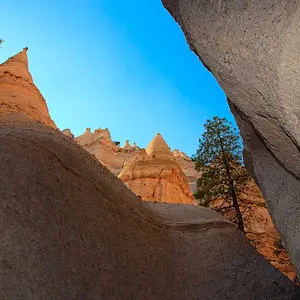
3.
_MG_1461-2.jpg


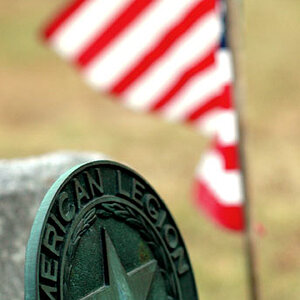
4.
_MG_1535.jpg
 
#1 is the best of the bunch
#2 bad reflection on his glass. Make sure you dont want anything white on there
#3 soft. You missed your focus
#4 Too centered. I think you want more on the left with this pose.
 
She loves them and infact has now asked me to do two more shoots.

After I read this I said... "You did an excellent job then"

Picky C&C to follow...

#1. Good shot, toes might be a little OOF but not distractingly so. Maybe play around with a tighter crop, personal choice on that one. My pick of the bunch for sure.

#2. I am sure you noticed the reflection in his glasses so I am not going to harp on that. The big blue bar running into his head is a distraction along with the super yellow leaf to his left.

#3. Seems soft and maybe a stop underexposed. Also, her left arm going out of frame like it is looks a bit unnatural. WB seems a bit cool on my monitor

#4. Good shot.

Like I said. If your customer is happy, you should be happy. They are good photos and I can see why the customer will use you again.


p!nK
 
Thanks both of y'all. Most of the C&C that y'all gave me I seen myself which is an improvement to me because it is telling me I am learning what to look for. I do plan to do this the right way. Taxes, Ins., ect. but I want to make sure I am even close to being good enough.
 
They look cool. I would warm them up a bit before final edits. :)
 
1. Is a real good shot, unfortunately the rest are nothing great.
4. Is ok, but the post on the right is bothering me. I would make sure you get every shot like shot one if you are going to be hired by other people. There are pros that take waay better pictures, but fortunately, people who are not into photography, will love just about any picture of their kids.
 
the first pic is def the best. they do look a little dull in color. but keep up the good work.
 
Yes you are right there are pro's who take MUCH better pictures than me. I am no were NEAR being truly pro. But even a pro started someplace right? I did not charge what a pro charges.
 
I am just saying, make sure you can accurately take good pictures.
 
I understand... I have to work on focus, and lighting and pretty much everything right now lol. But this is my way to learn. I don't go out and advertise at all. But if someone ask me to do some photos I do with the understanding that I am not pro do not claim to be. And if they like the pictures then and only then they can buy them. I don't charge sitting fee's until I get MUCH better. But the money I do make I plan to pay taxes and do it it the right way... just the way I am.
 
I understand... I have to work on focus, and lighting and pretty much everything right now lol. But this is my way to learn. I don't go out and advertise at all. But if someone ask me to do some photos I do with the understanding that I am not pro do not claim to be. And if they like the pictures then and only then they can buy them. I don't charge sitting fee's until I get MUCH better. But the money I do make I plan to pay taxes and do it it the right way... just the way I am.

More shots like #1, less like #3 and I think you will be fine.


p!nK
 
As other said, #1 is the best. I would definately work on some post processing though. Also, the focus is soft on all of them. If you are going to be doing professional work, you may want to look into getting a sharper lens or learning some more post processing. Especially if you shot in RAW.

The vignette in 2 and 4 looks bad.
 
Here is a quick adjustment I did in CS5. All I did was adjust the color, adjust the levels ( black point and midtone contrast ), I have a slight saturation boost and sharpened ( not the greatest given the small size of the file and everything ) but just an example.

Original:
_MG_1442.jpg


Edit:


_MG_1442 by GooniesNeverSayDie11, on Flickr

It was a little hard to adjust the contrast due to the vignette.
 
I agree with pretty much everything above, you may want to work on posing them a bit more as well in conjunction with some better post work
 

Create an account or login to comment

You must be a member in order to leave a comment

Create account

Create an account on our community. It's easy!

Log in

Already have an account? Log in here.

Back
Top Bottom