What's new

First time trying portraits

echoyjeff2221

No longer a newbie, moving up!
Joined
Jun 27, 2010
Messages
645
Reaction score
140
Location
WA
Can others edit my Photos
Photos OK to edit
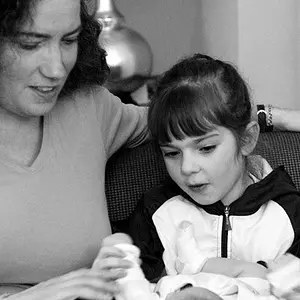
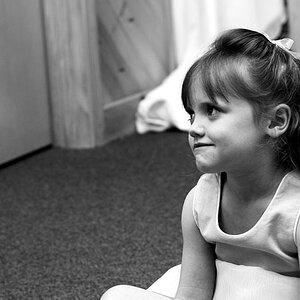
Hey all! I have never posted in this section, but I've been in China for vacation and couldn't resist taking a few candid shots of these twins at a local park. I was nervous about asking, but apparently they're all for taking pictures of strangers here in China :) They were exuding pure happiness. It made my day.

Any C&C would be appreciated! Any tips on portraits would be nice, since it's probably something that I'll do more as I get more into photography. It's mostly the post editing process that I'm confused about.


girl3 by echoyjeff222, on Flickr


girl2 by echoyjeff222, on Flickr


Girl1 by echoyjeff222, on Flickr
 
You are shooting in automatic mode, so about the only control you have is to create better compositions. Here is a great website on composition. Guidelines for Better Photographic Composition.
Back up. You are cutting of bits and pieces of the girls. You never want to chop off fingers, feet, toes, etc. If anywhere you want to make sure you are cropping at an appropriate joint
Your camera needed more light in these. The camera dropped the shutter too slow and that's why it's blurry. The girl moved and it was recorded in the image as blur. If the shutter is slow to close and is open for a long time the subject or you can move or shake. If the shutter opens and closes faster you don't have time for motion. Obviously if the shutter is open for a long time it's getting more light than if it is open for a short time. You didn't have enough light-the camera kept the shutter open for a long time. How? Either add more light via flash or raise your ISO.

Your camera is a bridge camera. You aren't doing yourself any favors by using it in auto mode. It does the same things that every camera in the world would do. If you take the time to learn how to use the camera to create the image and exposure you will have infinitely better results-no blur for starters. Here are some tutorials to get you started: Digital Photography Tips and Tutorials
 
Huh? I didn't think that I was shooting in automatic mode. I'm pretty sure it was aperture? I shoot most of my shots in aperture priority ... hm.
 
You are right... I looked at the white balance.
WHen you are in aperture priority mode you have to watch your shutter speed. If your subject is alive you need to be above 1/125. If your subject is moving above 1/250. If your shutter is dropping below that you have to add more light somehow. Either by your aperture or by your ISO OR by flash
 
thanks for the comment -- I took a look at the first tutorial link that you gave me. The thing is, I know most of the basics already pertaining to general photography. I just haven't got a clue how to apply it to portraits xD It seems like a different ballpark.

edit: the part on avoiding mergers helped :)
 
Last edited:
thanks for the comment -- I took a look at the first tutorial link that you gave me. The thing is, I know most of the basics already pertaining to general photography. I just haven't got a clue how to apply it to portraits xD It seems like a different ballpark.
I'd say that is your challenge now! See how you can see your subjects differently and find a way to give them a new feeling or meaning using composition!
 
do you have any links for people photography only? that first tutorial was a great refresher.
 
i know >.< i switched the white balance between one of the shots for some reason. portraits have so many more noticeable variables!! POO!
 
Back up, give yourself some room, pictures of hands, necks and shoulders get boring really quickly.
Get children interacting with each other and the environment.

and fix the WB before posting.
everything you post should have all the wrong stuff that you know fixed before you post so that everything you hear will be new and a learning experience.

Lew
 

Create an account or login to comment

You must be a member in order to leave a comment

Create account

Create an account on our community. It's easy!

Log in

Already have an account? Log in here.

New Topics

Back
Top Bottom