What's new

Fourth Wedding .... and ISO - please help

kric2schaam626

TPF Noob!
Joined
Jul 5, 2009
Messages
361
Reaction score
17
Location
Fox Cities, WI
Can others edit my Photos
Photos OK to edit
I did a wedding on my own this weekend - not something I usually do as I am an assistant to another photographer (I prefer it that way). This couple needed some one "inexpensive" so they asked me . . . Here is one of the photos. I did some PP to get rid of the graininess of the photo, but I have this terrible habit of leaving my ISO too high :( Is there anything I can do to fix it? I did a blur over the most obvious parts. I was keeping tabs on my ISO and WB especially but I don't know why I leave it so high!! Frustrated. (Let me know what you think! Any input appreciated.)
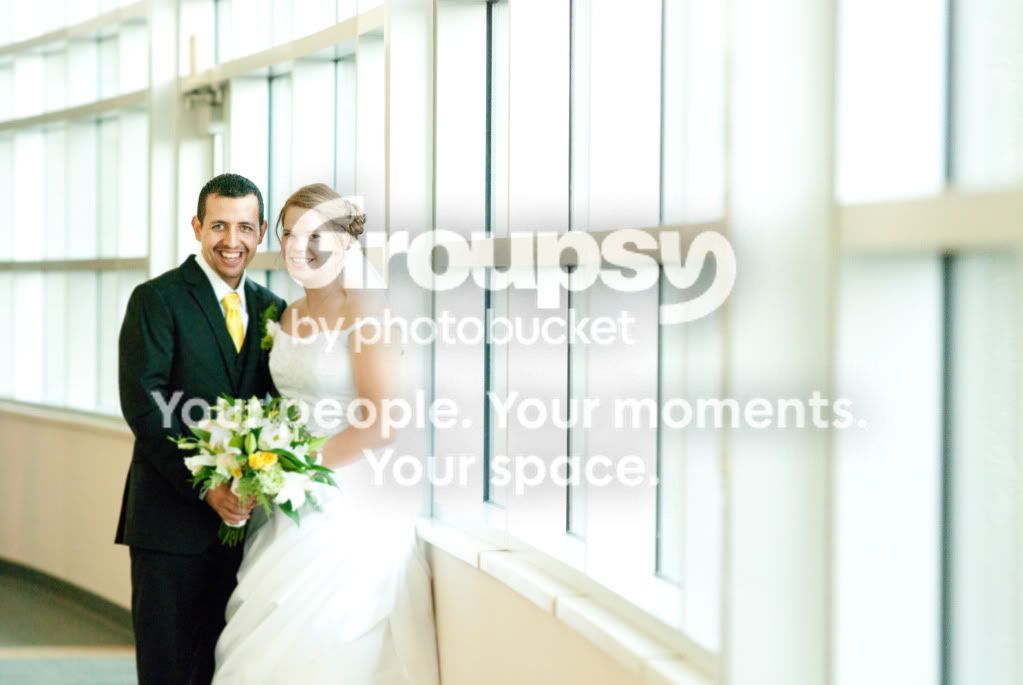
DSC_06071.jpg
 
Ouch...well, my original statement was going to be why are you shooting at a High ISO when you have an AB 8oo. Then I looked at the EXIF and saw you were at ISO 500.

Honestly, in today's market, I would say you are a bit outdated. A wedding photographer, today, really needs to have gear that can shoot at ISO 1600 without a problem. With your AB800, you probably should have been able to get away with ISO 200 to start with.

With your D80, you really need to know your limitations and make sure you stay within them. Just my .02.
 
Ouch...well, my original statement was going to be why are you shooting at a High ISO when you have an AB 8oo. Then I looked at the EXIF and saw you were at ISO 500.

Honestly, in today's market, I would say you are a bit outdated. A wedding photographer, today, really needs to have gear that can shoot at ISO 1600 without a problem. With your AB800, you probably should have been able to get away with ISO 200 to start with.

With your D80, you really need to know your limitations and make sure you stay within them. Just my .02.

Ok, but I didn't use my AB here. This is all natural light. My question is, can the graininess be adjusted in PP?
 
Ok, but I didn't use my AB here. This is all natural light. My question is, can the graininess be adjusted in PP?

I'm not sure. I don't know what post processing you have already done. The only noise I see is in the suit, but it looks pretty bad. The rest of the photo seems a bit overexposed and a little soft. Again, not sure what was original and what was done in post processing. With the jpeg image that you have posted, there isn't a lot of room for post processing.

It all just depends. Were you shooting in RAW? Do you have a RAW file you can link to that we can have a go at and see what we can do?
 
Ok, but I didn't use my AB here. This is all natural light. My question is, can the graininess be adjusted in PP?

I'm not sure. I don't know what post processing you have already done. The only noise I see is in the suit, but looks pretty bad. The rest of the photo seems a bit overexposed and a little soft. Again, not sure what was original and what was done in post processing. With the jpeg image that you have posted, there isn't a lot of room for post processing.

It all just depends. Were you shooting in RAW? Do you have a RAW file you can link to that we can have a go at and see what we can do

I did shoot in RAW but I have never posted one before, how would I do that? Can I do it on photobucket?
 
You can post a link to a website like 4shared.com that allows you to share any kind of photo. I'm not sure if photobucket can do it, but there are a lot of file sharing websites that will allow you to share whatever you want. I do use 4shared.com for stuff like that, and it's always been pretty easy.
 
You can post a link to a website like 4shared.com that allows you to share any kind of photo. I'm not sure if photobucket can do it, but there are a lot of file sharing websites that will allow you to share whatever you want. I do use 4shared.com for stuff like that, and it's always been pretty easy.

Alrighty, I'll have it up in a minute. I am pretty embarrassed to be sharing this at all but . . . yeah. :/
 
Edited:
Just saw that you uploaded the RAW...here is the RAW edit.
6000600733_3a921a7793_z.jpg


Still needs a bit of a selective color adjustment to desaturate his suit or remove the greens, but I'm off to bed. Good luck with your photos. It can be done. It will just take a bit of work.
 
Last edited:
Here is what I can do with the Jpeg...Looking at it displayed here, it's a bit too far with the blacks, but there just wasn't much tonal range to work with from the Jpeg file to start with. I am sure it could be done better with the RAW file.

6001119774_dba07aafa3_z.jpg

I like what you did, even with a crappy jpeg. I posted the RAW above. Let me know if you have any issues.
 
Oh, just one thing, groom just about always goes on the other side, that way the bride doesn't cover up the boutonnière.
 
some edit is to smooth and giving the wedding images to plastic look.

If you don't manage to change iso when needed, why don't you set it to auto :)
 
Edited:
Just saw that you uploaded the RAW...here is the RAW edit.
6000600733_3a921a7793_z.jpg


Still needs a bit of a selective color adjustment to desaturate his suit or remove the greens, but I'm off to bed. Good luck with your photos. It can be done. It will just take a bit of work.

That's awesome. Thanks for your help!
 
You are thinking about this backward. Instead trying to fix the noise... why dont you embrace it. Make it black and white. Noisy black and white = money.. if done tastefully. I sometimes even add noise to my B&W.
 
You are thinking about this backward. Instead trying to fix the noise... why dont you embrace it. Make it black and white. Noisy black and white = money.. if done tastefully. I sometimes even add noise to my B&W.

I've never heard of that; I'll try to take it with more grace!
 

Create an account or login to comment

You must be a member in order to leave a comment

Create account

Create an account on our community. It's easy!

Log in

Already have an account? Log in here.

New Topics

Back
Top Bottom