What's new

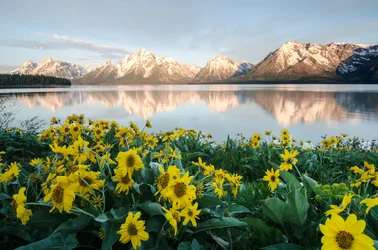
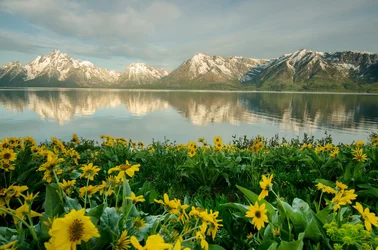
Grand Teton morning flowers..

NancyMoranG

Been spending a lot of time on here!
Joined
May 9, 2012
Messages
2,883
Reaction score
1,055
Location
Anywhere we want! Just us And the RV
Can others edit my Photos
Photos OK to edit
Trying again with my sunrise shots. I did try some minimal adjustments in PSE 11. I am not proficient and mask or layering is not in my repertoire! :)
Used the ND filter and my soft edge 2 stop., tripod.
As always, comments and help appreciated.

My internet is not great inside the park, so response isn't always quick. Drove 40 miles to Jackson for fresh veggies, milk and internet ;)

1.
Mountains look soft....f stop?

Grand Teton sunrise flowers.webp

2.
Colter Bay flowers sunrise 2_edited-1.webp

Thank you for looking.
 
Beautiful! I think the 2nd one is my favorite. What a great spot!!! Put a pin in it on a map for me lol!
 
Beautiful! I think the 2nd one is my favorite. What a great spot!!! Put a pin in it on a map for me lol!

Wow! These are fantastic. If you are concerned the mountains are not as sharp as the flowers you could always try focus stacking.

OMGosh thank you guys! I have never gotten a 'winner' symbol before today!
That pink glow lasts about 8 minutes so it's always a race to catch everything right.
Focus stacking....hmmmm...I will add it to the list to learn! ;}
 
Beautiful shot! I noticed (and I'm guessing at this) that it appears you toned down the highlights to reduce the brightness of the mountains which is fine but when you do that it tends to muddy and darken the other things in the pic. EG, the flowers in the first pic looked nice and vibrant with color in the 1st pic but not so in the 2nd pic. This is something I want and need to learn to do myself and that's learn how to isolate one spot in a pic (expl. > reduce highlights on the mountains) and leave the flowers and everything else untouched. Does anyone know of a good video that demonstrates how to do that because I'd sure like to know how it's done.
 
@K9Kirk, thank you for commenting! In my amateur skill of PSE 11, I used the ?'lasso' type tool to outline mountains and minimally reduced brightness. Am afraid to do ruin what I do have...

I guess I should keep track of how I am using my equipment. It may account for the difference you spoke of.
I have a ND filter and maybe I turned it too much in 1 of photos, then adjusted camera settings.
Geez, I am a roller-coaster, hands in the air type girl, not chess...wink, wink.

This is Swim Beach and now that the Park has opened more areas, there are people there even at early hours. They even venture into the cold, mountain runoff water!
 
These are beautiful!

This is something I want and need to learn to do myself and that's learn how to isolate one spot in a pic (expl. > reduce highlights on the mountains) and leave the flowers and everything else untouched. Does anyone know of a good video that demonstrates how to do that because I'd sure like to know how it's done.

What editing program are you using @K9Kirk?
In Lightroom for local adjustments (as opposed to global adjustments) I use brushes most. It also can be done with graduated or radial filters. Search videos for your editing program about Local Adjustments.
 
@K9Kirk, thank you for commenting! In my amateur skill of PSE 11, I used the ?'lasso' type tool to outline mountains and minimally reduced brightness. Am afraid to do ruin what I do have...

I guess I should keep track of how I am using my equipment. It may account for the difference you spoke of.
I have a ND filter and maybe I turned it too much in 1 of photos, then adjusted camera settings.
Geez, I am a roller-coaster, hands in the air type girl, not chess...wink, wink.

This is Swim Beach and now that the Park has opened more areas, there are people there even at early hours. They even venture into the cold, mountain runoff water!

"Geez, I am a roller-coaster, hands in the air type girl, not chess...wink, wink."
LOL! I'm kind of the same actually. I just do the best I know with what knowledge I have and that's not a whole lot when it comes to PS. You mentioned using an ND filter and that would account for the difference but I jumped the gun. When comparing the pics again I noticed the foreground actually looks a little brighter, especially the greens while the background was muted. It's a better look I think.
 
These are beautiful!

This is something I want and need to learn to do myself and that's learn how to isolate one spot in a pic (expl. > reduce highlights on the mountains) and leave the flowers and everything else untouched. Does anyone know of a good video that demonstrates how to do that because I'd sure like to know how it's done.

What editing program are you using @K9Kirk?
In Lightroom for local adjustments (as opposed to global adjustments) I use brushes most. It also can be done with graduated or radial filters. Search videos for your editing program about Local Adjustments.

I'm using PS Elements '18. Do you know of any videos in particular that are heads above the rest on their instructions? So many videos that tell you what to do but don't explain how to do it and leave you guessing or they're too complicated. I'm trying to avoid the long search and head-ache.
 
Very nice exposure, wonderful images.
 
Do you know of any videos in particular that are heads above the rest on their instructions?

I wish I knew. I get easily frustrated with instructional videos. Mostly people talk about themselves too much and when they actually get to the instructions their screen never seems to look just like mine and I can't follow the mouse pointer etc...
 
Google photoshop Elements how to use the smart brush.
 

Create an account or login to comment

You must be a member in order to leave a comment

Create account

Create an account on our community. It's easy!

Log in

Already have an account? Log in here.

Back
Top Bottom