What's new

Hello :)

BeautifulChaos

TPF Noob!
Joined
May 19, 2010
Messages
10
Reaction score
1
Can others edit my Photos
Photos OK to edit
I'm a newbie to this forum and to photography. I just recently purchased my first DSLR and am trying to learn the ropes. I have an art background, so I'm hoping I'll be able to catch on quickly.

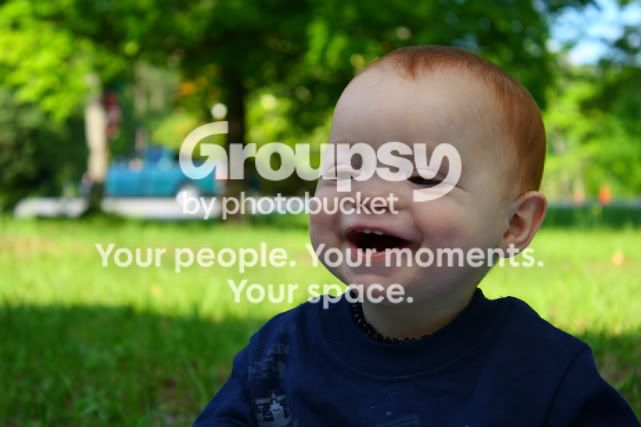
Here's a photo I took today of my son. Please tell me what you think of it and what I can do to improve it/future photos.
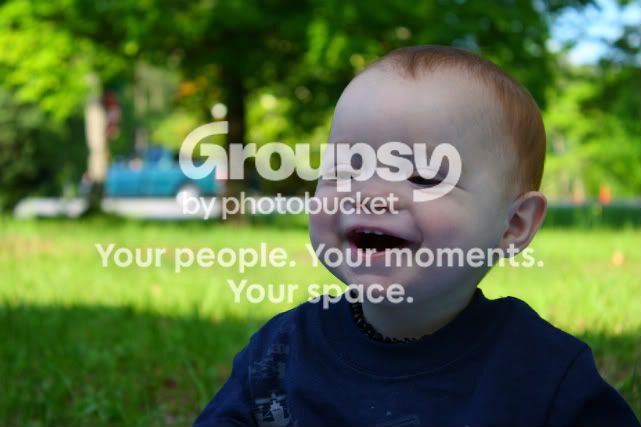
IMG_0900_edited-1-1.jpg


Thanks!!
 
Not a bad shot. Learn to use some fill flash outdoors and it can improve these kind of shots dramatically. The truck in the background is a little distracting.

Still not too bad, and welcome to the forum!
 
Welcome!!..
You son is adorable by the way ... uhmm just one tiny detail, is the child's other parent perhaps a smurf?... he looks rather blue.
 
He's blue because he's in the shade most likely. Mask him off and warm up the color temperature and he should come out ok. Scorp's flash suggestion was a good one as well.
 
Thanks for the help! Unfortunately, the only photo editing software I have is the free version of Photoshop online, so there's only so much I can do. I really wanted to get rid of that truck! :)

The composition and focus is okay? That's what I've been trying to work on a lot.
 
Thanks for the help! Unfortunately, the only photo editing software I have is the free version of Photoshop online, so there's only so much I can do. I really wanted to get rid of that truck! :)

The composition and focus is okay? That's what I've been trying to work on a lot.

Composition and focus are fine... but the shot itself is destroyed by your lighting. As mentioned, a little fill flash would have fixed this, switching your white balance to shade could have helped as well.

As for the truck, no need for fancy photo editing software, to fix the problem for free... move to your left about 2 feet. Its really important you take your background into consideration before you press the shutter button.

If you are looking for free photo editing software, try Gimp.
 
Thanks everyone! I downloaded Gimp and am now trying to figure out how in the world to use it. It may take a few days, but I'm hoping to get the truck edited out of the background and fix his skin tones. I'll post a before/after when it's finished!
 
Thanks everyone! I downloaded Gimp and am now trying to figure out how in the world to use it. It may take a few days, but I'm hoping to get the truck edited out of the background and fix his skin tones. I'll post a before/after when it's finished!

cant wait to see the outcome.
 
Welcome! :)

I agree about the truck and the lighting. Cute shot, and composition looks good. Here's info on fill flash.
 
Last edited:
He's blue because he's in the shade most likely. Mask him off and warm up the color temperature and he should come out ok. Scorp's flash suggestion was a good one as well.

How would I mask him off and change the temperature in Gimp, if you don't mind? I'm a complete newbie to the whole editing thing.
 
Wish I could tell you - I don't know, but I know if you googled 'gimp' and 'mask' or masks and maybe 'tutorial' you'll probably find a detailed explanation. After that you'll want to adjust the color levels
 
I can't get the cloning to look right, so the truck's still there. But does his skin tone look better?

Here's the first one:
1.
IMG_0900_edited-1-1.jpg


Here's the new one:
2.
IMG_0900_edited-2-1.jpg
 
Yes, much better.
 
Very good for your first attempt, the secret is keep taking at lot of shots trying different things... change aperture, exposure speed, try off camera flash, etc.
But you did very well... :thumbup:
 

Create an account or login to comment

You must be a member in order to leave a comment

Create account

Create an account on our community. It's easy!

Log in

Already have an account? Log in here.

Back
Top Bottom