What's new

Help with Sharpness

RossDelta

TPF Noob!
Joined
Sep 4, 2012
Messages
3
Reaction score
0
Location
Bristol UK
Can others edit my Photos
Photos OK to edit
Hi all

I recently bought a Rebel T3i and have been having issues getting sharp images.

I've learnt a lot about the basics and have read a few books and got to know the camera.

However just basically to get a shot to look sharp is still an issue unless I do some major editing.

I have seen other peoples portraits with this camera and kit lense and am amazed at the quality.

Please some help!

Shot on largest JPEG file.
Shooting Mode Portrait
Tv( Shutter Speed ) 1/160
Av( Aperture Value ) 5.6
ISO Speed 400
Kit Lens 18-55
Image Size 5184x3456
Image Quality Fine

Focus points on Eyes

I realise it isnt a great shot, but at the moment I just want to get a grasp of what I'm doing wrong.

http://www.flickr.com/photos/86578858@N03/7931680282/


Test Portrait by RossDelta, on Flickr

I have tried using the sharpening tool and it comes ok when I sharpen it around 80-90% however this image has not been edited.

All the photos I've taken are coming up around the same sharpness as the pic but from what I understand I shouldnt HAVE to sharpen always.

Any help would be greatly appreciated.

Thanks
 
If you have a 'protection' filter on the lens, take it off.

There are controls for sharpening, saturation, and contrast in your camera menus that effect how a JPEG gets developed. Those adjustments are really crude because they have so few steps, but you need to check what they are set at.

What sharpening tool?

What focal length was the lens set to for the photo you posted?

JPEGs have little, if any editing headroom, which is why when the highest quality finished image is desired, most photographers start with a raw image data file rather than trusting the programming a committee of Japanese camera software engineers w=rote years before you took the photo they edit.
 
Welcome to the forum.

There can be a lot of different aspects to consider here.
Firstly, 99.9% of digital cameras have what is called an anti-aliasing filter in front of their sensor. This filter helps to prevent problem like moire, but the cost is a loss of the potential sharpness. So many people will say that any digital photo could benefit from some amount of sharpening. (keep in mind that what we call sharpening, is just a boost to local contrast. You still need to make sure that your focus and DOF are accurate. You can't take a 'blurry', out of focus photo and fix it with sharpening).

Also, note that when you shoot in JPEG mode, the camera is doing a fair bit of processing on the image, including sharpening. You can change some settings (in the menu) to control the amount of sharpening that is applied in-camera.

Personally, I prefer to have the camera save RAW files, rather than JPEG. RAW files do not have sharpening (or any other) digital settings applied to them, so you have a 'clean slate' to start your post processing.

In a good workflow, a photographer may sharpen their images two or three separate times. First, there is input sharpening, which is set on the Raw software and applied when the raw file is processed. There is also output sharpening, which is applied after the images has been re-sized for export.

Also, there are many ways to sharpen a photo (different techniques and different software). There are entire books dedicated to the subject. So it's not just a simple subject. But the important thing is to first make sure that you are getting the best quality images from your camera. So for example, most lenses aren't at their best sharpness, when at their maximum aperture. So as an example, you could take that same photo, but rather than F5.6, use F8 and ISO 800.
 
If you have a 'protection' filter on the lens, take it off.

There are controls for sharpening, saturation, and contrast in your camera menus that effect how a JPEG gets developed. Those adjustments are really crude because they have so few steps, but you need to check what they are set at.

What sharpening tool?

What focal length was the lens set to for the photo you posted?

JPEGs have little, if any editing headroom, which is why when the highest quality finished image is desired, most photographers start with a raw image data file rather than trusting the programming a committee of Japanese camera software engineers w=rote years before you took the photo they edit.

Thanks for taking the time to reply.

I will try the sharpness options on the JPEG modes, thanks.

I have tried RAW but didnt notice a great deal of difference at the time, however I have not spent enough time in RAW to really know this so will try that again.

I checked the photodata and the focus points come up on the left eye and right cheek, taken on AF one shot mode.

Was taken at a 55mm focal lengh,

editing programs I have are photoshop elements for sharpening. Also have a RAW editor it came with.
 
Last edited:
Welcome to the forum.

There can be a lot of different aspects to consider here.
Firstly, 99.9% of digital cameras have what is called an anti-aliasing filter in front of their sensor. This filter helps to prevent problem like moire, but the cost is a loss of the potential sharpness. So many people will say that any digital photo could benefit from some amount of sharpening. (keep in mind that what we call sharpening, is just a boost to local contrast. You still need to make sure that your focus and DOF are accurate. You can't take a 'blurry', out of focus photo and fix it with sharpening).

Also, note that when you shoot in JPEG mode, the camera is doing a fair bit of processing on the image, including sharpening. You can change some settings (in the menu) to control the amount of sharpening that is applied in-camera.

Personally, I prefer to have the camera save RAW files, rather than JPEG. RAW files do not have sharpening (or any other) digital settings applied to them, so you have a 'clean slate' to start your post processing.

In a good workflow, a photographer may sharpen their images two or three separate times. First, there is input sharpening, which is set on the Raw software and applied when the raw file is processed. There is also output sharpening, which is applied after the images has been re-sized for export.

Also, there are many ways to sharpen a photo (different techniques and different software). There are entire books dedicated to the subject. So it's not just a simple subject. But the important thing is to first make sure that you are getting the best quality images from your camera. So for example, most lenses aren't at their best sharpness, when at their maximum aperture. So as an example, you could take that same photo, but rather than F5.6, use F8 and ISO 800.

Fantastic.

Guys you have both given me some really usefull information to try.

Thanks a lot,

I will try a few more photos in RAW with a lower aperture and see what happens.

I was worried it might be front focusing as even my point and shoot was considerably sharper than this. I noticed in one image the nose was in focus and a hand below the face was in focus, but the face was soft. The focus points were again eyes which made me think a calibration issue. But this is based on 2 weeks of experience and days of forum searching.
 
The things you say in your subsequent posts tell me a lot about your focus problems.
First you said that the nose will be in focus and not the face. This happens when you have a shallow Depth Of Field. In order to have enough depth of field to have the full face in focus you will need to do two things: Use a higher aperture number and back off from the subject.
Depth of field is the amount of your image front to back that will be in sharp focus. It is controlled by aperture-the wider the aperture or the lower the number the shorter your DOF will be. So your nose might be in focus, but your face won't be. It is also controlled by distance from the subject to your camera. The closer you are to your subject the shorter your DOF will be. The further away you are the larger your DOF will be. So, a close distance (whether by zoom or by actual distance) combined with a lower aperture number equals a very short depth of field.

Even more than your short depth of field your focusing points are having a big effect on your focus. You said
"I checked the photodata and the focus points come up on the left eye and right cheek, taken on AF one shot mode."
That tells me that you are using all of the focus points and letting the camera choose which one it will lock on to. You want to be using only one focus point and locking it on to the inside of the eye closest to you.
When you use multiple focus points the camera gets to pick which one it likes to lock on to. It's based on contrast and whatever is the best contrast is what will be in focus. That could be anywhere in the image.
 
RossDelta said:
Fantastic.

Guys you have both given me some really usefull information to try.

Thanks a lot,

I will try a few more photos in RAW with a lower aperture and see what happens.

I was worried it might be front focusing as even my point and shoot was considerably sharper than this. I noticed in one image the nose was in focus and a hand below the face was in focus, but the face was soft. The focus points were again eyes which made me think a calibration issue. But this is based on 2 weeks of experience and days of forum searching.

Raw image may look worse then your JPEGS. JPEGS are already processed by the camera whereas Raw files need to be processed by you.

Lenses usually don't perform their best at their largest aperture - images won't be as sharp as they could be. F/5.6 @ 55mm is, I believe, the largest aperture for that focal length. That could play a role in not so sharp images.

Also what MLeeK said - you should use just a single focal point - much more effective IMO.
 
When the largest aperture a lens can achieve at any specific focal length is about f/4 or more, focus softening from the lens aperture being wide open is usually not as big an issue as it is for fast lenses having maximum apertures in the f/1 to f/2.8 range.

With kit lenses, the issue with soft focus is often more about the lens being zoomed to maximum or minimum focal length, than it is about the maximum lens aperture.
 
KmH you say take off the protection filter on the lens' will this give sharper photo''s i have a filter on mine thats why i'm asking
 
Yes, remove the filter. Cheap filters will degrade your image quite noticeably!
 
It looks in focus to me, except the focus is on the end of his nose. Increase aperture and always focus on the eyes. :)
 
There are several things one can see:

Someone (you or the camera) is focusing on the nose/lips. My guess is that's how the camera is set. Change the focus mode so it is one point and put that point on the eyes -which are not in focus now.

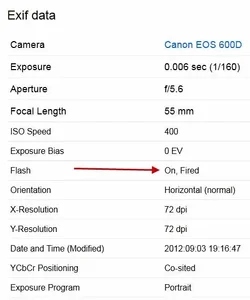
Sharpness is the difference between adjacent tones; using a on-camera flash (see the pin-points in the eyes confirmed by the EXIF) diminishes the apparent sharpness because it removes the microshadows that define the texture in the skin,

Sharpening (right image) can change the look of it a bit but can't make up for the bad point of focus and on-camera flash.

All that being said, your camera seems to be doing fine and you will get sharper images as you get more used to it.

Lew
$exif.webp


7931680282b5dd3f8f0dkll.jpg
 

Create an account or login to comment

You must be a member in order to leave a comment

Create account

Create an account on our community. It's easy!

Log in

Already have an account? Log in here.

New Topics

Back
Top Bottom