What's new

home studio shot for c&c

Bridget Greenwood

TPF Noob!
Joined
Feb 9, 2011
Messages
25
Reaction score
0
Location
TN USA
Can others edit my Photos
Photos OK to edit
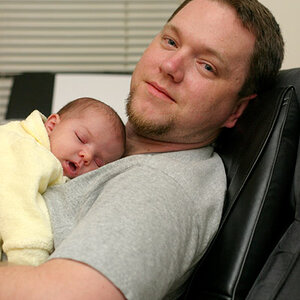
I am trying to learn studio lighting, I have one mono light and umbrella. I am not usually happy with the way my lighting looks, do I need another light or just more practice? any and all critique appreciated.
boy.JPG
 
Nice bedhead hair! :lol:

You need more light - or perhaps to use reflectors to maximize the light you do have - it's going to make your edges much more crisp than what you are showing here and get rid of those pesky facial shadows. Consider using natural light if you have a large window available. You also have a yellow tone to it that's affecting his skin tone....not sure if that's your WB or light source or something is reflecting on his cheek, but that's something to get under control too.

Cute kid!
 
I'm in the same boat as you. Trying to figure out what works for lighting. Seems you don't want any shadows, but as soon as I'm able to get rid of the shadows, then I get comments that the lighting looks flat, so I'm torn as to what you actually want things to look like. I also think that lighting preference has a lot to do with preference as to what look you like. It's a lose lose situation. :confused:
 
I'm in the same boat as you. Trying to figure out what works for lighting. Seems you don't want any shadows, but as soon as I'm able to get rid of the shadows, then I get comments that the lighting looks flat, so I'm torn as to what you actually want things to look like. I also think that lighting preference has a lot to do with preference as to what look you like. It's a lose lose situation. :confused:

Have you tried playing around with the contrast? Sometimes that's all it takes - especially B&W conversions are going to need a bump in contrast to make them more appealing.
 
he does have crazy curly hair and was rolling around on the floor before i got him to sit still for a sec. I thought I might need more light, and i think the issue with the skin tone was WB I had it left on auto
 
I'm in the same boat as you. Trying to figure out what works for lighting. Seems you don't want any shadows, but as soon as I'm able to get rid of the shadows, then I get comments that the lighting looks flat, so I'm torn as to what you actually want things to look like. I also think that lighting preference has a lot to do with preference as to what look you like. It's a lose lose situation. :confused:

Have you tried playing around with the contrast? Sometimes that's all it takes - especially B&W conversions are going to need a bump in contrast to make them more appealing.

Yup. Always play with the contrast & curves. Could be I just need to learn what contrast works with portrait work. Most of my stuff has always been nature & macro work, so it's obviously a totally different game. I don't do B&W, so not really relevant in my case. Thanks for the suggestions regardless. :thumbup:
 
Looks to me like you had mixed light sources with slightly different colors, which is why the white balance seems off.. if you correct for the yellowish left side of the face, the right side will probably become blue.. Your shutter speed at 1/60 sec. probably allowed some of the ambient light to affect the shot.

I would say one way or another you need more control over all of the light used in the scene.. whether it be through a second light, eliminating/minimising other light sources in the room, or perhaps using gels match the color of your added light to the existing light sources.
 

Create an account or login to comment

You must be a member in order to leave a comment

Create account

Create an account on our community. It's easy!

Log in

Already have an account? Log in here.

Back
Top Bottom