What's new

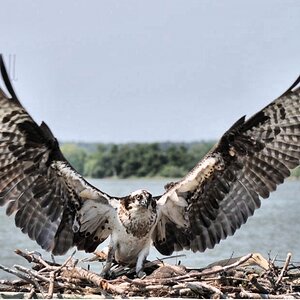
How can I take a photo like this with my camera?

Here is a picture I just took recently and post processed a bit to increase the colors/sharpness.

oEzu1.png


Here is the original.

http://i.imgur.com/yF1Ci.png

As you can see, the original is not as sharp unfortunately. I wish there was a way for me to take sharper pictures without having to sharpen them in photoshop. Actually, my camera has an option to increase sharpness a bit and It's turned up all the way but that's the best I can do with my camera to achieve maximum sharpness without post processing. The original doesn't look too bad though huh?
 
I"m still trying to figure out what is so special about the image you are trying to mimick. Does your camera have a raw setting? If it does, and you are using it, it won't matter what sharpness settings you use. You will have to sharpen in PP.

People shooting with the best gear available still sharpen in post.
 
I"m still trying to figure out what is so special about the image you are trying to mimick. Does your camera have a raw setting? If it does, and you are using it, it won't matter what sharpness settings you use. You will have to sharpen in PP.

People shooting with the best gear available still sharpen in post.

Yes I shoot in RAW :). When I shoot in Manual Mode or any other modes except Auto, my camera has something called a Photo Wizard. Basically, I can access this wizard and adjust the OVERALL sharpness/contrast of my camera, and everytime I take a photo it will produce it more contrast and more sharpness. But, it's still not enough cause I keep having to additionally sharpen them in Photoshop. I wish it wasn't like that. Why can't camera's simply produce these type of photo's without means of post processing? Is it really necessary? Why can't camera's take sharper images? I don't understand. Everytime I post process my photo's I feel like I am cheating and my photo's aren't as authentic as when I captured them..
 
Post process the photo is not cheating. All photos coming out from your camera need to be processed. It is either processed by the camera (settings defined by the manufacturer / software engineers) or you (settings based your own preference).
 
All active pixel image sensors have a filter array in front of them.

One of those filters is an anti-aliasing (AA) filter, also known as a low-pass filter.

The AA filter softens the sharpness of digital photos. All digital photos. So, some amount of sharpening has to be done to all digital photos.

If you shoot RAW the in-camera sharpening (and other settings, like contrast, saturation, etc) setting has no effect on the Raw file, but it does globally effect the Basic JPEG thumbnail that is embedded in the Raw file so the camera has something to show you (both image and histogram) on the rear LCD. Note: The Raw file can't be seen as a photo until it is converted from a data file to an image, outside the camera, using Raw conversion software.

You could shoot JPEG and let the camera discard 80% of the color data the image sensor captured, convert the pixel array into 8x8, 8x16, or 16x16 pixel MCU's, then make all it's crude, and global edits. That's what JPEG was designed for, to spit out a file that, good or bad, was ready for printing.

Either way, the original image data captured is going to get edited.
 
All active pixel image sensors have a filter array in front of them.

One of those filters is an anti-aliasing (AA) filter, also known as a low-pass filter.

The AA filter softens the sharpness of digital photos. All digital photos. So, some amount of sharpening has to be done to all digital photos.

If you shoot RAW the in-camera sharpening (and other settings, like contrast, saturation, etc) setting has no effect on the Raw file, but it does globally effect the Basic JPEG thumbnail that is embedded in the Raw file so the camera has something to show you (both image and histogram) on the rear LCD. Note: The Raw file can't be seen as a photo until it is converted from a data file to an image, outside the camera, using Raw conversion software.

You could shoot JPEG and let the camera discard 80% of the color data the image sensor captured, convert the pixel array into 8x8, 8x16, or 16x16 pixel MCU's, then make all it's crude, and global edits. That's what JPEG was designed for, to spit out a file that, good or bad, was ready for printing.

Either way, the original image data captured is going to get edited.

I think another reason why my photo's don't look that good is because after I transfer my RAW files to my computer, I import them into a Raw Converter, and then convert them into JPGS. Then I take the JPG and edit it in Photoshop. Could that be a reason my picture's aren't as good as they should be?
 
That depends on the color bit depth your camera records Raw data files at. Most digital cameras use at least a 12-bit color depth (some use a 14-bit color depth), while JPEG is an 8-bit color depth only file type.

That conversion from 12-bits, or more, to 8-bits, is how 80% of the color data gets discarded from a the original to make a JPEG. The JPEG file format was designed as a final, no need to edit, ready to print file type.

I mentioned 8x8, 8x16, and 16x16 pixel MCU's. MCU stands for Minimum Coded Unit. When you edit a JPEG you cannot edit individual pixels, just 64, 128, or 256 groups of pixels.
Bit Depth

Tutorials – The RAW File Format

What color space to you use edit in?

Digital Photo Editing Workflow

Tutorials on Color Management & Printing
 
That depends on the color bit depth your camera records Raw data files at. Most digital cameras use at least a 12-bit color depth (some use a 14-bit color depth), while JPEG is an 8-bit color depth only file type.

That conversion from 12-bits, or more, to 8-bits, is how 80% of the color data gets discarded from a the original to make a JPEG. The JPEG file format was designed as a final, no need to edit, ready to print file type.

I mentioned 8x8, 8x16, and 16x16 pixel MCU's. MCU stands for Minimum Coded Unit. When you edit a JPEG you cannot edit individual pixels, just 64, 128, or 256 groups of pixels.
Bit Depth

Tutorials – The RAW File Format

What color space to you use edit in?

Digital Photo Editing Workflow

Tutorials on Color Management & Printing

Sorry I dont understand what you are trying to say.. I know that RAW stores more data than a JPG, but I'm asking whether or not there is a way to edit RAW files straight from Photoshop, rather then converting them to JPG like I do everytime.
 
One thing I notice is that the OP seems to favor photos with less cluttered composition.

The photos from the NX100 look OK as far as sharpness goes (at least with the small photos presented here). The NX100 seems like a capable camera. There are some decent night shots taken with NX100's on Flicker.

So back to the original question... How do I get a photo that looks like...

Find a slightly desolate street corner at night or about 30 minutes after sun set will be nice!
Put the camera on a tripod.
Set the ISO around 200-400 to minimize noise.
Set you aperture to f8 if you are looking for maximum sharpness or f22 if you are looking for maximum light starbursts.
Check your shutter speed to make sure it is >2-3 seconds. If not, adjust your ISO to give you a slower shutter speed.
Trip the shutter using a remote release or use the timer.
Take a look at your histogram and your image. Adjust exposure to give you the right scene balance between brightness and lighting trails from cars etc.
Take a bunch of different exposures until you get something you like, and then take a few more just in case!

Sometimes you can only go so far with sharpness because of lens limitations. But most of the current generation mirrorless cameras and lenses are pretty darn good.
 
....I'm asking whether or not there is a way to edit RAW files straight from Photoshop, rather then converting them to JPG like I do everytime.
Yes, there is.

But, your Samsung NX100 is to new to be supported in CS4's Camera Raw.

But, if you use Bridge to upload your photos from the NX100 you can convert them to Adobe's DNG file type at upload, and the DNG file format will open in Cs4 Camera Raw just fine.

I have about two years of experience with Photoshop and retouching material so I think am good to go :)!
:scratch:
 
Last edited:
Regarding post processing, I have about two years of experience with Photoshop and retouching material so I think am good to go :)!

Uhmmmm. I have 11+ years experience and 2/3 of an unfinished degree in Imaging and Reproduction. If you think you have a handle on it after 2 years, then all I have to say is that you are either very arrogant, or too ignorant to realize what you haven't yet yet learned...
 
Regarding post processing, I have about two years of experience with Photoshop and retouching material so I think am good to go :)!

Uhmmmm. I have 11+ years experience and 2/3 of an unfinished degree in Imaging and Reproduction. If you think you have a handle on it after 2 years, then all I have to say is that you are either very arrogant, or too ignorant to realize what you haven't yet yet learned...

:roll:
 
Photoshop
Photoshop
Photoshop

That's how....
 
Regarding post processing, I have about two years of experience with Photoshop and retouching material so I think am good to go :)!

Uhmmmm. I have 11+ years experience and 2/3 of an unfinished degree in Imaging and Reproduction. If you think you have a handle on it after 2 years, then all I have to say is that you are either very arrogant, or too ignorant to realize what you haven't yet yet learned...

:roll:

Have something to say?
 
Matrix, the issue i think is not about a professional camera its about a professional photographer lol only the camera could not achieve a good result, it's about knowledge of photography, you can't buy a nice cooking equipment and that will cook a good food for you, you see what i mean, when i look about a nice picture its much more about the skill of the photographer not the camera. pls, don't take my answer in a bad way i just wish to share that even that i'm not a professional but an amateur still learning photography.
 

Create an account or login to comment

You must be a member in order to leave a comment

Create account

Create an account on our community. It's easy!

Log in

Already have an account? Log in here.

Back
Top Bottom