What's new

how do i avoid this

bribrius

Been spending a lot of time on here!
Joined
Jan 12, 2014
Messages
8,708
Reaction score
1,312
Can others edit my Photos
Photos NOT OK to edit
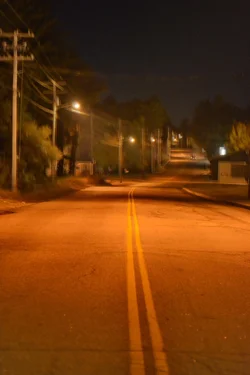
specifically if you look along the telephone polls on the left there is a immediate drop off where it turns into some white hazy. Using a 50mm 1.8g sometimes because it is lighter for a walk around but I am not liking the results in situations like this. I don't seem to have this happen too often though on distance shots? But when it does I get this dramatic cutoff line instead of a nice transition?
 

Attachments

  • DSC_5269_3471.webp
    DSC_5269_3471.webp
    293.3 KB · Views: 277
I'm not sure I really see it...I'm seeing some blurred light, from the light pole. Maybe even some motion blur.


Sent from my iPhone using Tapatalk
 
  • Thread Starter 🔹
  • Banned
  • #3
I'm not sure I really see it...I'm seeing some blurred light, from the light pole. Maybe even some motion blur.


Sent from my iPhone using Tapatalk
if you look down the telephone polls on the left right before the third one you will see a haze line. The photo is crap anyway not to worried about this one in particular just want to know how to avoid it in the future.
 
1. There *is* motion blur so that might have a little to do with it, but...

2. ...Have you cleaned that lens lately? It almost looks like it's just ... dirty... with a hugeass smudge you may not have noticed. Check the back element, if the front is clean... :lol: I see more of a random "blob", not a line. Unless I'm looking in the wrong spot...
 
#1. Don't shoot at 1.8

#2. Don't shoot when the humidity or smog levels are high, and if you do, try to keep lightsources out of frame. What I'm seeing (assuming it's what you're referencing) is the light being thrown by the streetlamp, illuminating something in the air. Whether it's pollution, humidity or whatever.

If that's not what you're talking about, then please disregard my post.
 
Looks like some user-error blur from shaky hands to me...
 
Look at the square shaped light (maybe a sign?) to the right and the building next to it - you almost have a double image. I wonder if you had a show shutter speed and/or moved the camera when you released the shutter, looks like the blur was enough to almost cause two exposures.
 
Last edited:
First off, it would be helpful if you provided more info about how this was shot.

As someone mentioned, it could be a mist in the air or just fog on your lens.

Then again, it could just be that you're shooting at night.

Ever shoot into the sun and get a lens flare? You can get the same thing with a street light at night, but because the surroundings are dimmer it may not be as dramatic. That's one possibility.

Another possibility is that the light itself will create a very high dynamic range in your photos. Because the different lights have different brightnesses, it's very hard to get a good exposure. What you're seeing may be that one light is brighter than another, that one area receives more light, or whatever.

Another possibility comes from the lights itself. Look at the below shot:

upload_2014-10-20_0-31-17.webp


You'll notice the globes around the lights seem to have sort of a mist around them, and in some cases look like the lights are spikey.

I can assure you that in day time (and real life) the globes are neither covered in fabric or spikey.

However, because of physics, you end up seeing some of the lights as if they are spikey, and some appear to be covered in fabric. This is an optical illusion.

Fixing this can be difficult. First off, you might want to check your exposure. Over exposing is more likely to have such ugly defects in it. You might try under exposing and brightening select areas

Or you could take multiple shots (bracketing). Create an HDR image, or just erase out parts of the images that you've laid over each other.

Hope that helps!

 
I'm not sure I really see it...I'm seeing some blurred light, from the light pole. Maybe even some motion blur.


Sent from my iPhone using Tapatalk
if you look down the telephone polls on the left right before the third one you will see a haze line. The photo is crap anyway not to worried about this one in particular just want to know how to avoid it in the future.

Avoid it by using a good tripod, mirror lock up, and a remote shutter release or the self timer.
 

Create an account or login to comment

You must be a member in order to leave a comment

Create account

Create an account on our community. It's easy!

Log in

Already have an account? Log in here.

Back
Top Bottom