What's new

How not to loose the sky?

Lmphotos

TPF Noob!
Joined
Dec 10, 2012
Messages
390
Reaction score
77
Location
Missouri
Can others edit my Photos
Photos OK to edit
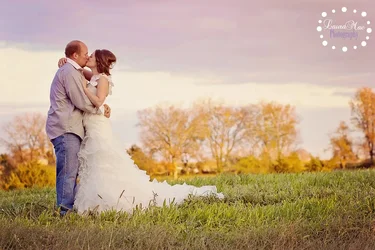
$403405_295042293935347_29307141_n.webp I used some fill light here and it brought back light to the two faces....but the sky was way more darker and richer here before that light. Is it possible to capture both?
 
Sorry. LOSE. Not "loose."

That is all. Carry on.
 
Sorry. LOSE. Not "loose."

That is all. Carry on.

SO Sorry because I bet you never made a mistake before......I guess my MSN was a waste sorry dad to waste your money! OK that is all now if people could help me with the photo which is originally what I thought this forum was for. But never mind all that glad I got a spelling lesson along the way. How did I write all those papers without you??
 
Were you shooting in program/auto? Are you saying that you took the picture liked the skies exposure then added a fill light on your subject and found the sky to be over exposed? Obviously I'm confused. Adding a fill light shouldn't have changed anything with the sky unless you or your camera made another change.
 
I was shooting in AV mode I believe, When I first took the picture it exposed for the sky which blacked out my couple. I turned on spot metering and then the sky looked horrid, SO I went back to evaluative and turned my external flash on I think to +1 can't remember all the way and got a decent light up of the couple but also the whole picture went lighter including the clouds and sky. (The clouds were full and dark and everywhere.)
 
A CPL filter would work wonders with the sky
 
How not to loose the sky?
It's quite simple...just set your exposure so that the sky looks how you want it to.
That would very likely leave your subjects too dark...and then you might ask "How not to lose the subjects?"

The first step is understanding that you just can't expose for both parts at one time, because they are so far off from each other (in terms of brightness). That's the dynamic range of the scene...and in this case, it well exceeded the dynamic range that the camera can capture (while maintaining high image quality).
This has always been an issue in photography, and photographers have always had to make these decisions.

So can you get both parts of the image to look good? Of course, we just need to overcome the dynamic range problem.
One of the easiest/best ways to do that, would be to add light to the subjects so that then are not too dark when you expose for the sky. A reflector would work in this case, but you would need a big one to light up their whole bodies...and even bigger if you wanted to light up the foreground that they are standing on.
Of course, you could use artificial light...flash being the preferred choice. A camera-mounted flash might be able to light them up, allowing you to expose for the sky and viola, your dynamic range is smaller, thus the camera is able to capture it nicely. The problem then is that you would lose the nice, soft side lighting that you have on the subject...and that is why off camera flash (OCF) is often used by photographers. It allows you to create nice lighting on your subjects and (if it's powerful enough) allows you to use exposure setting that will give you the skies that you want.

There are other ways to work towards your goal. For example, you could take multiple photos, exposing for different parts of the scene, and use software to combine them. You could selectively edit the photo. For example, edit just the sky to be darker/richer, without editing the subjects. You usually don't end up with results as good as when you use light to compress the dynamic range before you shoot, but it's certainly doable.

 
Your subject is in open shade which makes the sky a backlight. Expose to get the sky right and the subject is too dark. Expose to get the subject right and the sky burns out. There is no exposure that will get both right together, so you must light the subject to balance the exposure with the sky. You do that with flash. The procedure is straightforward. Determine the correct exposure for the sky since you can't alter that lighting. Adjust your shutter/aperture combination for the ambient light (sky) so you have the f/stop you want and then simply adjust the flash power output for the exposure you want on the subject at that f/stop.

Joe

edit: Mike, you beat me to it!
 
Since you were in av, the camera's program decreased the shutter speed to compensate for the flash. I usually use manual in these situations to make sure that the camera and I aren't fighting.
 
SO Sorry because I bet you never made a mistake before......I guess my MSN was a waste sorry dad to waste your money! OK that is all now if people could help me with the photo which is originally what I thought this forum was for. But never mind all that glad I got a spelling lesson along the way. How did I write all those papers without you??


The little fella on this shoulder says "be nice." :bigangel:

But the little fella on this shoulder says "shred the OP." :evil:

Decisions decisions.....:raisedbrow:
 
I was shooting in AV mode I believe, When I first took the picture it exposed for the sky which blacked out my couple. I turned on spot metering and then the sky looked horrid, SO I went back to evaluative and turned my external flash on I think to +1 can't remember all the way and got a decent light up of the couple but also the whole picture went lighter including the clouds and sky. (The clouds were full and dark and everywhere.)

Expose for the sky in manual and fill to your liking, don't forget you have 2 exposures with OCF aperture for flash and shutter speed for ambient
 
SO Sorry because I bet you never made a mistake before......I guess my MSN was a waste sorry dad to waste your money! OK that is all now if people could help me with the photo which is originally what I thought this forum was for. But never mind all that glad I got a spelling lesson along the way. How did I write all those papers without you??


The little fella on this shoulder says "be nice." :bigangel:

But the little fella on this shoulder says "shred the OP." :evil:

Decisions decisions.....:raisedbrow:

What a dilemma for you! Believe it or not I actually listened more to the guy on my left that above post the one on my right was telling me to type very very hateful things.
 

Create an account or login to comment

You must be a member in order to leave a comment

Create account

Create an account on our community. It's easy!

Log in

Already have an account? Log in here.

New Topics

Back
Top Bottom