What's new

How to avoid blowing whites..

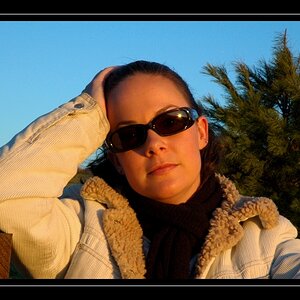
The lighting looks flat to me. Shouldn't there me more shadows on her face? How's my exposure? I'm also not sure how close to put the umbrella..Do I move it forward and back until it looks right?
It is flat. There are shadows, but they are hard to see because of where you placed the umbrella. One of the drawbacks to using a speedlight is you can't see before hand where the shadows are falling.

Yes the tree is adding a green cast. Blue sky can add a blue cast.

Moving the umbrella closer and further has 3 effects. Closer makes the light source as larger making shadow edges more diffuse, the light softer, and you don't need a much flash power because of the Inverse Square law.
Moving the umbrella further away makes it apparently smaller so shadow edges get more defined, the light is harsher, and becuase of the increased distance (Inverse Square law) the flash power has to be turned up to get the same exposure.

In that location the open sky beyond the shaded part she is in is to bright, because she is squinting.


Is it better to use the reflector umbrellas instead of the shoot through? I have one, but I haven't had a chance to play with it. This is a great thread..I'm learning a lot.

Yeah, she was squinting...Not much good shade right now. I told her to suck it up so I could practice...:lol:
 
Here's what I'm seeing, but I don't have a calibrated monitor or any decent software here at work so it may be off:


Note that the data at both ends of the histogram doesn't extend all the way to the edge. The dark side is closer but still there is no true black. The white side is well off the edge indicating that there is no true white, and her shirt should really be close to white or very light gray. When the histogram data doesn't completely fill the dynamic range that is available that's when we perceive the photographs as being "Flat".............

This can be corrected somewhat by moving the histogram sliders. Bring the white point down to the right end of the histo, and the black end up a bit.
 
Should I just not take my flash today and use the natural light?? I guess if I don't give it a shot I'll never learn.. We'll be shooting around 5:30 at a church, so I'm hoping there will be some good light. Thanks so much for all the help!! :hug:: <---------- It's a chick thing! :)
 
Should I just not take my flash today and use the natural light?? I guess if I don't give it a shot I'll never learn.. We'll be shooting around 5:30 at a church, so I'm hoping there will be some good light. Thanks so much for all the help!! :hug:: <---------- It's a chick thing! :)

Hah take the flash and learn it =)
 
This can be corrected somewhat by moving the histogram sliders. Bring the white point down to the right end of the histo, and the black end up a bit.
Agreed. That's what I usually do, however not all software has sliders on the histogram.

BTW, regarding your comment on the in-camera histogram in post #28, do you feel that this is a good thing or a bad thing? I've thought about it since I read your post and I haven't convinced myself one way or the other. I "Think" I would prefer the histogram to be consistent, however if the overall view doesn't show detail well (which would be the case on a low-resolution LCD) then the histogram could be incorrect when zoomed out all the way and only "Right" when zoomed in enough to see all the detail. On the other hand, the detail might not have an impact on the overall image. What's your take on it?
 
This can be corrected somewhat by moving the histogram sliders. Bring the white point down to the right end of the histo, and the black end up a bit.
Agreed. That's what I usually do, however not all software has sliders on the histogram.

BTW, regarding your comment on the in-camera histogram in post #28, do you feel that this is a good thing or a bad thing? I've thought about it since I read your post and I haven't convinced myself one way or the other. I "Think" I would prefer the histogram to be consistent, however if the overall view doesn't show detail well (which would be the case on a low-resolution LCD) then the histogram could be incorrect when zoomed out all the way and only "Right" when zoomed in enough to see all the detail. On the other hand, the detail might not have an impact on the overall image. What's your take on it?

I prefer it change with the zooming. That way, I can zoom in on a particular area of the shot and know exactly where it stands in terms of having enough data to work with in post.
 
Is it better to use the reflector umbrellas instead of the shoot through? I have one, but I haven't had a chance to play with it. This is a great thread..I'm learning a lot.

Yeah, she was squinting...Not much good shade right now. I told her to suck it up so I could practice...:lol:
You should have told her to open her eyes instead.

You can get the shoot thorough a lot closer to her. When I shoot through an umbrella it is usually just outside the image frame so it's as apparently big as possible.

Little beats being able to make your own shade where and when you want it.
 
I prefer it change with the zooming. That way, I can zoom in on a particular area of the shot and know exactly where it stands in terms of having enough data to work with in post.
Yeah, that's a good point. I'll have to play with it on my D7000 in varying situations and see how it works for me. I tend to agree with what you say though, sometimes it would really be nice to see what's hiding in the corners.
 
If you're shooting all natural light, I'd suggest spot metering and learn the zone system. All you need is to put whatever the object/subject that you're exposing for in the correct zone and most of the time the exposure will come out close to correct. The trick is how to identify the correct zone. When I shoot in natural light only, I try to keep the subject well expose and just let the background take care itself (over/under expose). That's just me though. :)
 
If you're shooting all natural light, I'd suggest spot metering and learn the zone system. All you need is to put whatever the object/subject that you're exposing for in the correct zone and most of the time the exposure will come out close to correct. The trick is how to identify the correct zone. When I shoot in natural light only, I try to keep the subject well expose and just let the background take care itself (over/under expose). That's just me though. :)

Thank you. I actually recently learned about the zone system..I have a couple pages bookmarked, but I haven't had time to really read them yet.
 
what vtec44 was saying is exactly what I was saying about metering the bright area and put it in the upper zone of your exposure. Learn that and you should be able to nail the exposure in one shot using spot metering.
 
:er: No...
What if the person is wearing black? Red?
Telling you... if you spot meter someones white shirt, you will underexpose. Hell.. you need to spot meter people differently if they have bright skin, olive, dark skin, super dark skin etc.

Use center-weighted metering and meter on the brightest part of the white dress. Spot metering would probably be too sensitive but you can try it as well. Read the meter values, set them up in manual mode, and shoot.

This is exactly correct. Meter for the brightest part of the dress in the light you will be using. Set the camera up for manual exposure and make sure that the brightest part of the dress is not blown by referring to the histogram. Then shoot the whole image in manual mode at that exposure reading or faster.

I have to agree with Schwetty.. whatever you meter.. is going to be metered as GREY! So if you meter white.. it will be come out GREY! Grey Card is your best friend.. Histogram is your 2nd best friend!
 
I have to agree with Schwetty.. whatever you meter.. is going to be metered as GREY! So if you meter white.. it will be come out GREY! Grey Card is your best friend.. Histogram is your 2nd best friend!
You're right. Absolutely right, both of you. It will be underexposed if the white is metered. I knew better and missed it completely.
 

Create an account or login to comment

You must be a member in order to leave a comment

Create account

Create an account on our community. It's easy!

Log in

Already have an account? Log in here.

Back
Top Bottom