
Partinobodycular
TPF Noob!
- Joined
- Mar 27, 2011
- Messages
- 18
- Reaction score
- 1
- Location
- Iowa
- Can others edit my Photos
- Photos OK to edit
I have a camera that I got a few years ago, and I thought that I would finally try my hand at taking something more than just family photos.
This is my first attempt at taking an actual "photograph" and after hours of fiddling with the lighting, this is the best that I could do. There's a lot about the photo that I'm not happy with, but as far as the lighting goes, I can't seem to find a way to get light on the bottom of the objects without introducing even more reflections in them. Plus I don't like the reflection on the top of the goblet. It's too distracting. But like I say, this is the best that I have been able to do.
Does anyone have any suggestions about how to better light this photo? How would a more experienced photographer light this shot? I'm very limited on equipment, but I'll try any suggestions as best I can.
Any ideas will be appreciated.
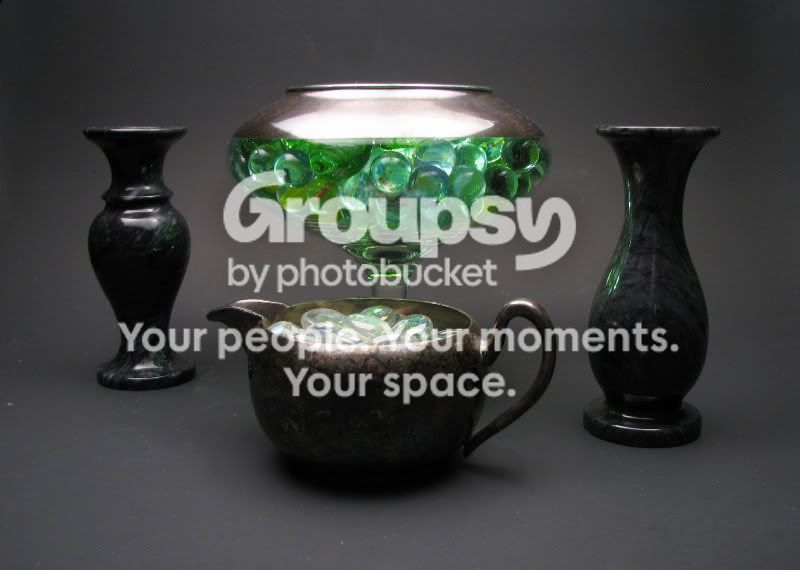
This is my first attempt at taking an actual "photograph" and after hours of fiddling with the lighting, this is the best that I could do. There's a lot about the photo that I'm not happy with, but as far as the lighting goes, I can't seem to find a way to get light on the bottom of the objects without introducing even more reflections in them. Plus I don't like the reflection on the top of the goblet. It's too distracting. But like I say, this is the best that I have been able to do.
Does anyone have any suggestions about how to better light this photo? How would a more experienced photographer light this shot? I'm very limited on equipment, but I'll try any suggestions as best I can.
Any ideas will be appreciated.


![[No title]](/data/xfmg/thumbnail/39/39419-5d4fd8535ab4f6e01caa38b72bf396e0.jpg?1734173503)

![[No title]](/data/xfmg/thumbnail/40/40285-2ce5915035c220ccb3485030863b62d0.jpg?1734174700)

![[No title]](/data/xfmg/thumbnail/40/40286-86401b94de8b01bea8bb4ea154aaea0a.jpg?1734174701)