What's new

How To Make this Better? C&C

tmjjk

No longer a newbie, moving up!
Joined
Mar 28, 2012
Messages
550
Reaction score
61
Location
Cleveland
Can others edit my Photos
Photos OK to edit
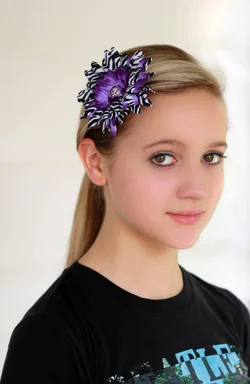
Should she be more centered? Does this crop work? Help $1 (1 of 1)-7.webp
 
crop doesn't work. move her more to the left since that is the direction she's facing. Nice shot otherwise
 
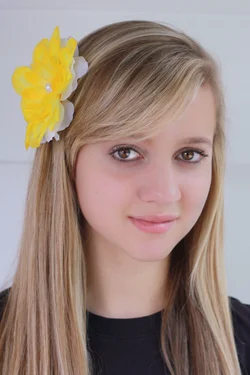
$1 (1 of 1)-9.webpLiterally just took this...any better?
 
tmjjk said:
<img src="http://www.thephotoforum.com/forum/attachment.php?attachmentid=9507"/>Literally just took this...any better?

I think it's really nice, overall... Would you like my opinion on some ways you can improve the photo?
 
Last edited:
tmjjk said:
Should she be more centered? Does this crop work? Help<img src="http://www.thephotoforum.com/forum/attachment.php?attachmentid=9504"/>


$image-1590155844.webp

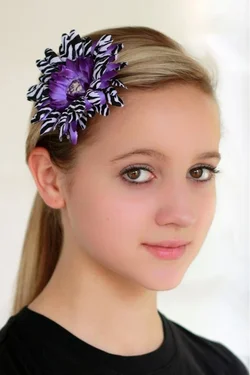
How do you feel about this crop?
 
Yes...love it :)
 
Let me start by saying, as I've said, I don't know much about shooting people...with a camera. :-)

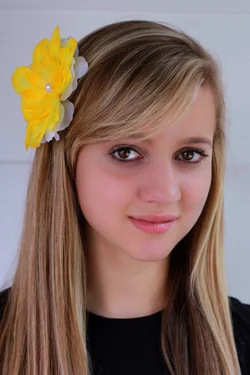
When I see pictures, I see a lot of haze or milky or cloudy...not sure what to call it. Like in this second picture. It's a good picture, so don't get me wrong..I'm just curious as to why most people photos I see have that. To me, I like to see darker, like the edit I put up. I'm not anyway shape or form saying mine is better, just saying this is how I like people pictures. With it being darkened like I did, I see some work may be needed if desired on shadows that are brought out, like under eyes.

anyway, just curious and thought I'd post and see.

$girl1.webp
 
color is off in the second image I think...grrr
 
Let me start by saying, as I've said, I don't know much about shooting people...with a camera. :-)

When I see pictures, I see a lot of haze or milky or cloudy...not sure what to call it. Like in this second picture. It's a good picture, so don't get me wrong..I'm just curious as to why most people photos I see have that. To me, I like to see darker, like the edit I put up. I'm not anyway shape or form saying mine is better, just saying this is how I like people pictures. With it being darkened like I did, I see some work may be needed if desired on shadows that are brought out, like under eyes.

anyway, just curious and thought I'd post and see.

View attachment 9510
Love it... now tell me how you did it
 
tmjjk said:
Should she be more centered? Does this crop work? Help<img src="http://www.thephotoforum.com/forum/attachments/people-photography/9504-how-make-better-c-c-1-1-1-7.jpg"/>

How do you feel about this crop?

I'm certainly not an experienced pro or anything, but I like the crop a lot better. I like that it cuts out the print on her t-shirt. I found that, and the composition, distracting in the first. I like the lighting!
 
tmjjk said:
Should she be more centered? Does this crop work? Help<img src="http://www.thephotoforum.com/forum/attachments/people-photography/9504-how-make-better-c-c-1-1-1-7.jpg"/>


View attachment 9509

How do you feel about this crop?
I like this crop better. She isnt looking into the side of the frame. Nice picture, though.
 
Ernicus said:
Let me start by saying, as I've said, I don't know much about shooting people...with a camera. :-)

When I see pictures, I see a lot of haze or milky or cloudy...not sure what to call it. Like in this second picture. It's a good picture, so don't get me wrong..I'm just curious as to why most people photos I see have that. To me, I like to see darker, like the edit I put up. I'm not anyway shape or form saying mine is better, just saying this is how I like people pictures. With it being darkened like I did, I see some work may be needed if desired on shadows that are brought out, like under eyes.

anyway, just curious and thought I'd post and see.

<img src="http://www.thephotoforum.com/forum/attachment.php?attachmentid=9510"/>

Respectfully, I think the skin tone in this edit is way off... Too much pink and quite unnatural... Just my humble opinion...
 
thank you :) I learned how to turn my camera the right way just yesterday :sexywink:
 
I did not edit it in anyway (other than adjust levels), again due to the fact that I don't know anything about how to fix colors, skin tone, etc. I only adjusted the levels to remove the haze.

I just wanted to illustrate the darker vs haze I was trying to get at, not actually edit the picture to make it look better.
 
Last edited:
Let me start by saying, as I've said, I don't know much about shooting people...with a camera. :-)

When I see pictures, I see a lot of haze or milky or cloudy...not sure what to call it. Like in this second picture. It's a good picture, so don't get me wrong..I'm just curious as to why most people photos I see have that. To me, I like to see darker, like the edit I put up. I'm not anyway shape or form saying mine is better, just saying this is how I like people pictures. With it being darkened like I did, I see some work may be needed if desired on shadows that are brought out, like under eyes.

anyway, just curious and thought I'd post and see.

View attachment 9510
Love it... now tell me how you did it

I just adjusted the levels in photoshop. brought the black on down a bit and the white one up a bit to where it just started to rise on the histogram, and then moved the gray one to the right to my preference. As the guy above me said, and I think its because I darkened it a bit, it throws off the saturation a bit and sometimes other things. So there would have to be further adjustments made. I don't know how to comfortably do those, maybe some of the others here can use your image and give us a quick lesson. :-)
 

Create an account or login to comment

You must be a member in order to leave a comment

Create account

Create an account on our community. It's easy!

Log in

Already have an account? Log in here.

Back
Top Bottom