What's new

Introducing myself! looking for critique

C_mo

TPF Noob!
Joined
Sep 16, 2011
Messages
30
Reaction score
6
Location
Northern Alberta
Can others edit my Photos
Photos OK to edit
Hello everyone! My name is Caitlyn and I bought my DSLR back in May to take better pictures of my (now) 9 month old son Wyatt. I've been slowly learning how to use it better, but I'm interested in learning and getting feedback to become better.

Here are some of my favorites I've taken over the past few months

2lo6x06.jpg


ng6aua.jpg


rlhocl.jpg


6rlil1.jpg


ra181t.jpg


(hopefully my links work, because the uploading tool wouldn't work for me and I'm not sure why)
 
Hi Caitlyn and welcome!

When you want C&C (comments and critiques) on your photos please do not post more than 3 pictures. It is more helpful for you since you will get better feedback on a smaller amount of pictures. It takes a lot of time to C&C a large amount of pictures and most people won't take the time to do so. Also, please let everyone know what you like about the image, what you don't like, what you were going for, etc. Oh - and number your pictures! You cannot actually upload pictures to this site. There is a sticky in the beginners forum that explains how to post pictures if you want more information.


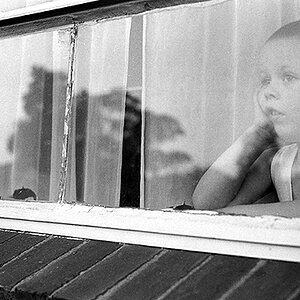
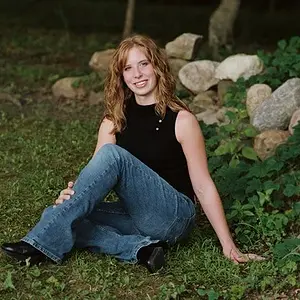
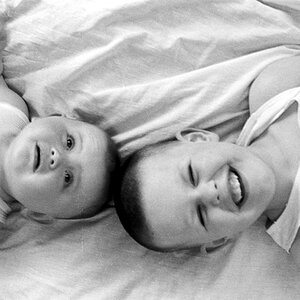
1 You cut off the top of his head, his arms/hands, and a piece of his ear!!!!! The WB looks off to me. It looks a little yellow but that could just be my screen. Adorable kid!
2 Looks a little soft to me. I don't like the way the light is falling on the subject - the side of his face is blown out (bright) as well as parts of the bed. The baby is also right in the center of the frame (look up the rule of thirds). The B&W conversion isn't very good either. Did you edit these? What software are you using
3 This one is kind of boring IMO. Too much empty space above his head, looks a little soft,
4 This one would've been better if you were in front of him taking the shot. As is, its not very interesting. (IMO = in my opinion)
5 I like this - he is so freaking cute! He's darker than the background and it should be vice versa. The blown out sky attracts the eye. Maybe cropping it would help but you will lose even more of the hat.

Good job so far! Are you shooting in automatic settings or manual? I'm a beginner as well and I found that the book Understanding Exposure by Bryan Peterson is really helpful! It took me from using automatic settings to using manual within a couple days. With manual settings you have more control over how the picture will come out. I also recommend reading your camera manual a couple times.

Are you editing these pictures and if so with what program? For black and white pictures do not use the camera settings to take a black and white picture. Take the picture in color then convert it to black and white with editing software.

Cambridge in Colour - Photography Tutorials & Learning Community
^^ excellent site - digital photography tutorials

 
Welcome! You've clearly put some thought into these, and they're a good start, but, with room for improvement... a few thoughts:

1. This is a bit of awkward crop. You've cropped off some bits of limbs (never a good thing, if you must crop limbs, do it boldly, and never at/near a joint, nor laterally). and you have the child basically pushed against the left side of the frame. Move back a bit, give him some breathing room and you'll have a stronger image. Try and clean off the little bits of sputum and such before you shoot; while they may not bother you as the mother, you'll find the image that much better without them.


2. The subject is dead centre in the image; try and move them off to one side, especially when using a landscape/horizontal composition. The monochrome conversion is a bit mid-tone rich and could use a contrast boost, but the exposure is what really kills the image. You have blown hghlights on one side of his face and shadow on the other. If you're not to the stage where you can use flashes for fill light, then consider a reflector, even a big piece of white card would have helped to bring some more light on to the shadow side of his face.


3. Too much wall, too little child. The conversion is better here, but his face still has exposure issues. and appears slightly soft.

4. Cute; the best of the lot IMO; again it could have used some fill light image right, but it's not bad, and you can probably tweak this in post. I would crop a little off of the top and left to make the child more prominent in the image.

5. Another cute shot, but again some more light was needed under the hat. Read your camera's manual chapter on 'spot metering' as it will help deal with situations like this where the meter is 'fooled' by the bright background.

Just my $00.02 worth - your mileage may vary.

~John
 
Thanks to you both for commenting!! I really appreciate it :)

The first picture is one of the first I took, so I posted it to show where I started, at the time I was just trying to keep him from crawling off of the bed, so I wasn't too concerned at the time about cropping it right lol... looking back you are both definitely right :)

I'm wondering, how would I go about using a reflector? I've been having a lot of problems with blown out images, especially when light is shining right on his bald little head.

Thanks again!
 
also I should mention that I used Photoshop elements to edit now, but #2 and #3 (which were both taken months ago) were edited online because I had nothing better. I'm still learning to use Photoshop, most of the features go over my head at this point
 
also I should mention that I used Photoshop elements to edit now, but #2 and #3 (which were both taken months ago) were edited online because I had nothing better. I'm still learning to use Photoshop, most of the features go over my head at this point

I have elements as well. I'll PM you some helpful links later.

As for the blown out images - are you using your automatic settings?? I think you should take Tirediron's suggestion about reading up on metering (spot, center, etc.) first before the reflector part. Just look up some lighting websites and the use of reflectors. It should explain it fairly good. Direct sunlight isn't the best time for outdoors photography. Noon is the worst time. So, thats something to think about as well. Shade and clouds are your friends!
 
also I should mention that I used Photoshop elements to edit now, but #2 and #3 (which were both taken months ago) were edited online because I had nothing better. I'm still learning to use Photoshop, most of the features go over my head at this point
Open Photoshop.
With Photoshop open press F1 on your keyboard.
That will take you to a long list of online tutorials that Adobe provides you for learning about how the various tools and features work.
 
Welcome to TPF Caitlyn! I hope you find this place as helpful as I have. There are a few knowledgeable people here and so you should be able to find yourself increasing in ability the more you take photos, post them here for critique and then work on any issues that may have been commented on. Another place I like going is: Cambridge in Colour - Photography Tutorials & Learning Community Good luck in your growth. We'll see you around on the forum.
 
also I should mention that I used Photoshop elements to edit now, but #2 and #3 (which were both taken months ago) were edited online because I had nothing better. I'm still learning to use Photoshop, most of the features go over my head at this point

I have elements as well. I'll PM you some helpful links later.

As for the blown out images - are you using your automatic settings?? I think you should take Tirediron's suggestion about reading up on metering (spot, center, etc.) first before the reflector part. Just look up some lighting websites and the use of reflectors. It should explain it fairly good. Direct sunlight isn't the best time for outdoors photography. Noon is the worst time. So, thats something to think about as well. Shade and clouds are your friends!

I generally use AV unless I'm inside... my house is dark and doesn't have a lot of available natural light so I use TV
 

Create an account or login to comment

You must be a member in order to leave a comment

Create account

Create an account on our community. It's easy!

Log in

Already have an account? Log in here.

Back
Top Bottom