What's new

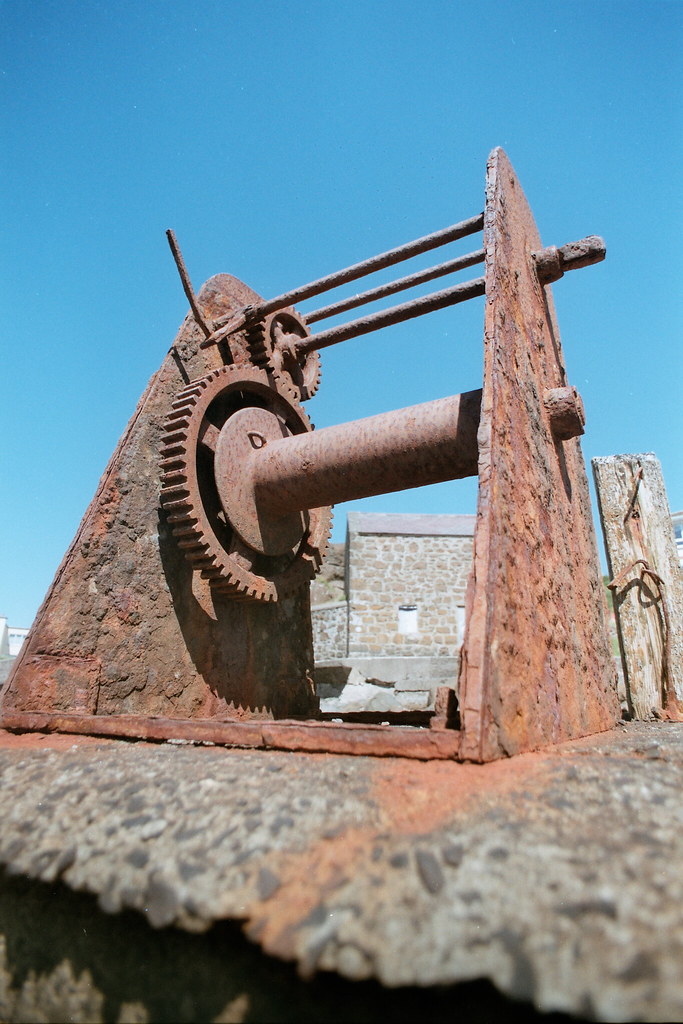
Is it possible for this photo to look good??

kreuzberg

TPF Noob!
Joined
May 28, 2009
Messages
79
Reaction score
0
Can others edit my Photos
Photos OK to edit
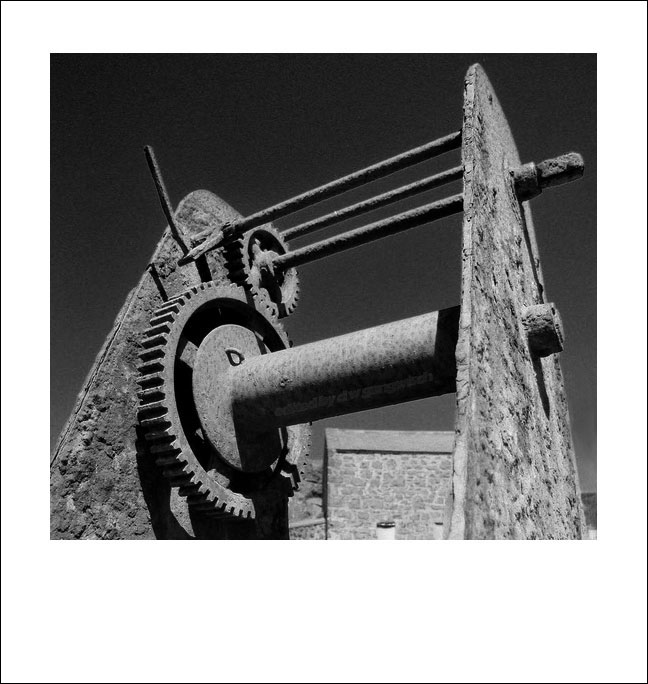
I took this photo recently and I like the subject and the angle I shot it at but I find the rest of the shot (background etc) unbelievably boring. The blue sky is just dull and and I think the foreground is too out of focus.

Is there anything I can do in photoshop to try and improve it or should I just scrap the picture and try and take it again from a different angle, maybe landscape instead of portrait (but again the background would still be boring!)?

Ive attached the original so feel free to mess about with it if you think it can be saved :)

EDIT: I cant figure out how to upload as an attachment so I've had to upload it to flickr instead
 
You can try for something like this:

3693662959_d933d94c17_b.jpg
 
Thats pretty good! May I ask what you did?
 
Sure,

I opened the image in ACR (Adobe Camera Raw) at a bit-depth of 16-bits. I adjusted the exposure, + 0.5 stop, moved the Clarity slider to +75, moved the Saturation slider to +8 then opened the image in Photoshop CS4. I cloned out the building between the devices uprights.

I then duplicated the background layer, cropped, set the blending mode to Luminosity and applied the Unsharp Mask filter at +150, radius 1,masking 0. I then ran the image through Imagenomic's Noiseware Professional in the landscape mode. After de-noise I flattened the layers and ran the image through Topaz Adjust 3 using the Clarity preset.

Next I clicked on Image>Canvas size and added a .025" black border to the image followed by a .5" white border.

Lastly I converted the image back to an 8-bit color depth to save it as a JPEG, uploaded to my private Photobucket site to link it to TPF.
 
I opened the image in ACR (Adobe Camera Raw) at a bit-depth of 16-bits. I adjusted the exposure, + 0.5 stop, moved the Clarity slider to +75, moved the Saturation slider to +8 then opened the image in Photoshop CS4. I cloned out the building between the devices uprights.

I then duplicated the background layer, cropped, set the blending mode to Luminosity and applies the Unsharp Mask filter at +150, radius 1,masking 0. I then ran the image through Imagenomic's Noiseware Professional in the landscape mode. After de-noise I flattened the layers and ran the image through Topaz Adjust 3 using the Clarity preset.

Next I clicked on Image>Canvas size and added a .025" black border to the image followed by a .5" white border.

Lastly I converted the image back to an 8-bit color depth to save it as a JPEG, uploaded to my private Photobucket site to link it to TPF.

The cloning work on the building is a little lackluster though, I can see trace beige from the structure rather clearly.
 
Not only that, but it is insanely over sharpened, and has massive artifacting in the sky and everywhere else. I would have slid the masking up quite a bit until it leaves the sky alone, and probably backed off the USM all around.
 
I'm surprised you put this through noiseware, it's extremely noisy.
 
Sure,

I opened the image in ACR (Adobe Camera Raw) at a bit-depth of 16-bits. I adjusted the exposure, + 0.5 stop, moved the Clarity slider to +75, moved the Saturation slider to +8 then opened the image in Photoshop CS4. I cloned out the building between the devices uprights.

I then duplicated the background layer, cropped, set the blending mode to Luminosity and applied the Unsharp Mask filter at +150, radius 1,masking 0. I then ran the image through Imagenomic's Noiseware Professional in the landscape mode. After de-noise I flattened the layers and ran the image through Topaz Adjust 3 using the Clarity preset.

Next I clicked on Image>Canvas size and added a .025" black border to the image followed by a .5" white border.

Lastly I converted the image back to an 8-bit color depth to save it as a JPEG, uploaded to my private Photobucket site to link it to TPF.

Wow that is all way beyond me! Which step of that sharpened up the focal object as I'd like to learn how to do that myself?

Thanks
 
You can try something drastic like this too...

thing.jpg


Honestly, I would get closer to the subject and get some interesting shots of the gear, rust or other details.
 
The cloning work on the building is a little lackluster though, I can see trace beige from the structure rather clearly.
Quick and Dirty. Not a lot of spare time and the pay ain't so hot on these either. :lol:

Not only that, but it is insanely over sharpened, and has massive artifacting in the sky and everywhere else. I would have slid the masking up quite a bit until it leaves the sky alone, and probably backed off the USM all around.
:hug::
 
Honestly, I would get closer to the subject and get some interesting shots of the gear, rust or other details.

Yeah thats what I was thinking, I'll have to go down with a 135mm. I took that original pic when I was trying out my new 19mm and just experimenting with perspective.

I quite like the B&W conversion, brings out the textures in the rust and makes the background a bit more interesting.
 
I also dislike the boring blank sky and the out of focus foregroud. Solution? Crop.

I like it better in B&W. My stab at it was tweaked by darkening the sky and balancing the rusty metal with Channel Mixer (low, slightly neg value for blue, modest value on green, and higher value on red, all totalling 100) and Levels (raising the middle pointer a fair bit).

rust.jpg
 
I made this!

jcCon.jpg


What do you think? I tried to clone out the building in the background but couldn't get it to look natural enough. The artifacting (I think?) in the sky and such I think are there to stay, unfortunately. Do you have a RAW file?
 
If possible, I'd go back to shoot it on a cloudy day. Clouds will make the sky less boring and get rid of the hard shadows on the gears etc.

If possible, park your car or put some kind of prop in front of the building to add a sort of smoother contrast to the rusty gears, which might make it less boring as well.
 

Create an account or login to comment

You must be a member in order to leave a comment

Create account

Create an account on our community. It's easy!

Log in

Already have an account? Log in here.

Back
Top Bottom