What's new

Is this worth pursuing?

Bend The Light

No longer a newbie, moving up!
Joined
Jun 8, 2010
Messages
2,591
Reaction score
375
Location
Barnsley, Oop-Nooerth, UK
Can others edit my Photos
Photos OK to edit
I saw an image like this on a contact's flickr...thought I'd have a go.
What do you think of this? I wanted it gritty and grainy. I also wanted it a little more Black & White than this, but when in "hard light" in PS which gave the required image, I couldn't merge or flatten layers as it changed the look of it all. No saving as JPEg, then! Grr.

Anyway...your thought son this...thank you. :)
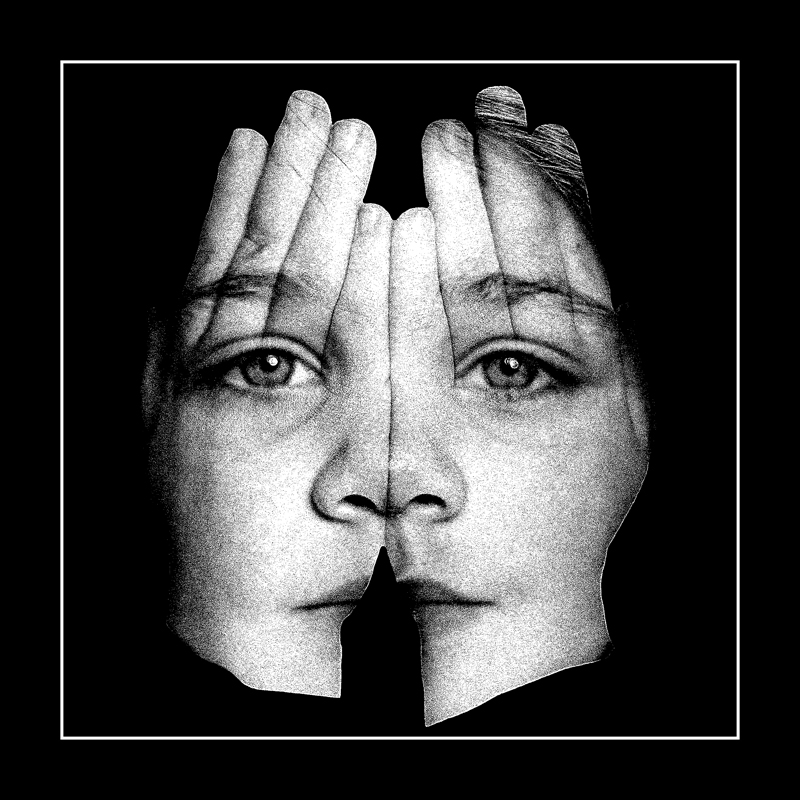

Ruby Hands 2 by http://bendthelight.me.uk, on Flickr
 
I am not sure. Maybe if it is not as grainy. I dont like the hand edges. Let me see the one on flickr that you saw.
 
I am not sure. Maybe if it is not as grainy. I dont like the hand edges. Let me see the one on flickr that you saw.

This was it:

Untitled | Flickr - Photo Sharing!

however, I was going for the grainy look, but that's just me. :)

I would also like to know how he did it (method) as I had fun with layers and masks...wondered if there was an easier way. Perhaps if my model (who is 6!) would stand still I might get a better start image. :)
 
I am not sure.. but I like that one better. I think it is worth pursuing.
 
I like the graininess. I might soften the edges of the hands around the bottom, but otherwise I wouldn't change a thing.
 
I like seeing the edges of the thumbs in your image vs. the flickr pic. Otherwise, it looks like a double exposed image of four fingered hands and an ear-less face! Also, you might have your models wrists closer together, so the mouth of the other image isn't separated so much.

I think once you get the hand edges softened, you'll have a winner.
 
I think that your image is much better done than the original. The only thing the original has on yours – aside from the edges issue – is that the mouth is not chopped. The idea of going B&W (and grainy) is a win in my opinion.

Not sure I understand what you mean when you ask if this is worth pursuing, though. This is someone else's idea – even if your execution is better, the creativity is still someone else's. Other than using this as a learning exercise, I can't see the use of doing this. Just my 2 cents, of course.
 
I am not sure.. but I like that one better. I think it is worth pursuing.

Thanks.

I like the graininess. I might soften the edges of the hands around the bottom, but otherwise I wouldn't change a thing.

Yes, I need those hard edges to go. Thanks. :)

I like seeing the edges of the thumbs in your image vs. the flickr pic. Otherwise, it looks like a double exposed image of four fingered hands and an ear-less face! Also, you might have your models wrists closer together, so the mouth of the other image isn't separated so much.

I think once you get the hand edges softened, you'll have a winner.

Thank you. :)

I think that your image is much better done than the original. The only thing the original has on yours – aside from the edges issue – is that the mouth is not chopped. The idea of going B&W (and grainy) is a win in my opinion.

Not sure I understand what you mean when you ask if this is worth pursuing, though. This is someone else's idea – even if your execution is better, the creativity is still someone else's. Other than using this as a learning exercise, I can't see the use of doing this. Just my 2 cents, of course.

The mouth doesn't bother me that much, although I intend another, and better, go at this.

I know it's someone elses idea (and not the guy I saw do it, either...I have seen it before that) but it was someone else's idea to to take a lot of images...it means that there is very little new in this game. I feel I should try to do all of these things, sometimes trying to match originals, sometimes adding my own slant. That's a learning process. I even tried cooked HDRs and selective colouring! :lol:
 
Am i right if i guessed this to be your Grand dotty? I liked the grains, which gives the image the required mystery; meanwhile i prefer diffused edges

Regards :D
 
I definitely like the look of your photo better. Nice website btw. Great shots. Regarding softening the edges - to get a really good selection, I would try shooting them against a white background and using two flash units. The one flash you want to set to get a proper exposure for the hands. The second flash is to aim at the white background, and set on manual so that it completely blows the background out. You could use a really bright light aimed at the background to accomplish the same thing. The hands will be exposed perfectly against a perfect white background, which should make the selection a breeze.

Regarding your layers in Photoshop and not being able to save them as JPEGs without flattening the image, it can be done if Lightroom is part of your workflow. I always start out with Lightroom, then export it into Photoshop to edit. The second it opens up in Photoshop, I hit "Save", which saves it as a TIFF (depending on your PS settings), and links the photoshop file to the lightroom file. Then I do all the editing in Photoshop that I need to do, and when I'm finished, I hit "save" again. You'll see the file in Lightroom change to reflect the changes you made. So at this point, if I want to create a jpeg, but don't want to flatten the image in Photoshop, I then choose "save as" in photoshop, and save the layered file with a new name. This severs the link between the file you have open in Photoshop with the file in Lightroom. So then I close the Photoshop file (retaining all of it's layers and masks), and return to the file in Lightroom. Then I just choose "Export", and export it as a JPEG.
 
I definitely like the look of your photo better. Nice website btw. Great shots. Regarding softening the edges - to get a really good selection, I would try shooting them against a white background and using two flash units. The one flash you want to set to get a proper exposure for the hands. The second flash is to aim at the white background, and set on manual so that it completely blows the background out. You could use a really bright light aimed at the background to accomplish the same thing. The hands will be exposed perfectly against a perfect white background, which should make the selection a breeze.

Regarding your layers in Photoshop and not being able to save them as JPEGs without flattening the image, it can be done if Lightroom is part of your workflow. I always start out with Lightroom, then export it into Photoshop to edit. The second it opens up in Photoshop, I hit "Save", which saves it as a TIFF (depending on your PS settings), and links the photoshop file to the lightroom file. Then I do all the editing in Photoshop that I need to do, and when I'm finished, I hit "save" again. You'll see the file in Lightroom change to reflect the changes you made. So at this point, if I want to create a jpeg, but don't want to flatten the image in Photoshop, I then choose "save as" in photoshop, and save the layered file with a new name. This severs the link between the file you have open in Photoshop with the file in Lightroom. So then I close the Photoshop file (retaining all of it's layers and masks), and return to the file in Lightroom. Then I just choose "Export", and export it as a JPEG.

Thanks for that...I will definitely have another go with better images / selections...I don't have flash units, but I do mess with a couple of studio lights from time to time, so maybe will do it then...have to get some time to do it in the next couple of weeks anywway. :)

I don't have Lightroom. :(

Cheers
 
Am i right if i guessed this to be your Grand dotty? I liked the grains, which gives the image the required mystery; meanwhile i prefer diffused edges

Regards :D

This is Ruby...my DAUGHTER. I'm quite young. :)

I make a pardon; actually i did not assess your age from your own image; i vaguely remember you mentioned somewhere about your grand daughter, my fault :grumpy:

Regards :D
 
Last edited:

Create an account or login to comment

You must be a member in order to leave a comment

Create account

Create an account on our community. It's easy!

Log in

Already have an account? Log in here.

New Topics

Back
Top Bottom