What's new

Lighting question

HabanoLover

TPF Noob!
Joined
Apr 28, 2012
Messages
21
Reaction score
0
Location
Birmingham AL
Can others edit my Photos
Photos OK to edit
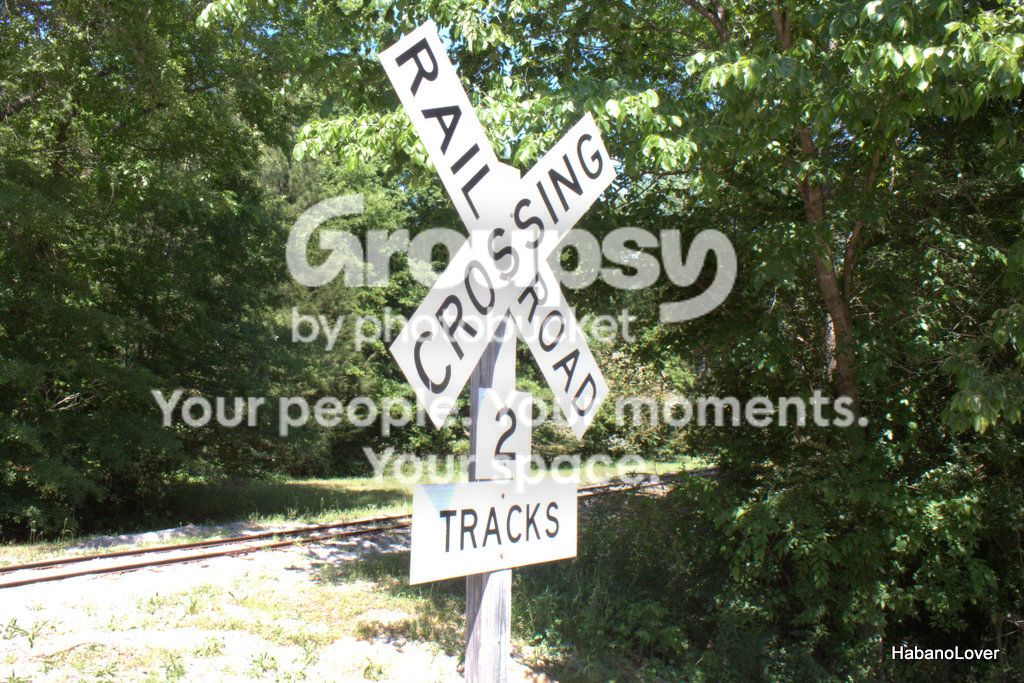
I am VERY green with a camera. I have a T1i and I have really started to get into it. I've been trying to take the same photos with different settings to get a better understanding of how everything works together. One thing I can not figure out is this lighting issue. Below are to photos taken today, both have the natural sun light kind of "overpowering" things (I have no idea what the real term for that is). I searched before posting and seems a Natural Density (?) filter would help, but what about my settings? These we both shot in Av Mode.
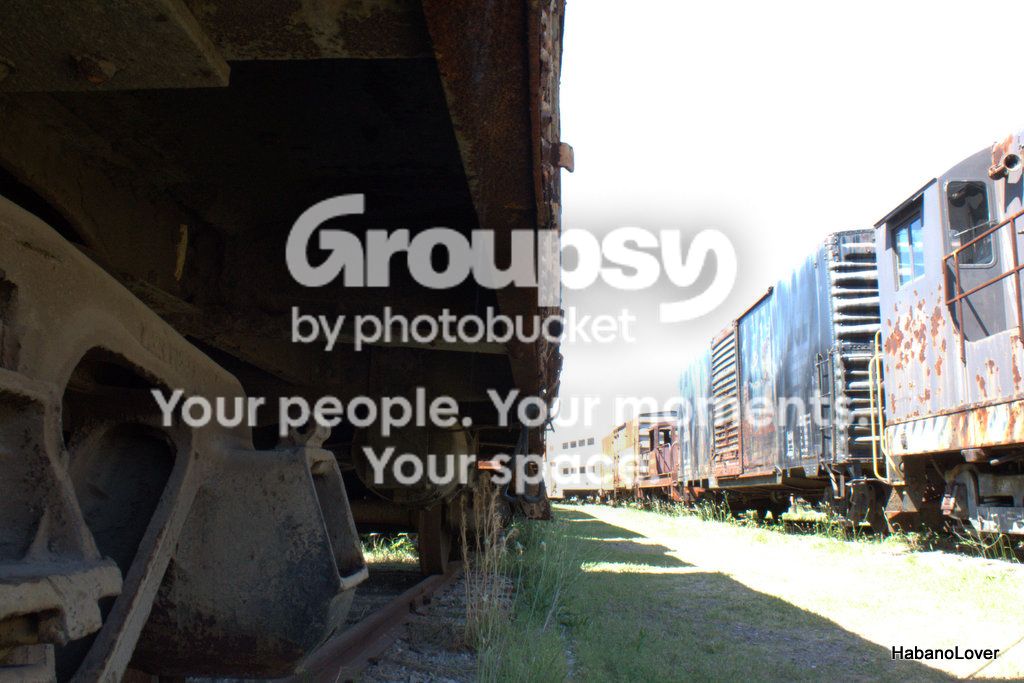
IMG_1780.jpg

IMG_1763.jpg
 
Typically, when the highlights are over-exposed, the term most often used is: "blown" or "blown out". Just jargon. Anyway, you see the problem already. For the under car shot, you should attempt to add additional light for the shade areas. This can be a fill flash, preferably off camera, or perhaps just a reflector to throw some light under the car. Either select an "average" area of light for the exposure, or set the aperture manually to compensate for the extreme differences in light.

The main problem in the second shot is composition. Try a vertical format, avoiding much of the over-exposed ground to the left of the sign.
 
These are just over-exposed. The second shot is the easier to fix -- just reduce the exposure.

The first shot is a bit tricker because of the extreme difference in exposure between the underside of the train and the lighting elsewhere. Mixed lighting shots can be tricky. Essentially you're running into a problem with too much dynamic range. The tonal value between the undercarriage of the train and the cars are on the adjacent track are just too far apart.

You cannot do anything about the power of the sunlight (other than wait until later in the day.) You could supplement the lighting under the car on your left. But boosting that light, it would allow you to reduce the overall exposure so that the number of stops of difference wouldn't be so great.

You could shoot with a "gradient neutral density" filter mounted with the gradient edge vertically so that it's dimming only the right-half of the frame. You could also shooting 3 "bracketed" images which are a few stops apart and then "merge" them using HDR (high dynamic range) software.
 
Thanks guys, I'm going to play with the exposure on that second one and see what I can do. :) I'll have to save the HDR suggestions for when I get a bit more comfortable.
 
Typically, when the highlights are over-exposed, the term most often used is: "blown" or "blown out". Just jargon. .
Blown out means so over exposed there is no detail left in that part of a photo, like the sky in the OP 2st photo.

But lets flesh out that jargon.

A pixel sample taken in that bright area of sky shows that all 3 color channels - Red, Green, and Blue (RGB) are maxed out at 255, 255, 255.

If only 1 color channnel is blown out (255, 240, 247) and the image is a Raw file, a parametric image editing application can recover some detail from the other 2 channels. If 2 channels are blown out (255, 242, 255) a snidgen of detail can be recovered.

The OP needs to learn about dynamic range, metering modes, histograms, exposure and linear capture, expose-to-the-right (ETTR) and how digital photographs work.
Digital Photography Tutorials
http://www.adobe.com/digitalimag/pdfs/linear_gamma.pdf
http://wwwimages.adobe.com/www.adob...ly/prophotographer/pdfs/pscs3_renderprint.pdf

Has the OP used a ND filter, flash would likely have been required to get enough light on the underside of the railroad car.

Sometimes, the dynamic range of the scene is so broad that the best solution is to make an HDR.
 
Last edited:
Thanks kmH! Those are great links. I have a lot of learning to do. I've played with these in GIMP a little and see what you guys mean about the exposure and the RGB channels. This helps a lot. :)
 

Create an account or login to comment

You must be a member in order to leave a comment

Create account

Create an account on our community. It's easy!

Log in

Already have an account? Log in here.

Back
Top Bottom