What's new

lookin for more opinions

lorigon27

TPF Noob!
Joined
Nov 6, 2011
Messages
78
Reaction score
5
Location
Missouri
Can others edit my Photos
Photos OK to edit
ok these i think are a little better than the ones i posted the other day.

whatcha all think? opinions always appreciated

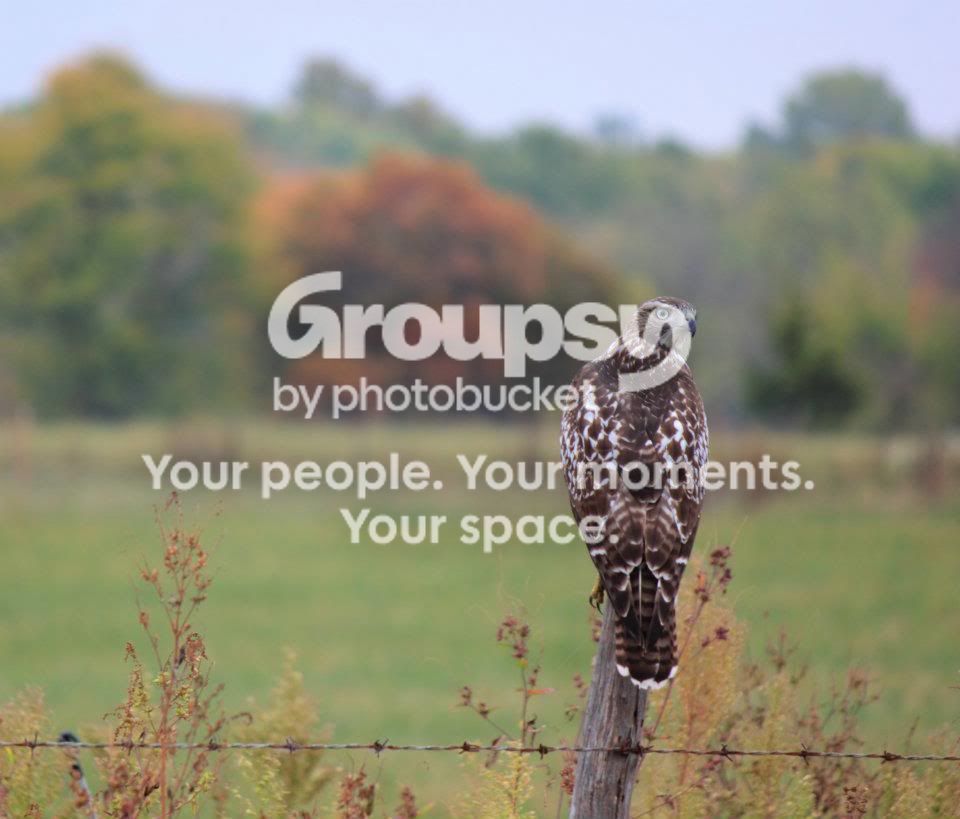
hawk.jpg


IMG_1280.jpg


IMG_0266.jpg
 
#1: I think it's underexposed, but awesome composition!

#2 I'd like to see it shot down lower. I also think a side angle would work better.

#3 IMHO, the second horse either needs to be fully out of focus or more in focus. It's kind of in this awkward 'sorta kinda in focus' state, which keeps me from being able to tell if it's supposed to be part of the subject, or not. I think ideally, the second horse is either fully part of the subject or not in the picture at all. Also, the light is a little hard. I know you may not have 100% control over it, but I'd shoot this more towards sunset if possible. The shine of the horse is washing out its terrific coloring.

Also, overall, I can't be certain, but it seems like you shot these at a much higher ISO than was needed. This time of day, you should be shooting at the absolute lowest ISO your camera allows. Maybe I'm wrong about this, but something about them just seems like ISO 400 during mid day to me.

 
thanks alot

1st was a little underxp and was rainy day

2nd deffintetly would have looked better from a lower angle, but if i got outta my car he would have ran off--kinda of a point and shoot type deal.

3rd um yes my iso was probly set too high (was one of my first pics after learning bout iso and functionality of my camera)
and i agree the horse in the background takes alot away from the chestnut horse


i cant wait to get better
 
1 - nice shot. I think composition-wise the owl should have some extra space on the right side of the frame and not the left. Could just me be. Also, it looks a little dull and hazy. Not sure what editing program you use but in photoshop if you use te unsharpen mask it can really make the picture pop. I can show you what I mean if you'd like.

2 - this one isn't working for me. Your too high, looks like the birds foot got cut off.

3 - looks a little soft like you might have missed focus. I wish the other horse wasn't there - would've been much better. You should have framed the shot so there was no fence in the background!
 
thanks alot

1st was a little underxp and was rainy day

2nd deffintetly would have looked better from a lower angle, but if i got outta my car he would have ran off--kinda of a point and shoot type deal.

3rd um yes my iso was probly set too high (was one of my first pics after learning bout iso and functionality of my camera)
and i agree the horse in the background takes alot away from the chestnut horse


i cant wait to get better

No problem, I'm 100% in the same place as you are. It's both frustrating at time but ultimately extremely rewarding. I can really start to get annoyed and frustrated with my pictures until I look back over some of the shots I took the first day I had my camera and compare them to what I'm doing now, lol.
 
Why are you using the horizontal frame, for vertical subjects like #1 and #2?
 
For 1 I get the horizontal frame for the subject because the background gives context, it's not just about the bird. For 2 thought a vertical frame taken at a lower angle would have been better, IMO.

Was 1 under exposed? It looks fine to me, no blocked up shadows and the hilights look ok. Pulled it up, histogram looks good. If anything, the exposure looks really full with lots of data there to work with. Just needs some contrast.
 
Was 1 under exposed? It looks fine to me, no blocked up shadows and the hilights look ok. Pulled it up, histogram looks good. If anything, the exposure looks really full with lots of data there to work with. Just needs some contrast.

Yeah, now that you mentioned it, I think it's a mix of undercontrasted with the high ISO that make it look initially overexposed to me.
 
#1: I think it's underexposed, but awesome composition!

#2 I'd like to see it shot down lower. I also think a side angle would work better.

#3 IMHO, the second horse either needs to be fully out of focus or more in focus. It's kind of in this awkward 'sorta kinda in focus' state, which keeps me from being able to tell if it's supposed to be part of the subject, or not. I think ideally, the second horse is either fully part of the subject or not in the picture at all. Also, the light is a little hard. I know you may not have 100% control over it, but I'd shoot this more towards sunset if possible. The shine of the horse is washing out its terrific coloring.

Also, overall, I can't be certain, but it seems like you shot these at a much higher ISO than was needed. This time of day, you should be shooting at the absolute lowest ISO your camera allows. Maybe I'm wrong about this, but something about them just seems like ISO 400 during mid day to me.

The ISO on the 2nd image was 200 and 100 on the third. For some reason I can't see what the ISO was on the first image.

In my earlier post I said that the shot of the horses looked soft. You shot it at f/2 which is probably the reason. Its very easy to miss focus when you are shooting wide open. To get a sharper image you should close down your aperture and stay away from the f/1.4 -f/3
 
The ISO on the 2nd image was 200 and 100 on the third. For some reason I can't see what the ISO was on the first image.

How can you tell that? Is there some trick to revealing the metadata that I'm unaware of on these photos?

Anyway, that's weird, then I can't really tell what looks off exposure wise, other than the undercontrast on #1. Is it just me or do they all look noisier than you'd expect with ISO 100 or ISO 200?
 
What internet browser are you using? You can get add-ons to show the EXIF data. If its a photo from flickr you can usually click on the photo and then when you get to flickr site the EXIF data is under Actions. I'm not really seeing any noise but I'm on a crappy laptop. But, the first shot could be at a higher ISO - I have no idea. My EXIF reader is saying there is no data so who knows.
 
What internet browser are you using? You can get add-ons to show the EXIF data. If its a photo from flickr you can usually click on the photo and then when you get to flickr site the EXIF data is under Actions. I'm not really seeing any noise but I'm on a crappy laptop. But, the first shot could be at a higher ISO - I have no idea. My EXIF reader is saying there is no data so who knows.

I'm using chrome. I'll search for EXIF add ons for it! Thanks, had no idea that anything like that even existed.
 
fjrabon said:
I'm using chrome. I'll search for EXIF add ons for it! Thanks, had no idea that anything like that even existed.

So that's what I'm using right now too. There are a couple different ones. Check the ratings - if the exif reader has low ratings don't get it. It sucks. I downloaded one with low ratings and it wouldn't work. Can't remember the name of the one I got but it had a 5 star rating or pretty close.
 
wow i have so much to learn.
ive had so much fun learning how my camera works and the theories behind photography and light.
very rewarding
 

Create an account or login to comment

You must be a member in order to leave a comment

Create account

Create an account on our community. It's easy!

Log in

Already have an account? Log in here.

New Topics

Back
Top Bottom