What's new

Looking for a technique for quickly setting flash for a scene? Not AUTO mode...

PropilotBW

Been spending a lot of time on here!
Joined
Feb 7, 2013
Messages
2,016
Reaction score
692
Location
Atlanta, GA, USA
Can others edit my Photos
Photos OK to edit
I have become very comfortable shooting in Aperture and Shutter Speed priority while using my 1.8, and no flash. My weakness is flash photography (among many other areas).

When I move indoors to take photos of my kids running about, I find myself switching to AUTO mode to get the flash settings correctly. I oftentimes have my pics coming out too hot while in A or S. I only have the built-in flash for now.

My kids don't sit still while I fiddle with flash settings, so I would appreciate your advise please.

What's a quick way to gauge flash power, aperture, shutter speed outside of AUTO Mode?


I guess this is why professional event photographers take dozens of sample shots before the event occurs...
 
F-number = flash guide number / flash to subject distance. The guide number for the D5100 is 39 so at 10' the preferred f-stop would be 39 / 10 = f/3.9 at ISO 100 and 1/60 second.
 
If you're consistently too hot ( overexposed?) test a bit with exposure/flash compensation until you like what you see and save it if you can or simply write it down if remembering is not an option. Consistently is the key word for that to work.
 
PropilotBW said:
What's a quick way to gauge flash power, aperture, shutter speed outside of AUTO Mode?

Well, depends on the flash in use, to a degree. Basically, a flash has a GN or GUIDE NUMBER. In the USA and Canada, it is often seen in FEET, and at ISO 100. In Europe and the UK, and indeed the rest of the world, it is usually given in Meters (also Metres), and also at ISO 100.

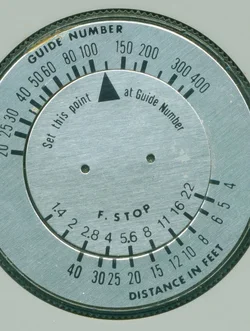
Here is an illustration from my photo upload site, a scan I made from an old 1960's flashbulb gun that I trashed. I tore the flashgun apart, but I kept the back of it, which has this nifty little rotating calculator on it. If you wish,k you can print this out, and then cut the two circular parts out, and print it, then glue it to two paper plate centers or whatnot, and the use a brad in the center to make your own calculator!

$150477536.webp

In this case, I set the calculator to a GN of 110, in feet, at ISO 100, which happens to be a fairly generic Vivitar 285HV/Sunpak 383/Nikon SB-800 Guide Number value. If you wish, look at the calculator, and mark some distances in Feet with the proper f/stop, and put those settings on a strip of tape or paper and slap that on the back of the flash.
 
F-number = flash guide number / flash to subject distance. The guide number for the D5100 is 39 so at 10' the preferred f-stop would be 39 / 10 = f/3.9 at ISO 100 and 1/60 second.

The GN for the D5100 is a constant 39?
 
F-number = flash guide number / flash to subject distance. The guide number for the D5100 is 39 so at 10' the preferred f-stop would be 39 / 10 = f/3.9 at ISO 100 and 1/60 second.

The GN for the D5100 is a constant 39?
Yes. GN is based on flash output at a specific distance.
 
F-number = flash guide number / flash to subject distance. The guide number for the D5100 is 39 so at 10' the preferred f-stop would be 39 / 10 = f/3.9 at ISO 100 and 1/60 second.

The GN for the D5100 is a constant 39?

YES, according to the specs, the GN is 39 in FEET, or 12 in Meters, at ISO of 100.

Since it does not have a zoom feature, at FULL, maximum output, the GN is 39 in Feet, at ISO 100.
 
Are you shooting flash in manual or are you leveraging the Nikon iTTL capability?

In iTTL you should be able to use flash to fill enough light to pleasantly expose the subject, but the camera will still meter for the available light so that you don't get that tragically "flashed out" foreground with a horribly underexposed background. In manual the technique is called "dragging the shutter" -- shooting an exposure which is long enough to collect more of the available light.)

Resolve that in your mind you will undertake to learn how to use flash. Like learning the basics of non-flash exposure, it can seem daunting at first... but once you get into it you realize that it's not all that complicated after all. Flash is similar... it's like a magic trick that seems incredibly complicated when you don't know the secret, but once you do know the secret you realize it isn't all that hard. But like pulling off a good magic trick... it DOES take some practice to have a fluid technique.
 
Thanks for the info. I appreciate the tips.
 
iTTL is inconsistent, because it is applying a rote software program.
That program makes decisions (often invalid) about what your intended main subject is. The data those decisions are based on evaluating the reflected pre-flash of light it sends out and then detects.
 
Are you shooting flash in manual or are you leveraging the Nikon iTTL capability?

In iTTL you should be able to use flash to fill enough light to pleasantly expose the subject, but the camera will still meter for the available light so that you don't get that tragically "flashed out" foreground with a horribly underexposed background. In manual the technique is called "dragging the shutter" -- shooting an exposure which is long enough to collect more of the available light.)

I went in to my settings and switched it to TTL mode. I will experiment with that setting. Thanks for that tip.
 
I do not have a flash that work with my cameras in TTL mode, so I always shoot it with manual mode. Most of the time were trial and error. Since I am shoot with a digital camera, I can adjust the settings based on the test shot.

After I did that for awhile, a lot of time the initial settings on the camera and flash is pretty close to what I want. i.e. f/5.6, 1/160 iso200/iso320 with flash power on 1/2 or 1/4 indoor with normal ceiling height. OR sometimes I will lower the shutter speed to balance the ambient. OR open up the aperture with less flash power.

Of course, if I am in a totally different environment, I will need more test shots to determine the settings. The good thing is, for indoor shots, the results were usually quite consistent once I determine the settings.
 
1. Use Manual Power for flash 1/1 or any.
2. Since ur using a on camera flash. ur flash while move with the camera so flash power will be different if ur changing distance from ur model.
3. use a light meter to meter flash its lot more reliable then trail n error method.
4. dont forget to post us the results.
 

Create an account or login to comment

You must be a member in order to leave a comment

Create account

Create an account on our community. It's easy!

Log in

Already have an account? Log in here.

Back
Top Bottom