What's new

Low light noise

JohnTrav

No longer a newbie, moving up!
Joined
Jun 29, 2012
Messages
442
Reaction score
28
Location
Philadelphia
I use a canon 7D and an 70-200 f/2.8 L lens. That's the gear I used.

Yesterday I was shooting a bowling event for my gf's parents to help them promote their business. Bowling ally's are always low light so to compensate I had to raise my ISO to about 3200. My pictures seemed to have a lot of noise. I was shooting at about 200-350/s to freeze the action. I had my camera on a monopod for extra stability too.

What can be done to reduce the noise in photos? I know I can lower the ISO but then I won't get the speed I need to freeze the action. Should I be overexposing the picture a tiny but and correcting in post processing? Any help would be appreciated.

I will try to get samples when I get to a computer. Most likely won't be until tomorrow morning.
 
Noise tends to be more pronounced in dark and underexposed areas so slightly over exposing can help, sometimes. The only other option would be to purchase a camera that produces less noise at higher ISO settings.
 
In those circumstances? Not much. Shoot the lowest usable ISO, and best possible exposure. Software such as Noise Ninja or DeNoise can help reduce the appearance of noise to some degree, but just like shooting very fast film, the less light you have, the lower the IQ is going to be.
 
1. NEver never never never underexpose to reduce the ISO. If you underexpose, even slightly, and raise in post processing you will accentuate the noise or cause noise that wasn't there to begin with.
2. RAISE your ISO. Yep. Instead of exposing bang on and keeping your ISO to the lowest possible, go up one more and over expose slightly. Reducing exposure will help you to camouflage noise in your images.
3. Learn how to process high ISO/high noise images.

I shoot with the 7D and a 70-200 f/2.8 and totally max out the ISO on it regularly. Yes, there's noise, but if you learn how to shoot for it and then remove noise in processing it's a pretty great camera at high ISO's.
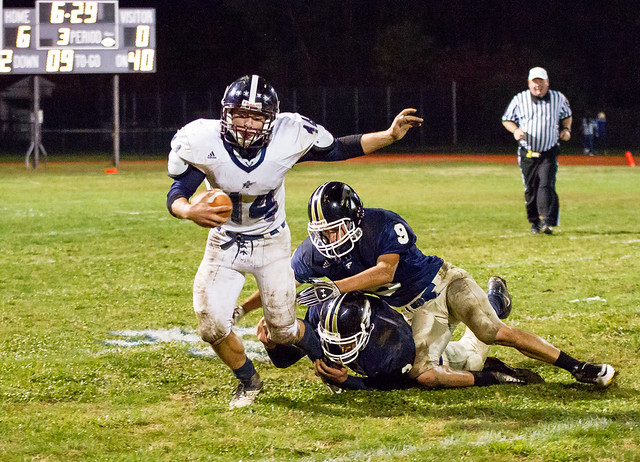
7D, Sigma 70-200 f/2.8OS, ISO 12800; Shutter 1/500 Aperture 2.8
8048902007_748c7fe4ca_z.jpg


Same rig, ISO 12800, shutter 1/500 aperture 3.5
8048903289_9b7dbebd12_z.jpg
 
In those circumstances? Not much. Shoot the lowest usable ISO, and best possible exposure. Software such as Noise Ninja or DeNoise can help reduce the appearance of noise to some degree, but just like shooting very fast film, the less light you have, the lower the IQ is going to be.

John, I gotta disagree with you on the lowest usable ISO. Sorry! That doesn't mean max it out just to max it out, but see my previous post. I've been using this rig in low light situations for a couple of years now and I've got some pretty extensive experience with using high ISO's in bad situations...
 
When you use high ISO settings, it is imperative that you nail the exposure.
Any post production exposure editing, be it a push or a pull, will make image noise more visible in an image.

There are many different noise reduction software applications available. Noise reduction of any kind will somewhat reduce image sharpness. Camera Raw/Lightroom's noise reduction tool works pretty good when used correctly. I also used Imagenomic's Noiseware Pro and features included with Topaz Adjust.
However, noise reduction is just one side of a coin. The other side of the coin is image sharpening.
Judicious application of both sharpening and noise reduction is usually called for. You may want to locally apply both noise reduction and sharpening.
Note: There are many image sharpening techniques. High Pass filter sharpening, LAB mode sharpening, luminosity sharpening, boosting mid-tone contrast, and others.

Note that image sharpening is best done in stages - capture sharpening, local sharpening, output sharpening. Images intended for electronic display use cannot be sharpened as much as images that will be printed.
 
YOU NEED FILL LIGHTING. Fill. Fill. Fill.
 
Thanks for the input. I will try doing what you guys mentioned and try and get some better results.

I did notice that noise was reduced in post processing. It wasn't gone but was not as noticeable.

Does photoshop have a special feature to reduce noise. Like a button you click or menu option. Or do you have to do I all yourself by making adjustments!
 
In raw processing on the details tab is the noise removal sliders. What version of PhotoShop are you using?
 
MLeeK said:
In raw processing on the details tab is the noise removal sliders. What version of PhotoShop are you using?

I use CS5. I was thinking about getting Lightroom 4.
 
Ever since I bought lightroom 3 (now to LR4), I mainly did all my sharpening and noise reduction in LR unless I need to do it selectively (with multiple layers and layer mask)
 
I'm not a fan of LR noise reduction. It makes the image too creamy. I use the Nik noise software.
 
Use the Sharpening feature in CS 5's Camera Raw. Lightroom 3 uses the same exact sharpening feature.

As far as editing goes, CS 5's Camera Raw and Lightroom 3 use the same parametric Raw conversion and editing application - Adobe Camera Raw 6 (ACR 6).
As far as image organization, image rating, image keywording, quick online sharing (Flickr/Facebook), PDF and Web Gallery production, batch processing (both Photoshop and Camera Raw), Greeting cards, contact sheets, and such you have the other CS 5 plug-in - Bridge.
 
KmH said:
Use the Sharpening feature in CS 5's Camera Raw. Lightroom 3 uses the same exact sharpening feature.

As far as editing goes, CS 5's Camera Raw and Lightroom 3 use the same parametric Raw conversion and editing application - Adobe Camera Raw 6 (ACR 6).
As far as image organization, image rating, image keywording, quick online sharing (Flickr/Facebook), PDF and Web Gallery production, batch processing (both Photoshop and Camera Raw), Greeting cards, contact sheets, and such you have the other CS 5 plug-in - Bridge.

Yes I have used bridge and like it a lot. Keeps my pictures organize and I can edit multiple pictures at once. I'm still learning how to use the photoshop programs but am liking what they can do. Hopefully I can get really good at it quick and edit my stuff faster and better.

I just want to be able to take pictures in low lighting with as minimal noise as I can. I know if I got a full frame camera it would help but that's not in the budget right now.
 

Create an account or login to comment

You must be a member in order to leave a comment

Create account

Create an account on our community. It's easy!

Log in

Already have an account? Log in here.

New Topics

Back
Top Bottom