What's new

Minimising noise on Long Exposure shots.

ronald911

TPF Noob!
Joined
Feb 11, 2014
Messages
9
Reaction score
0
Location
South Africa
Can others edit my Photos
Photos NOT OK to edit
Hi guys, I hope you all are doing well.

Over the last few nights, I've been playing around with Long Exposure shots. I have a Canon 600D and always shoot in RAW.

Now, the Canon 600D have a built-in feature, to remove grain/noise after taking long exposure photos, which works fairly well. But, that also means that it will take about the same time that I took the photo, to process the whole thing. Like, last night I did a 15 minute exposure shot, and then it took another 15 minutes for the camera just to process the photo, before saving it onto the card.

When I take the de-noise feature off, it saves almost immediately, but then of course it's ultra noisy, and completely unusable - Even in Lightroom, I couldn't fix it.

So, what can you guys recommend, so my photos are as noise free as possible, but with faster saving/processing times? Or would the "processing wait" be one of the trade-offs in taking these long exposure photos?

I always shoot in RAW and I keep my ISO at 100 with long exposure shots.

Thanks in advance.
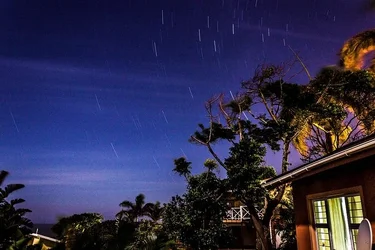
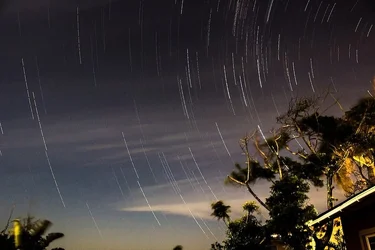
$12473490504_385d92f526_z.webp

This was the 15 minute exposure shot. It took another 15 minutes for the camera to process the photo, because of the de-noising feature.
 
The reason why it takes twice as long is that your camera is actually taking a second exposure as long as your first one, just with the shutter closed. Thus, what ends up in that image is ONLY noise. Your camera then subtracts that from the original image.

So any pixels that are running hot will be individually targeted by about the same amount they would have become hot by, etc. You stand no chance of doing better than this with software only in lightroom, because it's not software, it's a physical empirical data collection method your camera is doing.

Options if you think that takes too long, though:
1) Take a bunch of shorter exposures and blend them in equal transparencies later. You'll get less noise overall for less time in the field (much more time on the computer though).
2) Take one photo yourself with the lens cap on for 15 minutes. Then go ahead and take several more with the noise reduction feature turned off. Then go in yourself in software later and subtract the dark one from each of the others. You are doing the same thing the camera does, but not doing it more than is necessary like it does (it doesn't know that conditions haven't changed, so it doesn't know that it could just use the previous subtraction frame. You do, as an intelligent human). You need one dark noise exposure for every amount of time that you are using during your shoot. For example, if you do some 5 minute shots, some 10 minute ones, and some 15 minute ones, grab a 5 a 10 and a 15 dark exposure, one each.
3) If you can find some way to keep the sensor cool, it will have less noise without the feature turned on. For example, taking your astrophotography images in the dead of winter.


Basically, what's going on is that the longer the exposure, the more current is flowing constantly through the electronics in your sensor, heating it up and introducing buildup of thermal noise. Cooling it off fixes it, or taking shorter exposures giving it a brief rest in between, or taking a comparison shot where there's current but no image, to separate the two (which is what the camera does or you could do)


Oh also another option if you want to do very long exposures with NO special "noise buildup" issue like this, is shooting FILM instead of digital. You will have to worry about reciprocity failure with film
http://en.wikipedia.org/wiki/Reciprocity_(photography)#Reciprocity_failure
but you won't have to worry about any special long exposure noise at all, unlike digital. I have seen photos with 6 month long exposures on film and no extra noticeable noise at all compared to a 1/100th second exposure. Because it's just a passive physical thing sitting there. Film doesn't really "know" whether it's being exposed or not, after all.
 
Last edited:
Thank you very much for the tips.. I certainly will try these on my next shoot. Already preparing some of those dark exposures. :)
 
Already preparing some of those dark exposures.
You should still do it in the actual field for every shoot, not just once ever.

Pixels will go dead, get hot, get not as hot as before, whatever, over the course of days, weeks, months. And more importantly, ambient temperature will change from day to day, making the times not match up unless you do the dark exposures on location (and it's probably not linear changes in noise with temperature anyway. Even if it is, you'd have to convert to Kelvin, blah blah).

The advantage is still though that if you want to take 10 different 10 minute exposures, you only do one 10 minute dark exposure that night. But you should still do that one that night.
 
Oh, ok, that makes way more sense now! Thanks!

I've been doing some more reading now, on Long Exposure shots and it seems that many people recommend taking many short exposure shots and then putting them together in post afterwards. I will definitely try both tonight and see what works best.

Thanks for your advice. I really appreciate it.
 
Have you tried different ISO settings? I routinely shoot up to 10 minute exposures during some HDR work and after testing all available settings I use ISO 200 because it gives the least noise for any given time in my camera A Canon T2i and the noise level is easily handled by typical noise reduction software.
 
So, this is my attempt.. The idea is there, not half a noisy. Took 10 photos of 5 minute exposures each, then merged it in Photoshop.
Pity the star lines aren't solid, but we that's something I will focus on in my next shoot.

$12492681725_877418d61b_c.webp
 
when I do star trails I shoot 30 minutes-hour of 30 second exposures, f2.8 iso 1600-3200 depending on how dark it is. I then process them using starstax which has a gap filling mode.

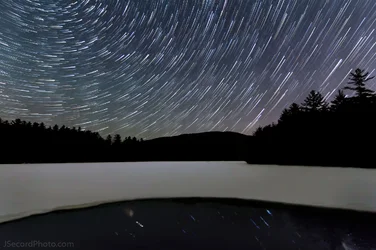
$squamtrails2.webp

now thats not my favorite star trails photo ever, in fact I am really not happy with it, but it demonstrates what I get at those settings
 

Create an account or login to comment

You must be a member in order to leave a comment

Create account

Create an account on our community. It's easy!

Log in

Already have an account? Log in here.

New Topics

Back
Top Bottom