What's new

Monitor Calibration...i can has yur imput?

Bitter Jeweler

Been spending a lot of time on here!
Joined
Apr 27, 2009
Messages
12,983
Reaction score
5,003
Location
Cleveland, Ohio
Can others edit my Photos
Photos OK to edit
Like Overread, I have found this kinda confusing.
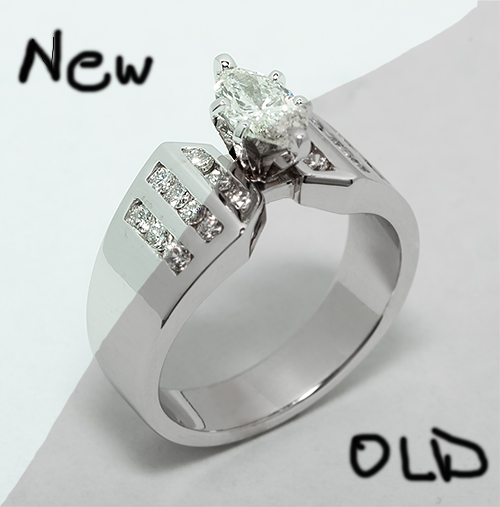

5098197490_faee532695_o.jpg


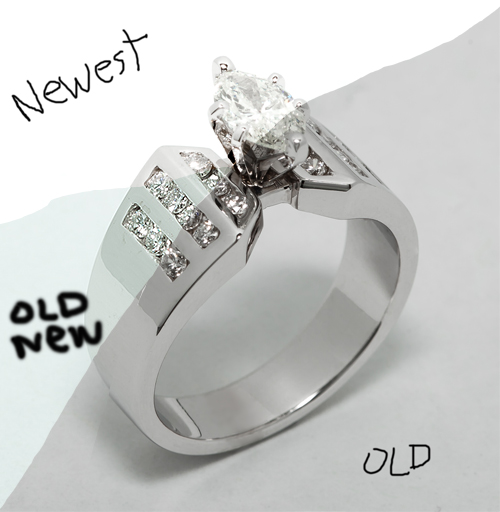
Tell me what you see, please.

The old image looked decidedly on the pink side, as well as what looked bright on the monitor was rather gray.

I think I got the brightness down to where it should be, but I am concerned about the color. Making sure whites are white.

Thanks for yur helps.
 
I see no pinks at all. The old image in rather gray with a solid gray background. The new image has a white background and looks bright.
 
On my iPhone4, the new side has a slight green cast, the old side doesn't look as pink. On my old monitor, the new half matches the white background on Flickr, and here. But on my new monitor, it doesn't. Grrr.
 
I'm on a calibrated monitor... I'm seeing a lot of green in your new image, and the old one just looks really dark/grey.
 
I see too much green in the "New" white side. I opened the image in PS, assigned an sRGB profile to it, then opened selective color and made the following minor adjustments:Whites: Minus 4 units of Cyan
Neutrals: Minus 2 units of Magenta

Those minor adjustments appear almost perfect to me, but not quite 100% right. But very,very close to the way I think it should be rendered. I saw the original post of these rings,and thought they looked rather gray and flat...this new split-field image really shows what a huge difference monitor calibration can lead to...the 50-50 split image you have looks a tad bit greenish, but the brightness of the diamonds and the metalwork is world's better looking than on the "Old" side.
 
It's appearing to be a bit teal-ish to me. :(
 
Are you people just jacking with him?

I looked at it on two color calibrated screens and I see no color cast. Gray on the old one, yes. New version looks pretty close to perfect.
 
Ok, I ran through it again...


5097733325_de9612b0a7_o.jpg


Thanks for your helps!


The Newest portion is now blown on my old monitor, but it looks perfect on the iPhone.

I now see the green cast on the old new portion, on the new monitor.
 
The newest one looks much much better. I'm not seeing any color casts, but it's soooo much brighter than either of the other two. I don't mind the brightness, and it makes the whites look more "clean" but I'm wondering how much it will affect your other colors? Hard to give a great judgement with a picture that's all silver/white/grey/black kwim?
 
oh yeah best so far. That's way more white. Gem looks a bit blown out though?
 
Thanks Manaheim. I pushed it that far in lightroom, close to blown, so i think it might be right now.

Aayria, I know what you mean, but wouldn't it be important to get your whites white, with no color cast which would eff3ct other colors then?
 
Welcome to torment! :)

I have to say whilst the new whites are looking better and far removed from the former grey I think the ring is slowly being lost to the white whilst with the grey version the ring stood out a little more. Though I think this is simply a choice of background colour and main subject colour being rather too similar.

I can also see the overexposure creeping in on the jewel of the ring just (though for me a change in viewing angle of a few mm makes a massive difference on the screen I currently have :(). I think the best thing is to calibrated - then go to bed and wake up fresh to view the calibration or leave the computer a good few hours - otherwise I think your eyes play tricks on you as they readjust to the new calibration (and keep trying to harken back to the old).
 
The 'old new', definitely looked a bit green-ish. 'Old', very gray....
'Newest', very white. looks right on the money actually; However, Your subject looks blown out to me...:-S
 
Ok, I ran through it again...


5097733325_de9612b0a7_o.jpg


Thanks for your helps!


The Newest portion is now blown on my old monitor, but it looks perfect on the iPhone.

I now see the green cast on the old new portion, on the new monitor.

YES!!!!! The whites are now pure as the driven snow!! That faint,sickly green,tealish color cast tyler mentioned is visible in this tri-color capture...the upper left corner is now brilliant, blinding white on a Mac OS system...looks a bit blown where the gemstone meets the retaining prongs on the diamond, but the whites are no longer polluted...very clean white-white.
 
Looking good. Now let's see the full image in your newest update.
 

Create an account or login to comment

You must be a member in order to leave a comment

Create account

Create an account on our community. It's easy!

Log in

Already have an account? Log in here.

New Topics

Back
Top Bottom