What's new

Monitor calibration, tell me everything

pony

TPF Noob!
Joined
Sep 30, 2009
Messages
210
Reaction score
8
Location
Chicago
Can others edit my Photos
Photos OK to edit
I am starting to do some editing and my pics look a different color everywhere I look at them.
I would like to make sure the monitor I am using to edit is correct
I don't have a ton of $$ to spend (would rather spend on lenses anyway LOL)
What is the least expensive and most effective software/hardware/whatever that will improve my monitor?
TIA
 
You can use a device such as a spyder3 pro and a colormunki to calibrate you monitor.

they are quite expensive but you can always rent.
The spyder3 express is only 80 bucks at bh right now and seems to work really nicely.

more expensive one also take into consideration embient light.


Make sure YOUR monitor is calibrated/profiled correctly.
Even if the colors of your pictures are off on other monitors, they are propably not calibrated either so its not a good way to see if your pictures colors are right.

I had the same problem but i was lucky that my monitor was not that off. no off enough to see alot of difference, My picture looked the same on flickr, facebook, my website and thats from different monitor.

It started being an issue when i started printing my portfolio. some print was coming out with a small green cast.
my prints are pretty good now since i calibrated my monitors, im not saying that they are 100% accurate but they are close that i cant see any color change, oversaturation, brightness seems good, no lost of details when i compare to what i see on my monitor.

here is my workflow
i shoot raw or sRGB jpgs.
cs5 in srgb
lighroom 3.3 in pro photo rgb.
I export my pictures using cs5 and softproof with the costco printer profiles. (this is were i printed my portfolio in 12X18)
 
Last edited:
If you have two monitors or are planing on getting two monitors then I would recommend going with the Spyder 3 Pro. You can pick one up for around $130.
 
FYI, the 'Spyder 3' is the hardware device...and there are different levels of software to go with it....Express, Pro & Elite...and that is where the price difference comes in.
If you are just calibrating one screen, the Express package should be fine. Datacolor - Global Leader in Color Management Solutions

Keep in mind that most monitors ( 'TN' -- the cheap ones) aren't ideal because they can't display all the colors actually in our images and they don't take calibration all that well. It's still better to have them calibrated than not...but if you are really wanting an accurate display, you will want a different type of monitor. IPS, for example.
 
I am starting to do some editing and my pics look a different color everywhere I look at them.
I would like to make sure the monitor I am using to edit is correct
I don't have a ton of $$ to spend (would rather spend on lenses anyway LOL)
What is the least expensive and most effective software/hardware/whatever that will improve my monitor?
TIA
Many print labs recommend the X-RITE, i1 Display 2 colorimeter and the software that comes with it. http://www.bhphotovideo.com/c/search?Ntt=i1+display+2&N=0&InitialSearch=yes

It is about the least expensive, yet effective solution because it measures how much ambient light is falling on your display.

There is a more expensive tool known as a spectrophotometer that can not only calibrate a computer display, but printers and projectors too. An example would be X-RITE's $450 ColorMunki
http://www.bhphotovideo.com/c/produ...CMUNPH_ColorMunki_Photo_Color_Management.html

Calibrating your display is only useful if you use sound color management practices.

At this link - Digital Photography Tutorials - scroll down to the Color Management heading for information regarding color management.
 
I am using the colormunki with the "photo" software, a friend is letting me use it since it is 500$.
 
Many print labs recommend the X-RITE, i1 Display 2 colorimeter and the software that comes with it. http://www.bhphotovideo.com/c/search?Ntt=i1+display+2&N=0&InitialSearch=yes

It is about the least expensive, yet effective solution because it measures how much ambient light is falling on your display.

There is a more expensive tool known as a spectrophotometer that can not only calibrate a computer display, but printers and projectors too. An example would be X-RITE's $450 ColorMunki
http://www.bhphotovideo.com/c/produ...CMUNPH_ColorMunki_Photo_Color_Management.html

Calibrating your display is only useful if you use sound color management practices.

At this link - Digital Photography Tutorials - scroll down to the Color Management heading for information regarding color management.


I will certainly read that, thanks for the link.
And thanks all for the recommendations. I only plan on using one monitor to edit. I honestly don't care what the pics look like elsewhere. I just want one monitor I can trust. Would hate to order a bunch of prints and have them all come back looking awful.
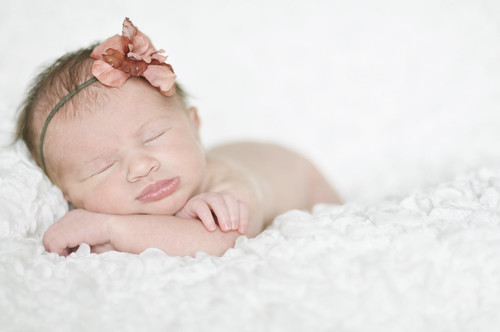
I tried to do a few real quick edits on a newborn shoot and I am fairly certain I turned my friend's poor sweet baby green! I have another friends baby this weekend and I am going to skip editing all together until I know which monitor is good LOL
5507111405_5baa4521cf.jpg
 
Or you could just work in B&W, where monitor calibration is a whole lot less important ;-)
 
Or you could just work in B&W, where monitor calibration is a whole lot less important ;-)
​
well not really true. what abour black and white point, brightness and contrast..

My black and white pictures came out too dark before i calibrated my monitors.

After calibration. details in my black and white prints are no longer lost because print came out to dark
 
Or you could just work in B&W, where monitor calibration is a whole lot less important ;-)
​
well not really true. what abour black and white point, brightness and contrast..

My black and white pictures came out too dark before i calibrated my monitors.

After calibration. details in my black and white prints are no longer lost because print came out to dark

I was sort of kidding.
 
I'm looking at a NEC EA23 monitor to match with my Epson Stylus R2880 printer. The price at BH is in my frame. Am I on track or do I need to look further. Experience help is appreciated. Not really sure if this is right place to ask this?
 

Create an account or login to comment

You must be a member in order to leave a comment

Create account

Create an account on our community. It's easy!

Log in

Already have an account? Log in here.

Back
Top Bottom