What's new

Mount Rainier C&C

Holy Cow! I can not wait for the 'experts' on this one- it is beautiful to me!! ( still a newbie)
But I am sure there is constructive help out there, but WOW.
Nancy
 
For me, the mountain is kinda blown out and there appears to be a little halo around the whole mountain.
 
Thanks, Nancy!

@ Jmandell, isn't that the snow blowing around? Or clouds? I'll try lowering the exposure on the mountain, though. Thanks for the tip!
 
I just read through your other post so I'll post my entire response here. It looks to me that you brought up the shadows quite a bit in the forest and brought down the exposure in the sky perhaps more than was optimal for the exposure. That may not be the actual case, but that is what it appears like to my eye. Are you using RAW or jpeg? What other processes have you applied? The composition is not bad except I would prefer it with less sky, so that the horizon isn't dead center.
 
I just read through your other post so I'll post my entire response here. It looks to me that you brought up the shadows quite a bit in the forest and brought down the exposure in the sky perhaps more than was optimal for the exposure. That may not be the actual case, but that is what it appears like to my eye. Are you using RAW or jpeg? What other processes have you applied? The composition is not bad except I would prefer it with less sky, so that the horizon isn't dead center.

1) I looked into the histogram, and it totally agrees with you. I fixed up the darks so they look better now -- here's the edited one below ...

2) I brought DOWN the exposure on the sky? Huh? It looks dark to you?

3) My camera only has JPEG :(

4) I just removed the vignette I had on the top right, dodged and burned a few places, cropped the bottom because that was the grainy/dark place, reduced noise, and just now I changed the levels to darken the shadows.

5) Yeah, I don't think it was dead center before I cropped the bottom out. Does the horizon in the middle not work for this shot? I thought the only time you were 'supposed' to do that when it was a reflection type of shot, to show balance.


Lakefinal2 by echoyjeff222, on Flickr
 
I think I have a picture from the exact same place lol. Overall I like the composition, although I too would have placed the horizon line slightly higher. I think there's a fair amount of noise for a photograph that looks like it was shot in fairly good light, and I'm not familiar enough with your camera to have any tips about how to combat that. Hopefully someone else can chime in on that one. I agree with what jmandell said about a "halo" appearing around the mountain, which is essentially just a blown highlight on the border between the colors in the image. Even if it was windy (judging by the water it wasn't) I doubt that you would be able to see any clouds of snow being blown. Does the "halo" appear in the unedited image? Man I wish the lake was that flat the day I was there though!
 
1) I looked into the histogram, and it totally agrees with you. I fixed up the darks so they look better now -- here's the edited one below ...

The darks do look a bit better. Had you brightened them up before? You can only get so much out of a jpeg image- trying to bring up darks too much creates a lot of visible noise. The sky isn't too dark to me, but the detail isn't there to support bringing it down as much as you have- it's made it super-saturated in color and the clouds look contrasty, which goes against the "soft" look you are going for. Of course it's just my opinion but I would try to reduce the saturation in the sky a bit.

A balanced composition can work in some cases, but in this case the sky is basically empty space and looks like it's just there to make the picture symmetrical. In this case, it does not help the composition. I would be interested to see what the bottom part that got cut off looks like. Just because it's dark doesn't mean it isn't good. Dark water looks striking and mysterious.

I think the main problem with not attaining the soft look you're after is due to processing a jpeg image as though it were a RAW file. The jpeg can only hold so much information, and when you try to pull out too much from the shadows or highlights you get a lot of noise. If I were in your situation I would try taking this photograph at multiple exposures (use a tripod of course) and process it as an HDR image. That way you can get the highlights down where you want them and the shadows up where you want them and avoid the noise issue, allowing a softer finished product.

One final thought as I re-read your last couple of posts- what ISO did you use for this? If you have grain in the shadows before trying to brighten them, then you might be shooting at too high of an ISO. If not, then it could just be your camera.
 
1) Yeah, it does appear in the original, though not as pronounced because I increased contrast in this one ...
2) I think I may know what the noise is all about. In my original, I DID take three exposures, but it was based more on the light. Was this a mistake? I wanted to capture the clouds, which were really nice. I heard a rule before saying that you should always expose for the darkest part of the image to retain detail, but wouldn't that have blown out the sky? The max my camera can do is a +1/-1 exposure, so I did that. There was a pretty wide range of light ... it was nearing sunset. So, because I increased the brightness in the foreground, there was a loss of detail because it was never properly captured in the beginning ... does that sound about right?
3) Probably not ISO ... I was at 100.

I'll post one a bit later. Thanks for the help!
 
You can usually expose more or less manually even if your camera won't automatically bracket for more than +/- 1 stop. If you exposed for the darkest part, then yes, your sky was probably a bit blown out. Rules in photography are seldom actual rules- they only really apply in certain cases- perhaps the majority of cases- but not in all cases. When photographing snowy scenes or bright skies, for instance, you would rarely want to expose for the darkest part of the image, or else the majority of the image will be totally blown out. Sometimes it's a compromise. Do you want to show every branch in the dark forest, or do you want to show the dramatic clouds? Expose for what it is you most wish to capture.

Also, if this is a composite of three exposures, then that might explain the halo people are seeing on the mountain. Part of the brighter exposure is probably peaking into the sky a tiny bit around the mountain's edge.
 
The saturation was pushed WAY too far for me (see the reflection of the clouds and the noise coming out from it) and it appears to lack contrast overall. It's a good image, I just think the post needs to be rethought/reworked.
 
The snow covered area at the top of the mountain blends more or less seamlessly with the sky, which is unfortunate. There's not much you can do about that except wait for the clouds to move to a more fortuitous location, and for the light to brighten up that snow. It is tonally close to the sky, and colorwise it is somewhere between the sky color and the cloud color, so it's going to be a murky edge at this time of day pretty much no matter what.

You have a pretty violent halo around most of the mountain, that white "outlining" which is most obvious on the long ridgeline to the left of the peak leading all the way down into the trees. You probably moved a "sharpen" lever much too far over.

The clouds in the reflection don't match the clouds in the sky, which is a bit of a problem.

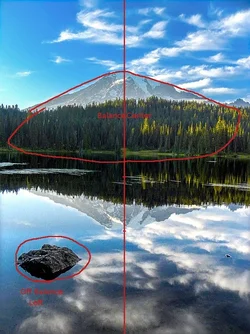
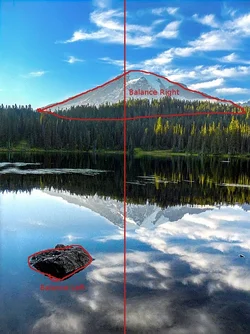
You're trying something with the composition which is potentially nice, with the foreground rock lower right. It is not balanced by anything, the mountain is just centered. Next time, try balancing the mountain and the rock around the center of the frame a little more.

The colors are a little surrealist, but quite nice.
 
Okay, you guys ... I tried to do everything you guys said.

1) I lowered saturation in the sky.
2) I tried to remove most of the halo around the mountain via cloning. Sorta worked? I realized that some of the white were actually clouds, though.
3) The clouds should reflect the sky now, now that I have NOT cropped anything.
4) Amolitor, what do you mean by balancing the mountain and rock around the center of the frame more? Would I do that by changing the perspective slightly (or maybe it looks better with no crop, dunno)
5) This is the no crop -- so now you guys get to see what I was talking about with the darkness.
6) I increased contrast in local areas, making shadows darker and lights lighter.

Eclectix, so you would have exposed for the foreground and then manually adjusted to expose more than 1 stop then, correct? I was just a bit nervous doing that because they wouldn't shoot one after another, so there was the risk of water moving too much or something along those lines. I haven't done it before, but is that the way you're supposed to do it? I might try that next time.

thanks again!


LakeNoCrop by echoyjeff222, on Flickr
 
I have to say that it is looking much better. With the sky a more natural color, I can more easily see that some of the halo is blowing snow. It just looks much better. Also, the extra bit of foreground at the bottom helps a lot in my opinion. The dark water grounds the image.

Yes, you can manually adjust it between shots. There will always be some movement of clouds, water, etc but I would use one exposure for sky and another for the water, blocking out the portion you don't want with a layer mask. That way it won't be a problem. In this case what you have is not that bad- the main barrier you are facing is your camera's resolution and jpeg only format creating noise limitations.

I believe what Amolitor meant was that the mountain is centered but the rock is off center, and there is nothing to balance the rock.

Think of each element of an image as items being placed on a balanced board. If you put an element of the composition on one side, it will set the composition off-balance. You can balance it by putting something of equal weight on the other side, or by putting something heavier on the other side but closer to center, or by putting something lighter on the other side but further from the center. In any of these cases the composition will be balanced. Since the rock is less heavy visually speaking than the mountain, if you put the rock off on one side you only need to budge the mountain a little bit to the other side to create balance, like this:


$__unbalanced.webp
$__balanced.webp


The image is nice as it is, but making it more balanced will cause it to appear more restful and engaging.
 
How did people cope with this back in the film days? I remember shooting with my film camera last year and never had this problem. Is the film camera just better?

How in the WORLD did you fix that balance in the second photo?!

Can you remind me again why RAW doesn't create as much noise as JPEG? I remember reading that RAW = camera doesn't edit it at all, but I'm not sure why it creates less noise.
 

Create an account or login to comment

You must be a member in order to leave a comment

Create account

Create an account on our community. It's easy!

Log in

Already have an account? Log in here.

Back
Top Bottom