What's new

My daughters skintone is driving me nutty...

Photographiend

No longer a newbie, moving up!
Joined
Jul 31, 2012
Messages
1,234
Reaction score
188
Can others edit my Photos
Photos OK to edit
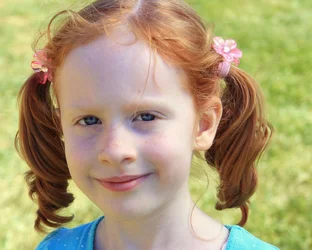
Something about her very pale skin picks up every single color in her surroundings and it works nicely if I am shooting on a white backdrop but not so much under any other circumstance...

From today
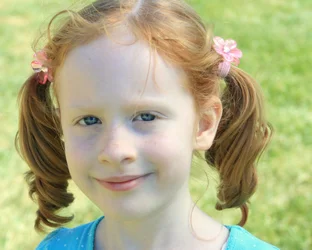
$IMG_4956-001.webp

Notice she is green, yellow, blue, pink... :(

Tried to find a neutral color to adjust the balance through Picasa... Haha... that was fun... also of no use it only makes it way worse.

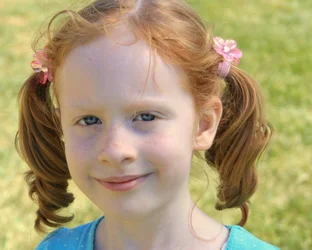
So then I was thinking Black and white. But her eyes become crazy dark which means I can't play with the contrast too much... Am I going about this the wrong way?
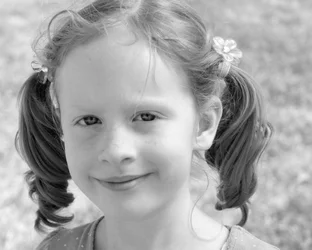
$IMG_4956-002.webp

Help is appreciate.
 
Do you happen to have a RAW of that you could put up somewhere that I could have a look at?
 
No, sorry, I haven't shot anything in RAW yet. I have to have a special software to view those right?
 
usually your camera will come with something, and photoshop can view them...
 
I bought the Camera Used from Amazon. Just got it last week actually. It didn't have a software disk or the little cord that connects it to the computer. We don't have Photoshop either... I will do little experiment though to see what the computer does do with a RAW image. Now I am curious...
 
Well... what I see from that pic is a few things.

1. It appears to be a little blown out. She is very pale so you'll need to be careful with that.
2. The color balance is a little wonky. She's pale, she has red hair, the background is green, so the camera is going to swing towards wherever it thinks it needs to compensate for all the other colors... which may be where you think she's picking up those other colors.
3. You missed the focus... it's on her pony tail instead of her eyes (not a problem with the color, but...)

Some curves, color and sharpening adjustments and...

$redhead.webp

Not perfect, in part because the JPEG is lossy so there's only so much data there I can work with, but hopefully you get the idea.
 
Look at GIMP. It may do RAW.. I don't know off the top of my head.
 
Look at GIMP. It may do RAW.. I don't know off the top of my head.

ot but youre about to hit 10k posts. lol

Holy crap. I usually notice when I do that and post some big long-winded thread about how I've hit x gazillion posts and all the things I think that no one cares about. I've completely missed it!!!!

:lol:
 
Thanks. That edit is much better.
 
What kind of camera do you have? If it's a Nikon, you can get CaptureNX2 for about $20--I don't know about Canon or the others.

I also can't really lend any assistance with the picture, but I had to post and say:

What a cutie! I knew a little kid who looked a lot like that...oh wait. I WAS a little kid who looked like that. Red hair, blue eyes, and fair skin that would burn, and freckle, at even the MENTION of a sunny day!
 
Last edited:
sm4him - Haha... :mrgreen: Thanks. Sounds like her. She has to be adorable to get away with all the mayhem... Push pins in the toothpaste... Gluing her art work to the walls... ya know... Kids.

I have a Canon EOS Digital Rebel XTi
 
You'd save yourself a lot of hassles with the skin tone and hair if you traded her in for a different model. ;)

Alternatively, if you've grown attached to her, you may just end up as the local expert on shooting people with fair skin and red hair.

I see you were using auto white balance, have you tried the manual settings for that? Some cameras do fine on auto wb but others not so good. Maybe the bright sun setting will do a better job? It's worth a try! :D

Here's my take after adjusting exposure, temperature, tint and clarity sliders in Lightroom 3:
$Phiend.webp
 
Last edited:

Create an account or login to comment

You must be a member in order to leave a comment

Create account

Create an account on our community. It's easy!

Log in

Already have an account? Log in here.

New Topics

Back
Top Bottom