What's new

My first Baby shoot. How'd I do?

alexdlgd

TPF Noob!
Joined
May 2, 2014
Messages
18
Reaction score
1
Location
Dallas, TX
Can others edit my Photos
Photos OK to edit
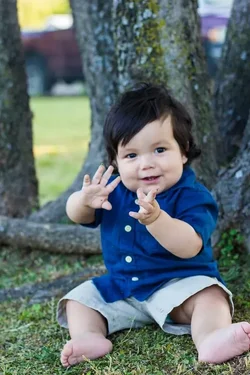
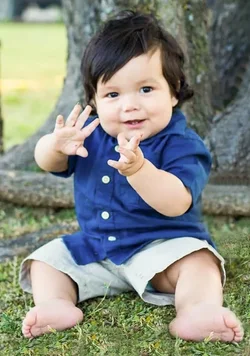
Hello all, I just came into this site a few days ago, and since then I did one shoot of my baby cousin. I am a newbie at photography so any help or advice would be great. Let me know if I did anything wrong in these shots, and if I did any good.

Shot with Canon 60D - 50mm @ f/2.8-3ish(no more than 4) - Shutter 1/125 - ISO 250 - no tripod - RAW -( these may not be exact number but are really close ) I will post correct information later on today). Please leave feedback. Thank you.

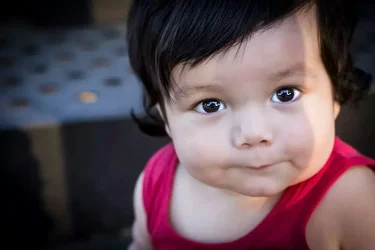
1.
$IMG_34341181342228.webp
2.
$IMG_34370084387882.webp
 
For your first go, not bad. There's definitely some room for improvement, but you're on your way. I think #1 would work better as a square crop; I think a bit more room all around would have been ideal, but as-is, the area image left contributes nothing to the image. In #2, be cognisant of your backgrounds and avoid thinks like the red truck. It's very softly focused, but still a little too clear. As well, watch your cropping; you've clipped off several toes.
 
For your first go, not bad. There's definitely some room for improvement, but you're on your way. I think #1 would work better as a square crop; I think a bit more room all around would have been ideal, but as-is, the area image left contributes nothing to the image. In #2, be cognisant of your backgrounds and avoid thinks like the red truck. It's very softly focused, but still a little too clear. As well, watch your cropping; you've clipped off several toes.

Thank you for a quick response. This was a nearby park and there was always something in the background. But, I didn't notice I cut his toes off, thanks for that. I'm still trying to work on getting sharp images, on #2 I placed the focus indicator on the Right eye, and it still didn't get it as sharp as I wanted. any other advice you can give would be great. Thanks again.
 
Hi

I am into baby and children photography too, I like the sun shining in the baby's eyes. ;)
 
If there's always something in the background, pick a different spot. Your cousin may not mind in this case, but as you grow and get better, you're not going to be able to get away with leaving cars/bright red trucks in the background.

As for the focus, without the EXIF data intact it's hard to tell what went wrong. The 60D's autofocus points aren't bad really, so my guess is your hand moved just slightly. At a shallow DOF it's pretty easy to throw off the focus.

I would re-crop it for you to show you how it could be improved and the truck minimized, and warm it up some, but you don't want people to edit them. I would straighten it to the right a bit, warm up the tones, and crop the left side off and under the truck, basically just tighten the crop on the kid. Can't fix the toes, but can toss the truck.

ETA - actually, looking at the other foot, I might be able to fashion together some toes for you, if you really really want to save this image.

#2 WB looks a little cool. And yes the toes, but that's already been mentioned :) Keep shooting!
 
Last edited:
Thank you for replying. Any others? :)
 
^^ I've edited my reply above since you liked it lol. I kept coming up with stuff to say. My fingers type faster than my brain most times.
 
^^ I've edited my reply above since you liked it lol. I kept coming up with stuff to say. My fingers type faster than my brain most times.

Unliked* .. Just kidding. I will change my editing thing (if I can). As far a hand movement, I figured that's what it was.. I have more pictures from that day, but I didn't want to overwhelm you all.
 
Ok, seriously this isn't top notch because you can kinda tell where I cloned some stuff. But it's an example of how the picture could be slightly rotated, warmed up, and re-cropped - those 3 steps took 5 mins. And how possibly someone who has a really steady hand could re-create a toe in a true emergency. But prevention is the best - just be careful of toe clipping ;-)

Don't worry about overwhelming us. We can't help if you don't post!

$babyboy2.webp
 
Oh ok, I see what you did here.
 
#1 hard edge of shadow on face, distracting background, horizontal format. Learn to watch for things like the light falling on your model, background elements, and which way to hold the camera.

#2 Better frame this time, but there is a lot of extra space above his head. Extra space per se is not a bad thing, but it seems you just missed the frame on this one. You say you managed to get his toes in the frame, but just barely, and so close as to be a problem. The problem will be apparent when the parents put a print in a frame. Picture frames cover just a bit of the margin all around, so it is better to leave a little extra on the margins for framing. When you are taking the picture, leave more than you think is adequate to allow for straightening and cropping later. The pose could be improved a bit by adjusting his pant leg so we're not looking up his pant leg. On babies it is not terribly important, but if this were a formal portrait, that would be enough to bin the shot, so get used to looking for those things and make quick adjustments as you go.
 

Create an account or login to comment

You must be a member in order to leave a comment

Create account

Create an account on our community. It's easy!

Log in

Already have an account? Log in here.

Back
Top Bottom