What's new

My kids- I need honest feedback.

Tone mapping: Tone mapping - Wikipedia, the free encyclopedia

If you're doing it and don't know what it is I assume you're using an editing program and playing around to see what looks good?

I think the general advice from those who know more than me (most everyone) will be to leave that alone for now (except for fun) and concentrate on the basics. You've got the eye for a good photo and if that's you in the photo you're young enough to go far if you decide to take photography seriously. :)
 
manaheim said:
My feedback is that pictures of your kids should be about their kids, not about the giant prop flower stuck on their heads.

This is admittedly a little harsh, but everyone trying to replicate Anne Geddes or whatever or whoever came up with this thing drives me buggy. When I look at a picture of my kids, I want to be sucked in by their beautiful eyes... I want to get all woozy over how cute her curls where back then... I want to marvel at how pretty her lips were and wonder where she got those.

I don't want to be hit in the face with a giant pink fake flower stuck onto her head with some weird giant band that covers up 30% of her features.

My advice to you is try doing it simply. There is great beauty in the simplicity, innocence and wonder of our children. Don't try to fabricate it. It's already there. All you have to do is capture it. Props not required.

Ok, thank you. :)
 
Angela Spangler said:
I like the boots ones. The first one looks a bit out of focus to me. You have some really nice shots.

Thanks! Yes, the first one is really bugging me now. I may have over edited it?
 
20 years from now when you look back through these are you going to say, "She had the prettiest skin back then" or are you going to say, "God I wish I had gotten the skin tones right"? No two of them have the same skin tones, and only the last one is close to being right.

As others have said, photos of your kids should be about the kids. Backgrounds, props, everything else should be used to accentuate them and not take attention away from them. Forget the editing gimmicks and focus on making them look true to life and not posterized / selectively colored / smoothed / whatever.
 
MLeeK said:
You will get much better feedback if you post between 3 and 5 images. You have given us a LOT to look at here and if we gave you feedback on them all it would take us over an hour. We also ask that you separate them on a new line and number them just so you know 100% you and I are talking about the same image.

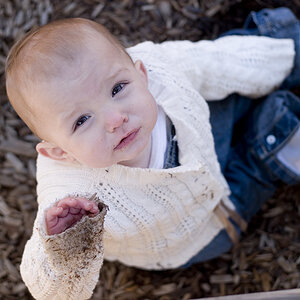
You are killing your kids with editing. I see you are finding some fun things to do in editing and playing is fine, but the images should be about the kids and not the neon of everything around them. I don't know if you are using the clarity slider in raw processing or what to get your faux HDR look in the first ones of the little girl it's really muddied up her skin tone in a couple of them. The first one is just out of focus. A word about out of focus or just barely blurry-you can't save it. You can fix a LOT of things in editing, but focus isn't one of them. If the shot isn't in focus-don't bother.
That little one has some awesome eyes.

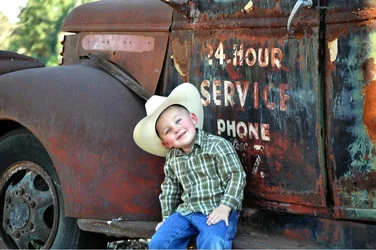
The processing/editing in the truck series has made the images REALLY busy with a lot going on between the texture and the color. I THINK you are going for a dark, color rich contrasty pop look and you seem to be getting it somewhat, but then you are pushing over the top. I'd also guess that your monitor isn't well calibrated and you are probably working on a laptop from the color and extreme brightness to this set.

Calibration is beyond important if you are working with photos. What you see on your computer is not what you would get when you print and it's not what we are seeing. You will need a calibrator and software, but to help in the meantime you can start by reducing the brightness and contrast on your monitor to about 75% and that will help. Monitors are set up for internet and gaming out of the box. Photography and printing is very precise in it's brightness, contrast and color-if those aren't right and calibrated according to some standards you will get something different than what you THINK you are getting.

Thank you! I got caught up in my excitement being that it was my first day on here. I promise no more than a couple pics next time. I really have a problem with over editing. I should probably get find my untouched pics and give it another try. I do like a little bit of the pop look. I am working from a lap top and IPad. I'm going to change that right now. Thank you for all of the advice!
 
MLeeK said:
You will get much better feedback if you post between 3 and 5 images. You have given us a LOT to look at here and if we gave you feedback on them all it would take us over an hour. We also ask that you separate them on a new line and number them just so you know 100% you and I are talking about the same image.

You are killing your kids with editing. I see you are finding some fun things to do in editing and playing is fine, but the images should be about the kids and not the neon of everything around them. I don't know if you are using the clarity slider in raw processing or what to get your faux HDR look in the first ones of the little girl it's really muddied up her skin tone in a couple of them. The first one is just out of focus. A word about out of focus or just barely blurry-you can't save it. You can fix a LOT of things in editing, but focus isn't one of them. If the shot isn't in focus-don't bother.
That little one has some awesome eyes.

The processing/editing in the truck series has made the images REALLY busy with a lot going on between the texture and the color. I THINK you are going for a dark, color rich contrasty pop look and you seem to be getting it somewhat, but then you are pushing over the top. I'd also guess that your monitor isn't well calibrated and you are probably working on a laptop from the color and extreme brightness to this set.

Calibration is beyond important if you are working with photos. What you see on your computer is not what you would get when you print and it's not what we are seeing. You will need a calibrator and software, but to help in the meantime you can start by reducing the brightness and contrast on your monitor to about 75% and that will help. Monitors are set up for internet and gaming out of the box. Photography and printing is very precise in it's brightness, contrast and color-if those aren't right and calibrated according to some standards you will get something different than what you THINK you are getting.

Thank you! I got caught up in my excitement being that it was my first day on here. I promise no more than a couple pics next time. I really have a problem with over editing. I should probably get find my untouched pics and give it another try. I do like a little bit of the pop look. I am working from a lap top and IPad. I'm going to change that right now. Thank you for all of the advice!
Don't sweat your over-editing so much. EVERYONE does it at first! As you learn and grow you will get some great editing techniques that you enjoy on the computer as well as look great.

What are you working with for your camera and for your editing program?
 
One last thing (although I agree with all that has been said about the framin and the editing), no one here really cares about your baby.
We care about the pictures.
So post only the very few, the best ones and then you will learn from the comments.
Posting a bunch means that nothing gets looked at closely and you don't get the detailed help that will help you progress.
 
MLeeK said:
Don't sweat your over-editing so much. EVERYONE does it at first! As you learn and grow you will get some great editing techniques that you enjoy on the computer as well as look great.

What are you working with for your camera and for your editing program?

I have so much respect for you guys that understand all of this stuff! There really is a lot to be learned and I appreciate people like you who take the time to explain this stuff to beginners like myself! I have 2 entry level cameras I alternate between, a Canon Rebel and a Nikon D90. I find myself reaching for the Nikon most days. I am also very much guilty of just using the automatic settings because I have never been properly trained. The only other one I feel comfortable with is the Program setting. My laptop is so outdated it belongs in a museum. As you mentioned, I'm probably seeing a different image than the rest of the world. I purchased the IPad2 last year and it is generally what I use for editing. Since money is tight I just use programs like Snapseed and Photogene. Sometimes I edit with one, save it and edit more on another. That's not a good thing is it?
 
Granddad said:
Tone mapping: Tone mapping - Wikipedia, the free encyclopedia

If you're doing it and don't know what it is I assume you're using an editing program and playing around to see what looks good?

I think the general advice from those who know more than me (most everyone) will be to leave that alone for now (except for fun) and concentrate on the basics. You've got the eye for a good photo and if that's you in the photo you're young enough to go far if you decide to take photography seriously. :)

Haha...that is exactly what I'm doing! Do you have any recommendations for minor editing? I would at least like some soft skin tones.
 
SCraig said:
20 years from now when you look back through these are you going to say, "She had the prettiest skin back then" or are you going to say, "God I wish I had gotten the skin tones right"? No two of them have the same skin tones, and only the last one is close to being right.

As others have said, photos of your kids should be about the kids. Backgrounds, props, everything else should be used to accentuate them and not take attention away from them. Forget the editing gimmicks and focus on making them look true to life and not posterized / selectively colored / smoothed / whatever.

Good point! Thank you :)
 
OLaA said:
Nice pictures. I really like the boy and the truck. I found a great resource for editing at Photography Tutorials, Photography Tips, Photography Lessons, Photography Equipment Reviews, Photography Wordpress Themes. It's only for lightroom and photoshop, but they have a huge amount of tutorials that you can watch at your own pace. Not sure what you're using for editing, but either way I'm sure you can take some principles shown, and apply it to what you're using.

I will check that out immediately! I'm using Snapseed and Photogene. I have never even seen Lightroom. Thanks
 
The_Traveler said:
One last thing (although I agree with all that has been said about the framin and the editing), no one here really cares about your baby.
We care about the pictures.
So post only the very few, the best ones and then you will learn from the comments.
Posting a bunch means that nothing gets looked at closely and you don't get the detailed help that will help you progress.

Yes, sorry about that. I promise I won't do that again. Thank you :)
 
MLeeK said:
Don't sweat your over-editing so much. EVERYONE does it at first! As you learn and grow you will get some great editing techniques that you enjoy on the computer as well as look great.

What are you working with for your camera and for your editing program?

Here is the original:
Is it salvageable???
 

Attachments

  • $image-428497854.webp
    $image-428497854.webp
    106.4 KB · Views: 134
Make him bigger in the frame - and not in the center.
Remove or de-accentuate bright stuff that pulls the eye. All that truck and the sky in the corner isn't needed.
make his face a bit warmer.

burn the corners to keep the viewers' eyes in the important spots.
his face looks a bit blurry but I enlarged the original.


image428497854llll.jpg
 

Create an account or login to comment

You must be a member in order to leave a comment

Create account

Create an account on our community. It's easy!

Log in

Already have an account? Log in here.

New Topics

Back
Top Bottom