What's new

Need help with my poor quality photos

mellybellybabygurl

TPF Noob!
Joined
Dec 14, 2013
Messages
1
Reaction score
0
Location
Melbourne
Can others edit my Photos
Photos NOT OK to edit
I hope someone can help me, I've never used a forum before.

I am starting a home photography business. The camera I'm using is a Sony DSLR A290 and editing program is Adobe Photoshop CS6. I took these photos indoors, my natural lights sucks so use 2 soft boxes. I am still learning ISO, F etc and need help on how to get crisp clean photos.

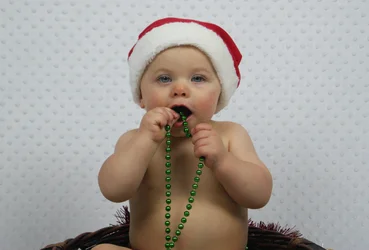
This is my work so far. The only editing has been adjusting the brightness.
$036.webp$203.webp$232.webp

If anyone can offer some suggestions, maybe what settings would be appropriate for my camera. I will appreciate any help I can get, thanks in advance
 
Welcome to the forum! First and foremost, there are 'appropriate settings' for your camera. There are appropriate settings for a given situation (but in portraiture 1/15 of a second and ISO 800 is almost NEVER appropriate!), and usually more than one group of settings. In other words, it's virtually impossible to offer suggestions for settings since they can change with every shoot, and often during a shoot.

The images you've posted aren't bad; the WB seems a little off, but the exposure is acceptable. The lighting however is rather flat, that is lacking in shadow and contrast. If I had to guess, I'd say you used two continuous light SBs each about 45 degrees off of lens axis? Spend some time reading up on portrait lighting and the differences between a key light and a fill light.

A couple of general thoughts on the images: Avoid centering your subject in the image, and move the subject further from the background.

While I would never discourage someone from trying to start their own business, I would suggest that if you're still "learning ISO, F, etc" than you may be putting the cart before the horse. There's a LOT more to being a professional photographer than just having a camera and being able to take an 'okay' picture. I would also suggest that you consider upgrading your body; the amount of noise I'm seeing at ISO 800 is excessive.

Good luck!
 
Besides the comments already mentioned, It would be a good idea to study up on some composition basics. The rule of thirds is a classic place to start.

Digital photography school has a wealth of information for beginners to study, including articles with information on exposure, composition tips, and a beginners posing guide.

Small businesses are known to have an extremely high failure rate for the first year. If you'd like to be on the bright side of that statistic you may do best to hold off starting up until you have the knowledge required to run a successful business. Unfortunately if you get started with mediocre shots, you will gain reputation as a mediocre photographer, and as I am sure you are aware reputations are hard to escape from. On the flip side, if you learn to master what you are doing first, you will gain reputation as an artist.

Good luck with which ever road you decide to take.
 
Just take it all slow, learn and practice. Look through books, do web searches on photos with babies and try to copy the poses. It's another case of starting the business without knowing how to really use the camera. The world is full of failed attempts, it's not easy to get the work, but when you do make sure you can deliver the images, a few disappointed clients turns into a lot of lost business.
 
Use Spot metering mode and/or get and use a hand held incident/reflected/flash light meter, dial in some exposure compensation to adjust for all the white in the scene.

Lighting, accurate exposure, and sharpness are keys to professional quality portraits.
I do not agree that the exposure of the images is acceptable as work product for a photography business.

Consumer grade cameras and consumer grade kit lenses don't deliver professional grade sharpness.
The least expensive way to improve image quality is to upgrade the photographer's artistic, technical knowledge and skill.
A knowledgeable and skilled photographer can make high quality images using consumer grade gear, and judicious post processing.

Using Photoshop's Camera Raw I measured the RGB luminosity value of the highlights on the child's cheeks, forehead, upper lip and chin.
I got values for the red channel of 180 - 200. That indicates under exposure. Facial highlights should be in the 235 - 240 range in the red channel when the exposure is correct.

I can not show you that, or the photo corrected for the under exposure because you have chosen - My Photos Are NOT OK to Edit.

In other words, the photos are under exposed, and under exposed by a full stop. What is a "Stop" of Exposure in Photography? | Photography Mad

A likely way that happened with your photos is because of the white background and the light metering mode your camera was set to. You likely used what Sony calls Multi-Segment metering mode.

A DSLR's built-in reflected light meter is calibrated based on the assumption that the vast majority of scenes that will be photographed with the camera will have an average reflectance equivalent to 12% to 18% gray.
When there is a lot of white in a scene (white background, snow, a white wedding dress) the built-in light meter gets fooled and reduces the exposure to make it equivalent to 12% to 18% gray.
Understanding Camera Metering and Exposure

If you look closely, your background is indeed a light shade of gray and not white. The gray backgound is most noticeable in the last photo where the baby has the beads in hand.

So knowledgeable and skilled photographers know that when there is a lot of white in a scene they have to take the built-in reflected light meter's exposure indication with a grain of salt and do a couple of things:
1. Add Exposure Compensation (EC) to account for the fact all the white in the scene is fooling the light meter. (page 79 of your a290 user's manual)
2. Use a light meter mode that doesn't meter the entire scene. (page 81 of your a290 user's manual)
https://docs.sony.com/release/DSLRA290.pdf

Essentially, you will need to understand a vast majority of the information in this group of tutorials - Digital Photography Tutorials
Plus you will want to be skilled at using image editing software like CS 6.

The goal though is to get it as close to right in the camera and then use Photoshop to finish the image rather than to fix technical errors.

 
Last edited:
You're not ready to start a home photography business until your skill level is at the point that you can produce good quality results on a consistent basis. If you get into trying to do this too soon I don't think it'll be as likely to be successful.

If you're still learning ISO, f stops etc. that sounds like you need to keep learning how to use a camera; it would be like someone trying to start their own catering business when they don't know how to do much more than to boil water - seriously, if you're planning to go into business you have to know what you're doing.

It looks like you have potential and could do this with more time and practice and skill development. I think it takes time to build up a successful photography business.
 
OP; welcome to the forum! I think you could use better light, meaning studio strobes in those softboxes.

Move your subject away from the background, select one light to be the key light, and use another for fill. If you have a third light, make that one a hair light or a rim light or perhaps a backdrop light.

Experiment with the placement of your lights to produce the type of image that you want.
 
Last edited:

Create an account or login to comment

You must be a member in order to leave a comment

Create account

Create an account on our community. It's easy!

Log in

Already have an account? Log in here.

Back
Top Bottom