What's new

Nephews First Photo Session!

LMP87

TPF Noob!
Joined
Apr 20, 2014
Messages
22
Reaction score
1
Location
Tampa, Florida
Can others edit my Photos
Photos OK to edit
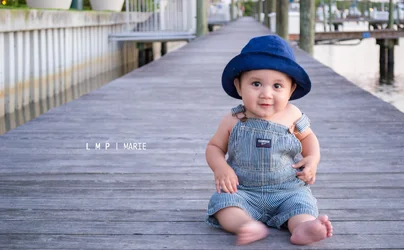
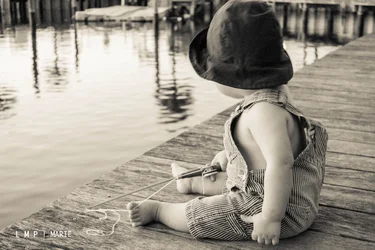
$DSC_0039.webp$DSC_0050.webp$DSC_0096.webp
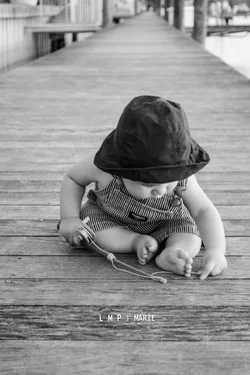
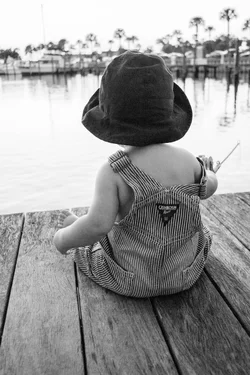
$DSC_0056.webp$DSC_0083.webp

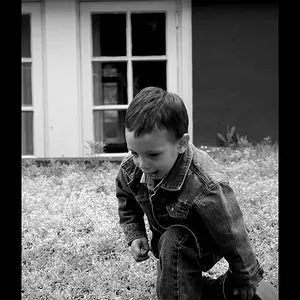
Had a chance to take my nephews first photography session. I am not a professional so any advice would be very appreciated! This was my first time having a photo shoot around sunset after lots and lots of research for the "just right lighting"
 
Great shots, only things i could point out is the foot moving in 1 :) and the crop in 3 is a little tight. but awesome you must be pleased with them
 
These are fantastic! I'm not a professional either, but these are beautiful. The foot movement in the top left one caught my eye as well and there is a tiny bit of blur (focus?) when the first two are bigger, but they really are beautiful!
 
It seems your focus is well off... if you had nailed that these would be fantastic shots!....
 
It seems your focus is well off... if you had nailed that these would be fantastic shots!....

It is too. doesn't show unless you enlarge them. I think the second one is more motion blur, but the first is definitely off. But yea other than that they are great
 
looks like you might be shooting too slow a shutter speed for hand-holding, much less a moving subject.

to be honest, there's not much to these. 4 out of the 5 don't really show his face and the one that does is completely out of focus and he's so small in an uninteresting frame.

I like what you were going with in #3. But I think you need to get EVEN further on the ground to being the horizon level below his head.
 
While these aren't bad shots by any means, when judged objectively by a photographer's standards (as opposed to John Q. Public's) they do come up lacking. First, as noted is the motion blur issue, which, IMO, consigns them all to the cutting room floor. Additionally, when shoot portraits, always try and get down to the subject's eye-level rather than shooting down from your own. Remember that your camera works very well in the vertical or 'portrait' orientation, and doing so would have allowed for compositions with much less empty space. Lastly, consider shooting from farther away and using longer focal lengths in order to achieve a more unfocused and thus less distracting background.
 
EXIF says ISO 100, shutter of 1/6. Not nearly fast enough, and explains the focus & blur problems.

These would be cute, if they were in focus. EXIF also says max aperture is 5. It appears you're using a zoom lens on one of the shortest focal lengths. Like tirediron, I'd suggest using a longer focal length and f/4 or so, and increase your shutter speed, by a lot. You want to shoot people, especially babies, fast enough to stop motion, and 1/6 isn't going to cut it. If your lens doesn't allow for a longer focal length/wider aperture combo, which could be this case, I would have increased the ISO to allow the shutter to speed up.

Cute idea, and cute kid. I like the comp of #1 and #4 best. But since they're all blurry, I would have tossed them TBH.

 
EXIF says ISO 100, shutter of 1/6. Not nearly fast enough, and explains the focus & blur problems.

These would be cute, if they were in focus. EXIF also says max aperture is 5. It appears you're using a zoom lens on one of the shortest focal lengths. Like tirediron, I'd suggest using a longer focal length and f/4 or so, and increase your shutter speed, by a lot. You want to shoot people, especially babies, fast enough to stop motion, and 1/6 isn't going to cut it. If your lens doesn't allow for a longer focal length/wider aperture combo, which could be this case, I would have increased the ISO to allow the shutter to speed up.

Cute idea, and cute kid. I like the comp of #1 and #4 best. But since they're all blurry, I would have tossed them TBH.

this pretty much sums it up.
get back out there in good lighting and bump that shutter speed to around 1/160 or so (depending on how steady you are) and you will have a better time with focus and motion blue. you can also bump the ISO a little as well, maybe to 200 or 400. I usually toss anything OOF or with motion blur.
 
Thanks, I was sort of please. For #1, Im not really sure how to get the right shutter speed. When I make the shutter speed higher the lighting gets really bad (dark)... Any suggestions?
 
These are fantastic! I'm not a professional either, but these are beautiful. The foot movement in the top left one caught my eye as well and there is a tiny bit of blur (focus?) when the first two are bigger, but they really are beautiful!


thank you! Everytime I use a higher shutter speed the lighting in the picture gets darker.. Any suggestions?
 
Thanks everyone! I will try to work on getting eye level with people and my shutter speed.. One thing is that every time I raise my shutter speed the lighting in the picture gets darker.. any suggestions?

I am new so I am still learning on focal lengths.. etc..
 
Thank you for the articles! VERY APPRECIATED! :) also, doesn't increasing the ISO make it more grainy?
 
Thank you for the articles! VERY APPRECIATED! :) also, doesn't increasing the ISO make it more grainy?

Yes BUT not if you are only raising it a couple of hundred... I can get up to 1000 ISO on my d7000 and it is still well and truly acceptable. If I were you I'd be using a shutter of at least 160 if not higher for a fasting moving, arm flailing little guy like this. :)
 

Create an account or login to comment

You must be a member in order to leave a comment

Create account

Create an account on our community. It's easy!

Log in

Already have an account? Log in here.

New Topics

Back
Top Bottom