What's new

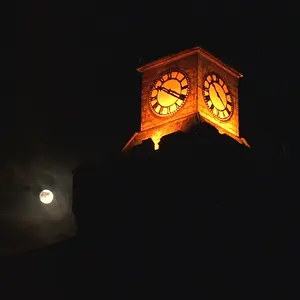
Night photography....what am I doing wrong

Thanks.
I'm a noob as well, where do i turn it off on my D40?
 
Thank you everyone for the great advice.

Just went back, set it up on the tripod.
2sec selftimer release.
Noise reduction on
IS off

ISO 100/8sec/F8.0

Noise reduction wont do anything if you shoot with RAW.
 
Thanks.
I'm a noob as well, where do i turn it off on my D40?

It's a lens feature, and Nikon calls it VR (Vibration Reduction). If your lens has it, there would be a switch on the lens, probably near the AF/M switch.
 
oh thanks a lot.
i my lenses dont have VR cause im using the old lenses that comes with the D40.
 
Looks much better now, nice photo.
 
the second one is much much better, nice one!
 
Hard to say since I changed several parameters in one go.
But I am going for:

1) the image stabilizer. If set on a tripod it indeed causes blur. I tried it out inside with a test shot and voila. Blurred image, under good lighting conditions.

2) the fact that I pressed the shutter by hand. It might cause some movement in the first few tenth of a second of exposure. Now I used the 2sec selftimer.
 
Thats why it says nOOb on the side :lmao:

Indeed, didn't turn off the IS.
Also, next time I try, I should use the 2sec shutter delay time.
Pressing the release button gives a little movement too ofcourse

I frequently use this (2 second timer) because I am not the steadiest and find I often get motion blur. Its a great alternative to a remote shutter release in a lot of situations.
 
Great improvement! I was excited to see you took their advice and got a great photo as a result. Well done! :)
 
Thanx Josh. Thats why I joined this place.
I get a lot of good comments from friends about my photos. Some even have ,my pics on the wall.
But I have so much more to learn and here, people really seem to wanna help you improve.
(ofcourse there is always the resident grouch that just trashes your work,but hey, they are everywhere !)

 
Thank you everyone for the great advice.

Just went back, set it up on the tripod.
2sec selftimer release.
Noise reduction on
IS off

ISO 100/8sec/F8.0

Noise reduction wont do anything if you shoot with RAW.

I believe it does work. Where do you base your comment on?
Long exposure noise reduction is not the same as post processing noise reduction that is used for noisy high ISO images. The post processing noise reduction works with the existing data on the image. Long exposure noise reduction takes a second image that is totally dark and uses this second image with the original image to look for noise to be removed. All this is based on the fact that the sensor heats up when doing long exposures and the heat can cause noise. so a 20 second image will take 40 seconds total time...one for the regular image and one for the black image.

So by comparing the dark image with the regular image, the camera knows which noise is caused by the hot pixels and removes it. It will not remove the noise caused by upping your ISO.
 
twinky.. i take that back. It does work. All it does is put a tag for noise reduction on DPP. I am not sure if LR3 will pick up the data or strip it down. There are only 3 factors that will affect a RAW file, shutter speed, aperture, and ISO. The rest are just tags on the raw files that can easily be modified later in post.
 
To my knowledge it does not just put a tag for use in post processing for whatever software to run noise reducs. It actually takes a second image that is black and then IN camera processes the two images to remove the noise in the RAW.

So when you upload your images to your computer, the noise reduction has already been done.

Do you have a link to what you are mentionning? I'd be interested in reading more
 
I can assure u that it doesn't take 2 images.

A shot at 8 seconds, takes 8 seconds.....not a second longer
 

Create an account or login to comment

You must be a member in order to leave a comment

Create account

Create an account on our community. It's easy!

Log in

Already have an account? Log in here.

Back
Top Bottom