What's new

noise @ ISO 100 - is it me or the camera

lucky8

TPF Noob!
Joined
Apr 4, 2011
Messages
5
Reaction score
0
Location
new york, usa
Can others edit my Photos
Photos OK to edit
5591330126


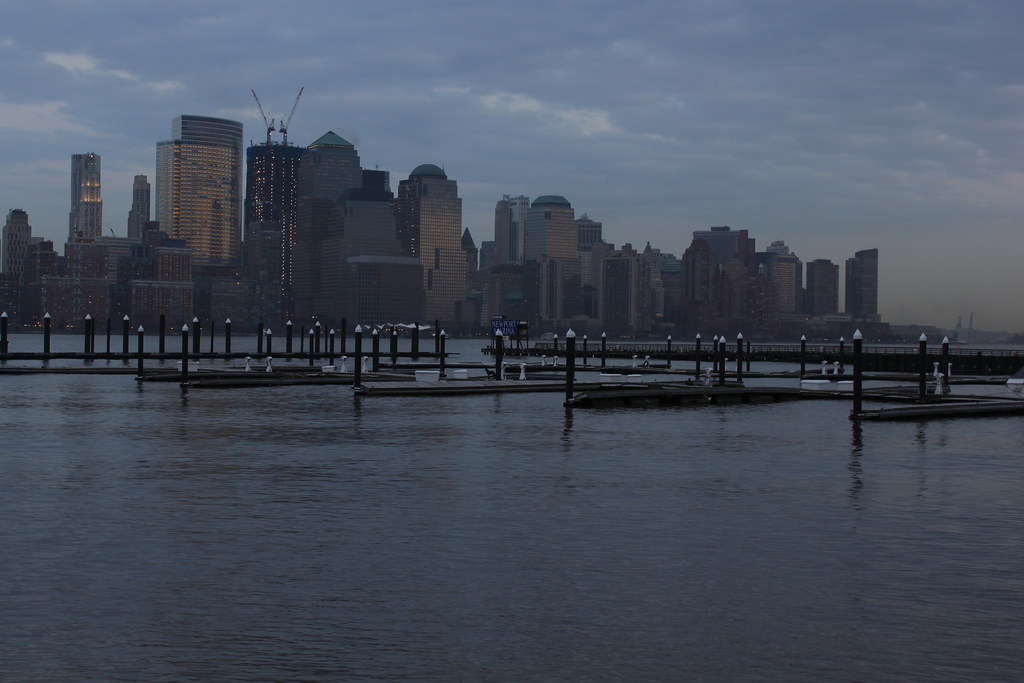
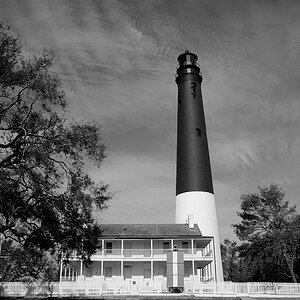
shot with tripod and ISO 100 shutter speed 1/10 but if you download the image and look at 100% the buildings and sky has a lot of noise.... wat am i doing wrong.
 
Can't see the image?

5591330126_c711112e11_b.jpg

OP: the image link has to end with the photo extension (like .jpg) or it won't show. On flickr, right click an image, click large. Then right click the image, and copy URL. Use that link.

Anyways, on topic. Really, there isn't a whole lot of noise in the sky. Maybe a bit, but it looks more like image compression artifacts than noise. What image format are you shooting?
 
Don't know that this will be any help, but what size format are you using? If you are zooming up nice and close to look with low pixel size, then it will look distorted. My other guess is probably because it is dark. What was shutter speed and aperture?
 
Don't know that this will be any help, but what size format are you using? If you are zooming up nice and close to look with low pixel size, then it will look distorted. My other guess is probably because it is dark. What was shutter speed and aperture?

I am using max size 'L' on my canon at 15Mb. Yes i did zoom in and look at the picture at 100%. Shutter speed was at 1/10 and aperture was close to f5.0 with an ISO of 100. Yes i did underexpose the image but when i took a look at the image at 100% i saw a lot of noise, im not sure if i am doing something wrong or its my camera.
 
Underexposed shots will always be more prone to noise. You should try to reshoot and overexposed a little bit (without burning parts) and then in PP bring it back where you want. This way you'll have less noise. Not sure if I'm clear... Read this, it explains a little better.
 
Underexposed shots will always be more prone to noise. You should try to reshoot and overexposed a little bit (without burning parts) and then in PP bring it back where you want. This way you'll have less noise. Not sure if I'm clear... Read this, it explains a little better.

yes def makes sense.... i will re shoot tomorrow and see how it goes. By the way where can i post pictures for comments and critique, i mean i would like people to see 100% of my image coz only then is the noise or distortion what i am talking about visible. Right now using flickr but it doesnt show the true size.
 
I did read the article and have a question.... if i were to shoot a landscape i would definitely be shooting at a very high fstop in order to get maximum depth of field, which according to the article and understandably means i am using the least amount of data to capture my image, am i right? does the shutter speed counter balance this or not really?
 
You should also shoot in RAW and use some noise reduction if noise really bothers you.
 
You should also shoot in RAW and use some noise reduction if noise really bothers you.

Its not about noise bothering me... i am a beginner and just wanted to get feed back if i was doing something wrong that i got noise in my image or if what i am seeing is really noise or just being out of focus or is there a possibility of something being wrong with my camera ( i just got a canon T1i ). If you actually download the original image and zoom in at 100% and look at the buildings you will see the noise i am talking about.
 
It really does look like image compression artifacts to me. I don't have the full size to look at, but when you zoom into the posted jpg, you see blockiness in the sky, not colors that don't belong (i.e. noise). This means one of a couple things: Your camera has poor jpg compression algorithms. For this, shoot RAW (you should shoot RAW anyways). The second is the editing software you use. Either use a higher quality compression in that program (in Photoshop I use 10 for forum, 12 for larger size prints), or switch programs.
 
I did read the article and have a question.... if i were to shoot a landscape i would definitely be shooting at a very high fstop in order to get maximum depth of field, which according to the article and understandably means i am using the least amount of data to capture my image, am i right? does the shutter speed counter balance this or not really?

The aperture does not affect the amount of data, the overall exposure does. So if you just overexpose a bit (as much as you can without actually clipping any highlights), you will get the most amount of data to work with. You then bring down the exposure on the RAW file in post. Keep in mind, this doesn't really work when shooting jpg.
 
Keep in mind that while yes, using a smaller aperture gives you more DOF, it also hurts your image quality. Your best image quality is going to come from the sweet spot, which on most lenses, is close to F8.
Also, I'd suggest learning how to use the hyperfocal distance. With that, you can figure out which aperture will give you the DOF that you need, so that you don't just go right to F22. You may find that you only need to use F8 or F11 etc., which can give you a better photo than using F22 or F29 etc.

The shutter speed does offset the aperture, but only in terms of exposure. Along with the ISO, the three settings together determine your exposure. If you use a tripod (and remote or self timer) then you can pretty much use any shutter speed (provided your subject isn't moving)...so that allows you to use any exposure and any aperture that you choose. When shooting hand-held, you have to ensure your shutter speed isn't too slow as it will cause blur.

As mentioned, shooting RAW and exposing to the right can help to get the most info for your photo...and really try to avoid underexposing and having to fix it later.
 

Create an account or login to comment

You must be a member in order to leave a comment

Create account

Create an account on our community. It's easy!

Log in

Already have an account? Log in here.

Back
Top Bottom