What's new

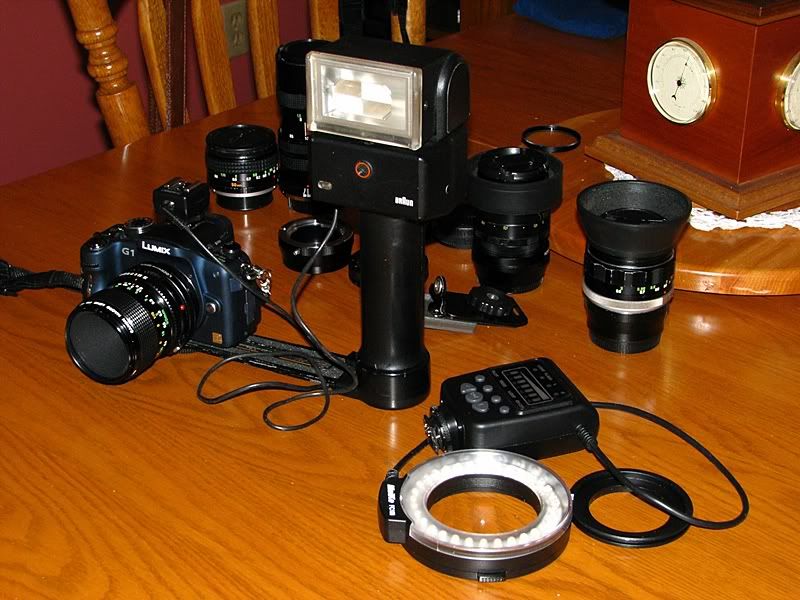
Now I can use the old Braun hammerhead.

Ron Evers

Been spending a lot of time on here!
Joined
Jun 28, 2008
Messages
6,631
Reaction score
2,588
Location
In the country 60km north of Toronto, Canada
Can others edit my Photos
Photos OK to edit
I got a hot-shoe to pc adapter from China for $10 which allows me to use this old relic. If only I could figure out the scales on the back to get the correct exposure without trial & error.


IMG_4272sm.jpg
 
Cool; those are great units. As long as you know the guide # (Google is your friend, and chances are Butkus has the manual if you don't), exposure is easy.
 
It looks like it has a sensor which is probably an auto thyristor...so it should have an auto (or semi auto) mode. You just have to match the setting on the flash it the camera's aperture & ISO.

I've got a Braun Vario-zoom flash. It's what I learned to shoot flash with...I still use it as a back-up to my Canon flash. Great unit that I got at a swap meet for $25.
 
I have attempted to get info on the net but can only find manuals for sale ($15) & no info on guide number.

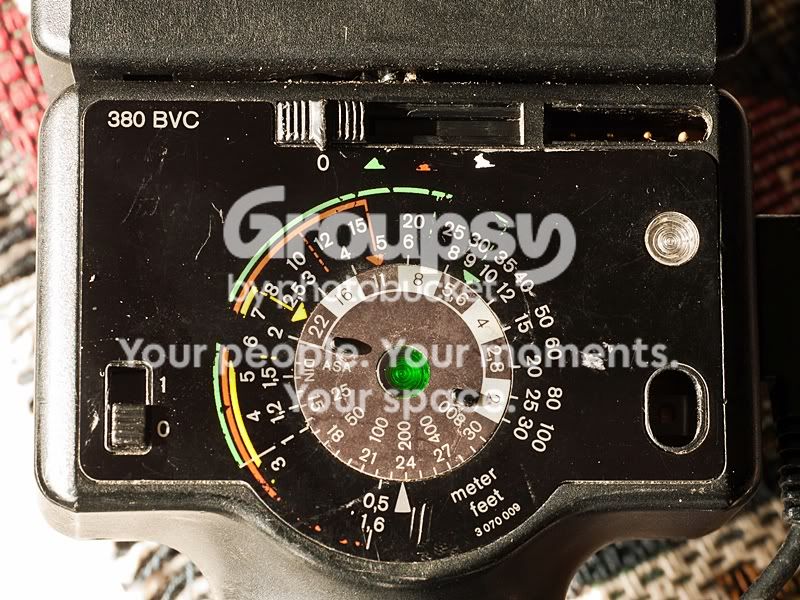
Mike, I think the sensor is for slave mode which works. There are 4 power levels (?) set by the slider @ the top which is pictured below in the full power position. However, I get exactly the same exposure on the other three positions & I do mean exactly. The only variable on the disk is the ASA/ISO which is set @ 200 in the pic.


P1080580sm.jpg


I wonder if someone here knows the guide number for the Braun 380 BVC.
 
I wonder if someone here knows the guide number for the Braun 380 BVC.
I'd guess 38 meters, although the scale only seems to go up to 30m.
 
I think you need to ALSO slide that little switch in the lower left UPWARD to "1" when using the Three "Auto F/stop" mode settings....

As shown, with the slider at the top in "O" and the switch at "O", you are in full manual. "I think".

Guide Number at 100 ISO....maybe shoot a test scene at 10 feet at 1/3 f/stop differences, beginning at f/16, then opening up 1/3 stop at a time....best-looking f/stop's photograph at ISO 100 multiplied by TEN, will be the GN, in that room, with the flash aimed straight ahead. My guess is that the GN is 120 to 160. In feet, at ISO 100. I am super-tired today, so I could easily be wrong.

Gawd, I am punch drunk....set the doggone DIAL to 100 ASA, and look at the 10 foot indicated exposure and that will tell you the factory GN...."Doah!"

It is set to 24 DIN right now (Deutsch Industrie National??? I think the German "ASA") and says 10 feet is f/16 and 1/3, indicating a GN of a little over 160 at DIN 24.
 
Derrel, the bottom slider is the on/off switch.

Looks like the GN @ ASA 100 is 150.

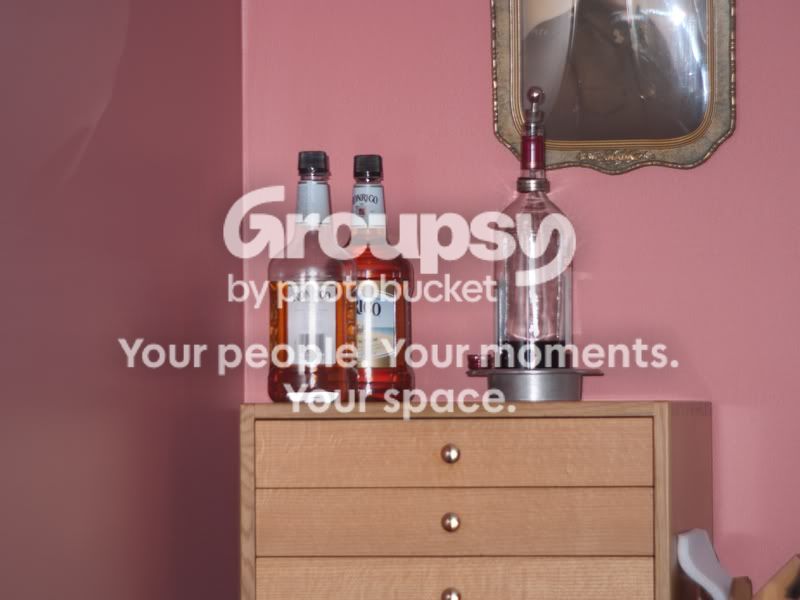
I shot into a dark corner from 30' @ f3.8 & here is the result OOC:


P1080602sm.jpg


The histogram is nicely centred. So we now know whats what @ full power but no idea what the other settings are supposed to do.
 
Assume Green and Red are A modes that use the thyristor/sensor. Red puts out less light. Yellow?
You don't need to know the guide # - use the calculator and judge the distances. I use mine accurately and don't know the GN.
 
You don't need to know the guide # - use the calculator and judge the distances. I use mine accurately and don't know the GN.

Yes, I see that now & I can read the distance off the lens.

Thanks guys, for helping me get my head around this thing.
 
I can see by the dial photo that the three AUTO F/STOPS are f/22 (Yellow setting); f/11 (Orange setting); and f/5.6 (Green setting). That is, with the ASA/DIN set to 200. As the ASA setting is shifted, those f/stop values will shift. At ASA 100, the AUTO stops would move to f/16,f/8,and f/4.

I cannot see from the photo of the front of the flash--is there a secondary switch or slider that needs to be engaged to go in to the AUTO-mode??? Dumb question maybe, but on the back, at the top, is that slider with the slotted gripping marks the actual slider??? Or is that thing on the right hand side some kind of sliding switch???
 
Derrel there is only one other switch on the unit that turns on/off the slave mode, it is on the side.

The slider with the slotted gripping marks IS the actual slider & as it is moved to the right the gate covers the open area to the right where you see the pins above the ready light. I have no idea what the hole below the ready light is for.
 
Okay--that makes sense. Do you suppose that those pins communicate the proper F/stop info to the flash??? That's kind of what it looks like...when the the left-most pin is depressed, the flash would be configured for the "green f/stop"; then when two pins are depressed, "orange mode", three pins "yellow mode"....and all the way to the right---I dunno....stroboscopic mode maybe??? Maybe the switch is literally worn out, or there is a metal strip on the back side that is oxydized...those small pins are very SMALL, in terms of area for switching and sensing...have you tried sliding the switch back and forth 20-25 times, to wear off any oxydization? If that slider inside is brass...well, hey, you're 70 years old..you know what old,neglected brass looks like...I have had various older camera electronic switches "go bad" on me, only to come back to working after 20-25 full movements thru their adjustment range scraped off the oxy...

That hole on the back--was that an Open Flash, or Test button, perhaps??? [Have you tried sticking a wet nail in there, and wiggling it around, just to get a charge? lol]

What is that switch or setting on the front??? If I help you get this working, I want a "toonie" coin for my troubles!!!
 
There are what appears to be two sensors on the front, no switches or buttons.

I have moved the sliding switch (very stiff) back & forth several times but not likely 20 or more; that is a good thought.

I also noted the colour coded markings @ 2 stop intervals but do not understand the meaning of them.

I just re-read my post to Mike & see the message is not clear. Full power is brighter than the other three settings which were identical; the histograms for each did not vary. As you suggest It could be the result of corroded contacts but I somehow doubt it. My rational is that there is a single contact point on the slider that can only engage a single pin @ a time. If true & a bad contact was made with one pin, the output would be different from the next pin & since with the exception of full power all positions yielded the same result.

Tis a puzzle.
 
The color-coded markings on the flat dial indicate which lens f/stop must be set on the camera lens, for a particular ISO setting>>>>>>WHEN THE SLIDER at the top is set to the green, orange, or the "missing" yellow marks. The "O" position is Full Power, I am assuming.

Take the orange arrow on the flat dial: it points,with an Arrow, to f/11, and thje distance the orange line runs indicates a FAR limit of 15 feet in ORANGE MODE: now--are you testing the flash at LESS THAN 15 feet??? Minimum distance is 1.6 feet or .5 meter; the distance MUST BE between 1.6 feet and 15 feet when used in Orange Mode AUTO. Beyond 15 feet, the flash will output MAXIMUM flash power...

YELLOW MODE>>>ARROW says set lens to f/22, and have subjects between apprx 2.35 meters OR CLOSER....

GREEN Mode>>>arrow says set lens to f/5.6, with subjects between 1 meter, and 9.5 meters...

SO, that is how this type of flash MUST be used...you absolutely MUST set the ASA value on the flash, and then you must yourself, set the lens f/stop to the correct f/stop, and MUST remain within the Minimum and Maximum distances as shown by the color-coded lines...if your subjects are at LONGER distances than the specified range, the amount of light coming back will be insufficient, and the Thyristor will dump as much juice as it has in order to try and fire at full strength...which means at more than 8,15,and 30 feet, your shooting distance on the bottles might be too far, and all three AUTO f/stops will yield basically the maximum flash output the flash has got to give.

 
Off topic but Ron, did you ever figure out what that slimy stuff was growing in your driveway?
 

Create an account or login to comment

You must be a member in order to leave a comment

Create account

Create an account on our community. It's easy!

Log in

Already have an account? Log in here.

Back
Top Bottom