What's new

Opera... (browser)

Dmitri

No longer a newbie, moving up!
Joined
Jun 20, 2008
Messages
5,882
Reaction score
44
Location
End of the line
Can others edit my Photos
Photos NOT OK to edit
ok so I semi-switched from Firefox to Opera, and will see how it goes.

My first problem: Is there no way to block ads??? I checked through the widgets on their site and didn't see anything.
 
Also one thing I miss from Firefox was that it let you go back x amount of pages with one click (a drop box with previous pages), so you didn't have to hit Back several times.
 
I do like the Speed Dial thing tho!
 
Speed dial is fun - also right click on any image and go to iamge properties for EXIF viewing :) (if the image has exif of course). As for popups go to "tools" then "quick preferences" and its in there. Most other commands and options will be in the tools menu or one of its sub menus.

Back and forward - meh you gotta tap back again - I got round this by getting a mouse with side buttons and setting one to be the back button :)
 
I'll never go back to Firefox. I've been using Opera for a few years now. There are SO many things in Opera I simply couldn't live without now. The feature I probably use the most is Ctrl-Z when I accidentally exit a tab when I didn't mean to. I seem to do that a lot.

EDIT:

Also the fact that it's so customizable. For instance, another button I often accidentally hit is the home button, which I never use on purpose (I hit ctrl-space if I want the home screen). I removed it completely.
 
P.S. if you have questions about what you can do with Opera, just ask clarinetJWD, who I'm sure will be along to comment anyway. He knows a lot about the capabilities of Opera.
 
Hi there!

Opera has 2 ways to block ads.

The first is manually:
Right click, and select block content.
Click all of the ads, and they will be blocked.

The second is through the use of javascript:
Opera doesn't have extensions in the way Firefox does, rather it uses javascript to modify web pages, and widgets as mini-apps.
AdSweep - An ad blocker for your favorite web browser (like Adblock) is a javascript plugin that very effectively blocks ads in Opera or Chrome. See that page for the download and installation instructions.

I've been using Opera for many years, and am glad it's starting to pick up steam.
 
Also one thing I miss from Firefox was that it let you go back x amount of pages with one click (a drop box with previous pages), so you didn't have to hit Back several times.

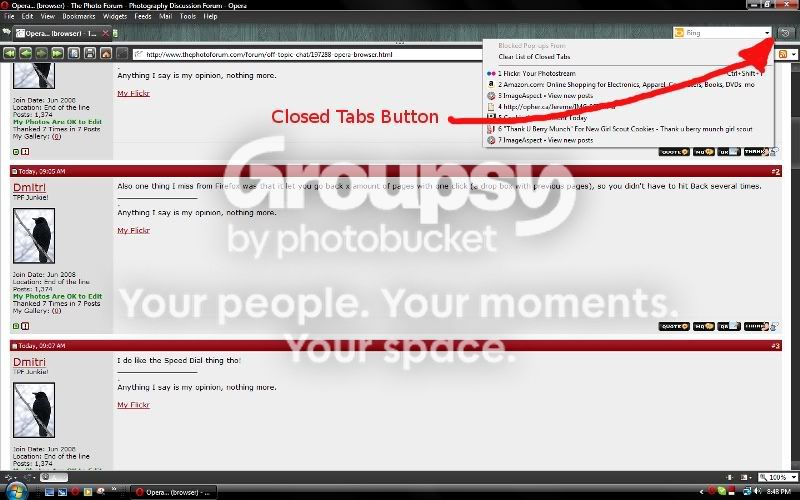
Opera has had that for years and years. Simply mouse-down on the back button and a dropdown menu should appear. It also as a dropdown listing recently closed pages allowing you to select a page you closed hours ago.

I've been a faithful Opera user for over 8 years, since before Firefox hit the streets. I started using Opera when Macromedia (I was working for them at the time) licensed Opera's rendering engine for use in Dreamweaver. I particularly like the way Opera integrates email and RSS subscriptions. It has a very good download manager.
 
Speed dial is fun - also right click on any image and go to iamge properties for EXIF viewing :) (if the image has exif of course). As for popups go to "tools" then "quick preferences" and its in there. Most other commands and options will be in the tools menu or one of its sub menus.

ah nice. I had that on Firefox but had to use an addon for it :)

clarinetJWD said:
AdSweep - An ad blocker for your favorite web browser (like Adblock) is a javascript plugin that very effectively blocks ads in Opera or Chrome. See that page for the download and installation instructions.

Just tried that, doesn't seem to work for me. Downloaded the js, pointed my prefs to the directory, and nada. Not even the webpage shows it functioning. I've been using this ad block filters thing (Tamil - Opera ad block filters) which is ok, but not nearly as good as AdBlock was for Firefox :( I was so surprised to find out that there are ads on Facebook lol
clarinetJWD said:
I've been using Opera for many years, and am glad it's starting to pick up steam.

As Firefox continues to shoot itself in its own foot, I'm glad there are good alternatives out there.

Dwig said:
Opera has had that for years and years. Simply mouse-down on the back button and a dropdown menu should appear. It also as a dropdown listing recently closed pages allowing you to select a page you closed hours ago.

Aha, you're right! Awesome, thanks :) :)
 
Yeah, I haven't bothered to install adsweep in a while, and it seems the new version is...****.

It changed developers, and the new guy doesn't know what he's doing, so there's been a mass exodus to this:

Fanboy's Adblock List for Opera for a one time deal, or
Mark Gillespie - Adblock Updater Service for Windows will add the same file, but update it automatically every 7 days. I just installed it on Opera 10.5, and haven't done a lot of testing, but it zapped everything here just fine.
 
Also one thing I miss from Firefox was that it let you go back x amount of pages with one click (a drop box with previous pages), so you didn't have to hit Back several times.

closedtabs.jpg
 
Trying it out now, promising. :)
 
Damn, lol. Just checked - I have 10.1.
 
Hmm... When I check for updates, it says I have the latest version.

edit

10.5 still doesn't show on the automatic updates, so I just downloaded it and updated it manually. It wouldn't start (?)...

Had to go back to 10.1... Oh well, I like this version, lol.
 
Last edited:

Create an account or login to comment

You must be a member in order to leave a comment

Create account

Create an account on our community. It's easy!

Log in

Already have an account? Log in here.

New Topics

Back
Top Bottom