What's new

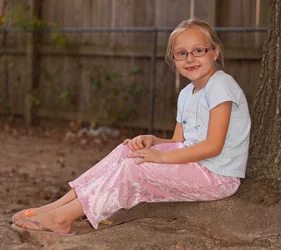
Other than her PJ's what do you think

revenater

TPF Noob!
Joined
Nov 28, 2011
Messages
261
Reaction score
22
Location
Rogers AR
Can others edit my Photos
Photos OK to edit
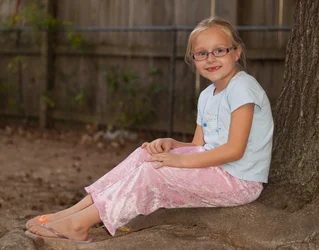
I am practicing with my new speedlite and messing around in my backyard with my little girl. $IMG_5696_edited-1.webp
 
Last edited:
It's nicely shot. A bit to the orange. I am assuming you are asking about the lighting? It's pretty decent. It's not totally flat lighting, she has dimension to her face, yet she is evenly lit. I really like it.
Not a fan of the fence intersecting her head, but I don't think you're caring much about that in this one!
 
How can I fix the orange? I am new to post I have elements so any advice helps. I do not like the fence either but I was not paying to much attention to that part at this point.
 
Poor girl doesn't have matching sandals
 
You have posted this multiple times. Don't do that. We see them all when you post them by looking at the active topics. THe admins will lock one down. One is plenty!

Are you shooting in jpeg or raw? I work white balance in raw processing, so I am little to no help actually IN photoshop.
 
Lol she is going Punky Brewster style (if you ever show that show back in the 80's). My two younger girls wear the same size and have like 10 pair and they mix match them.
 
I like it. nice lighting, nice pose. I agree about the fence, but understand it's not the focus here. Nice job.
 
Sorry about the double post I do not know how I did it and I cannot seam to figure out how to get rid of the other. I shoot Raw most of the time. This was in raw
 
Don't worry about it. The powers that be will get rid of it if they're here or the other one will go off into obscurity.
To fix orange in raw processing the top of your first panel is white balance. You'll need to decrease the temp a bit and the tint a bit.
 
Sorry about the double post I do not know how I did it and I cannot seam to figure out how to get rid of the other. I shoot Raw most of the time. This was in raw

Just report your own post, with a message asking to close it. The mods will more than happily accomodate you.
 
Is this better?
 

Attachments

  • $IMG_5696_edited-2.webp
    $IMG_5696_edited-2.webp
    531.9 KB · Views: 153
480sparkey,
Thank you.
 
You appear to be shooting with the flash on-camera, judging from the position of the catchlights in her eyes, and the angle of the shadows. For a direct flash photo, the appearance is pretty good. However, your flash head is close to the lens axis, and that generally gives "flat" lighting as the shadows are almost invisible.

As you learn to control the flash, you will find that putting the flash off-camera will give you better detail definition because the shadows will help define the shapes.

Another factor to controlling the light, is to know that small light sources (bare flash, direct sunlight) cast harsh shadows, while large light sources (open sky, large reflector, softbox) cast soft shadows. So while the initial primary goal of using flash is to get enough light to get a decent exposure, this is quickly followed by the need to position the light to create the detail-defining shadows, and to modify the light to manage the hardness/softness of the shadows.

Bare flash on camera works well, however, when used in fill mode, where the flash exposure is throttled down by 2-3 stops (via flash exposure compensation feature). This then doesn't add light to the highlights, but does fill in the shadows to a certain extent.

 
If I was to get the flash off my camera would you recommend a flash stand or a on camera bracket?
 

Create an account or login to comment

You must be a member in order to leave a comment

Create account

Create an account on our community. It's easy!

Log in

Already have an account? Log in here.

New Topics

Back
Top Bottom