What's new

Panorama help?

Mach0

TPF Supporters
Joined
Oct 16, 2011
Messages
2,616
Reaction score
432
Location
203
Can others edit my Photos
Photos OK to edit
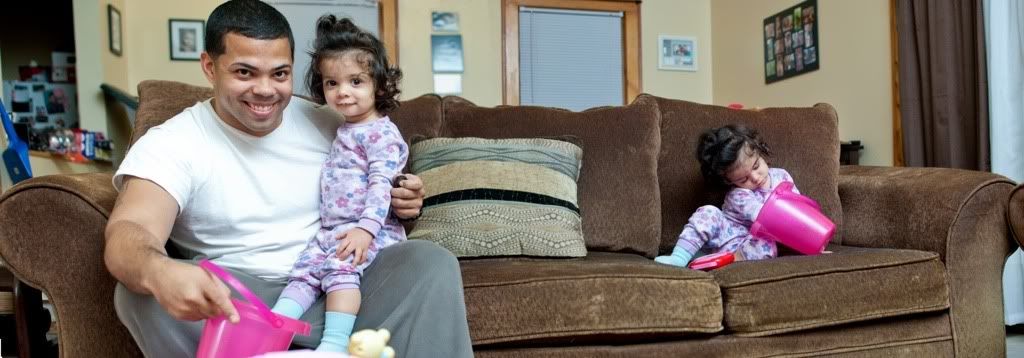
I set the tripod and made sure it was level when swiveling before I shot. I took two images of my daughter and I on the couch. Both images were not distored at all. When I used photomerge, it distorted the hell out of me. Any way to correct this ? Thank you.
ad346107.jpg
 
Last edited:
Reshoot. The only way get this as distortion free as possible is going to be by making sure that the camera is level and square and equidistant from all subjects. Think of it as you and your daughters sitting along the circumference of arc, and camera being at the centre. Using a different focal length may help as well. I can't see any EXIF data appended to this image; what focal length did you use? Try something closer to 35mm (crop) or 50mm (full-frame).
 
Reshoot. The only way get this as distortion free as possible is going to be by making sure that the camera is level and square and equidistant from all subjects. Think of it as you and your daughters sitting along the circumference of arc, and camera being at the centre. Using a different focal length may help as well. I can't see any EXIF data appended to this image; what focal length did you use? Try something closer to 35mm (crop) or 50mm (full-frame).
Thanks for your response. It was a 35 mm on a crop body. The exif was 52mm, f stop 2.5, exposure 1/60s, Ev-9, iso 200. The camera was positioned directly in front and then panned to the camera right for the second shot. Are you suggesting that the camera gets positioned in the center and leveled again?
 
The camera was positioned directly in front and then panned to the camera right for the second shot.
Place the camera in the middle of the sofa, so that it's the same distance away from you, as it is from your daughter. In this shot, it looks like it was closer to your side.

Also, it may not apply well in this situation, but one technique for getting less distortion for panoramas, is to rotate the camera to portrait orientation (even if that means taking more shots).
 
I'm suggesting re-shooting with the camera in the centre and panned around to get the number of shots required.
 
Portrait orientation is nearly always best. It avoids heads being chopped off when photomerge goes to work you should also overlap by about 40% on each shot to help the software match the layers more precisely. You also need to make sure that the camera is on the same level on all shots. My camera has a built in two way level so I can keep the camera at the same pitch both vertically and horizontally.
 
Thanks a bunch for your help. I'll retry it the way you all suggested. Side note:::: this stuff is addicting hahaha
 
It is, and when you have 40 megapixel camera, it eats your hard disc for breakfast - I have two panos posted here, the originals of which are 4.5 GB each and are 400 megapixel in dimension ( I decided to use a supersharp 120mm lens for the shots which meant taking 11/12 shots). Also even though it will eat up your hard disc do make sure you shoot in raw and in manual. Make sure you keep the same exposure and aperture settings on each shot. I would reccommend stopping down to around f/8 -11 to get as much of the scene in good focus as possible. Especially when you shoot more exposures in portrait orientation.
 

Create an account or login to comment

You must be a member in order to leave a comment

Create account

Create an account on our community. It's easy!

Log in

Already have an account? Log in here.

Back
Top Bottom