What's new

Portraits (2 pics for CC)

redessa

TPF Noob!
Joined
Aug 22, 2011
Messages
235
Reaction score
22
Location
Utah
Can others edit my Photos
Photos OK to edit
I was asking earlier about lens choice for this session and how to engage the little one with Down's. Turns out I was nervous for nothing. She was the sweetest thing ever! (Even if she doesn't like shoes LOL) If I didn't already have a houseful of my own kids I would have been very tempted to take her home. :)

Anyway, I would love feedback on these pictures.


IMG_7619 by redessa, on Flickr
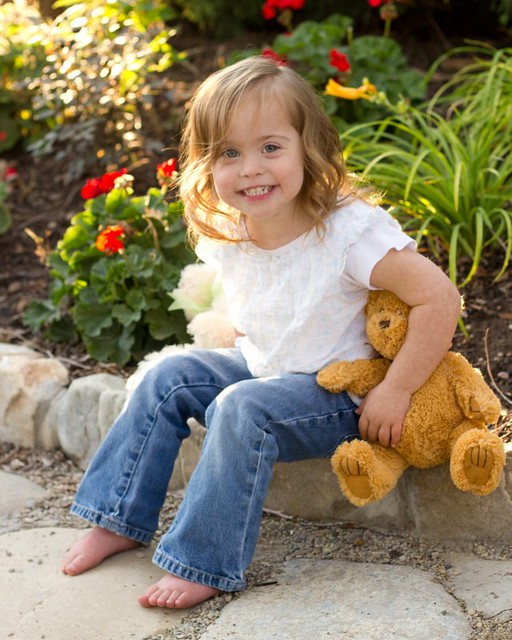

IMG_7609 by redessa, on Flickr
 
#1 you went too far wit the luminance smoothing, if you had to sharpen it to the point where you also had to do that, then it was too far gone to begin with
#2 is a lot better
 
wait....thats the same girl? the first picture puts her age at late-teens, early 20s.....thats insane lol....
 
She is adorable indeed! :hug::
 
wait....thats the same girl? the first picture puts her age at late-teens, early 20s.....thats insane lol....

Ha, ha, ha. No, I guess I should have stated it again (it was in my earlier post) that I was photographing sisters. I was just most concerned about working with the special needs girl. And the older one is actually a young teen.
 
#1 you went too far wit the luminance smoothing, if you had to sharpen it to the point where you also had to do that, then it was too far gone to begin with
#2 is a lot better

Thank you. I honestly am very much lacking in my photoshop skils. I don't see a whole lot of difference when I monkey around with some of the sliders. Whether that's my inexperience or the limitations of my really, really old monitor I don't know. But here it is without any adjustments to the sharpening or luminance. I don't think the photo is a lost cause but i could be wrong.


IMG_7619-1 by redessa, on Flickr
 
She is under exposed a full stop. You can use Photoshop to check the exposure. Use the Info window and check the value of the red channel on the skin highlights. They should be between 235 and 240 in the red channel.

i brought up the exposure, added a little clarity, dodged the whites of her eyes and her teeth a bit and used USM (Un-Sharp Mask) to enhance the overall local contrast of her eyes (Amount - 10, Radius - 250, Threshold - 0).
6158954988_f3704bdc91_z.jpg
 

Create an account or login to comment

You must be a member in order to leave a comment

Create account

Create an account on our community. It's easy!

Log in

Already have an account? Log in here.

Back
Top Bottom