What's new

RAW Really Means RAW?

2) How does Windows show me a non-green, interpolated preview of my RAW files in my folders, prior to me converting them? Again, it would have to convert every time and then just throw it away if not stored in the RAW.


The preview of the RAW file is the result of the Microsoft Camera Codec Pack. And Microsoft update that once in awhile for newer models

Download Microsoft Camera Codec Pack (16.4.1970.0624) from Official Microsoft Download Center


In my Windows machine, before I install the codec pack, the Windows Explorer cannot show thumbnails nor preview of my Canon RAW files.

I know that. That doesn't tell us anything useful though, because you would need a codec either way. You would need one to let the OS know how to extract the embedded preview jpeg, and you would need one to let the OS know how to debayer and color correct, if that's what's happening. OR you would need one to let the OS know how to read off the already-debayered primary data if THAT'S what is happening, too.
 
Without seeing any of your work, is it necessary to process 50-100 images in a sitting? The way your OP was written makes it obvious you're not a pro, so why process such a high volume? Just get back from vacation? GREAT "keeper" rate?

I used to get bogged down and frustrated with the time it took to edit images until I realized I was wasting a lot of time processing images that were only so-so. When I cut back to only spending time on to the images that were the most interesting, I found that I could process them more quickly and with higher motivation than trying to slog through a bunch of images. You can always go back through them and play around a later date. Again, without being critical of your work (having never seen it), maybe you could try spending more time reviewing/rating your images to figure out which ones are really the best of the best and deserving of your time and energy in processing.
 
Without seeing any of your work, is it necessary to process 50-100 images in a sitting? The way your OP was written makes it obvious you're not a pro, so why process such a high volume? Just get back from vacation? GREAT "keeper" rate?

I used to get bogged down and frustrated with the time it took to edit images until I realized I was wasting a lot of time processing images that were only so-so. When I cut back to only spending time on to the images that were the most interesting, I found that I could process them more quickly and with higher motivation than trying to slog through a bunch of images. You can always go back through them and play around a later date. Again, without being critical of your work (having never seen it), maybe you could try spending more time reviewing/rating your images to figure out which ones are really the best of the best and deserving of your time and energy in processing.
Probably one of the best answers given. Yes, I'm a beginner and think they "all" are keepers. But looking through my catalog I can see quite a few duplicates, and some just plain boring ones. I guess I should do what I do with Flickr, only concentrate on the better ones for keepers. Right now I'm shooting mainly landscapes with an animal or two here and there. Flickr: The Oklahoma Kid's Photostream
 
Just compare the size of a raw file with that of an interpolated file,
What is an "interpolated file?" That's not just a thing by itself. To be sure it is interpolated, you have to save in some specific format like jpeg or png or tiff or whatever, all of which have different baggage they come with confounding variables (compression amounts, or overhead data) that makes it difficult to compare the file sizes with certainty. Which format are you choosing to do your comparison with, and how are you solving the ambiguities involved in inherently different formats?

For example, the closest I can come up with would be to convert a RAW to photoshop and then save it as a lossless-ly compressed PNG file. When I do that, the file gets SMALLER by about 1 megabyte. Granted, I am going from 12 bit to 8 bit, but... (three channels 8+8+8 = 24, which should be twice the size of one channel @12)

I would have thought that the obvious, logical way to do this would be to compare uncompressed data, so that the difference in file size caused by compression was removed. Do you need me to walk you though such a comparison? A 14-bit uncompressed raw file from the 12 MP Nikon D3 is about 24 MB. There's not enough room for three channels of uncompressed 14 bit data from a 12 MP camera in 24 MB. They expand to around 36 MB when debayered and converted to uncompressed 8 bits per channel per pixel, as one would expect.


Where did you get the information that raw files are already debayered? Even without a reference, the evidence is there in the file size that they only contain one channel of data.
Where did you get the information that they are NOT already debayered? Your file size evidence is less than convincing (see above). If you have some other reliable reference to how proprietary formats work, then that changes things.

Did you sit down and decompile and reverse engineer them in your free time? Do you work for Adobe or something?

If so, I'm super curious to hear a rare inside scoop on how some of these work exactly. If not, then you're inferring, just like I am.

It's a subject that is frequently discussed in papers on workflow, data storage, image processing, raw converters etc etc. It's all over the place. I don't need to infer, I read discussions about debayering and where and when it happens regularly. I also use RawDigger regularly, and have a fairly good idea how the raw files of the cameras I use are structured. I use both Bayer pattern and Foveon sensors (the DP2 Merrill is an incredible camera for the size and I'm happy to use it, despite its little foibles), and I see the difference in raw file size every day. I use five different raw converters (Sigma DPP, Nikon Capture NX2, ACR, Iridient Developer and DxO Optics) for different purposes.

Next questions for you: When you are in a hole why don't you stop digging? Are you just a troll?
 
....... Granted, I am going from 12 bit to 8 bit, but... (three channels 8+8+8 = 24, which should be twice the size of one channel @12).......

How can you compare one 12-bit raw color to three 8-bit color channels and attempt to claim it supports your argument?

In order to create your 24-bit pixel, the demoasaicing process draws on four 12-bit raw pixel data sets. So 12+12+12+12 is gonna be larger than 8+8+8.
 
How can you compare one 12-bit raw color to three 8-bit color channels and attempt to claim it supports your argument?
In order to create your 24-bit pixel, the demoasaicing process draws on four 12-bit raw pixel data sets. So 12+12+12+12 is gonna be larger than 8+8+8.

Every sensor ---> one pixel, so it's going from 12 bits in the single sensor originally to 8+8+8 in a jpeg or a PNG at the end of the day. It's not 4 sensors to every 1 pixel; they share sensors.

I would have thought that the obvious, logical way to do this would be to compare uncompressed data, so that the difference in file size caused by compression was removed. Do you need me to walk you though such a comparison? A 14-bit uncompressed raw file from the 12 MP Nikon D3 is about 24 MB. There's not enough room for three channels of uncompressed 14 bit data from a 12 MP camera in 24 MB. They expand to around 36 MB when debayered and converted to uncompressed 8 bits per channel per pixel, as one would expect.
Okay that's great, but not very obvious when your Canon body does not have compressed and non-compressed options.
Without inside information as to file format (which I think I may have found now... maybe), file sizes alone is not enough, therefore, to tell me if it is interpolated or not, since I can't force the camera to tell me whether it is one or the other. It is just whatever it always is. It could be a 2:1 badly compressed non-interpolated image, or a 6:1 decently compressed interpolated image.

It's a subject that is frequently discussed in papers on workflow, data storage, image processing, raw converters etc etc. It's all over the place.
Okay, so you do have additional information about the structure itself. Like I said before, that changes things, and you encouraged me to go search with more effort for specifications (the first couple seemed to know everything about EXIF but nothing about data format), and I think I may have found a decent one.

Thanks *shrug*

Requesting details instead of just taking somebody at their unsupported word about random facts does not = trolling. :roll:
 
Every sensor ---> one pixel, so it's going from 12 bits in the single sensor originally to 8+8+8 in a jpeg or a PNG at the end of the day. It's not 4 sensors to every 1 pixel; they share sensors....m:

Clear as mud. This makes absolutely no sense whatsoever.
 
Every sensor ---> one pixel, so it's going from 12 bits in the single sensor originally to 8+8+8 in a jpeg or a PNG at the end of the day. It's not 4 sensors to every 1 pixel; they share sensors....m:

Clear as mud. This makes absolutely no sense whatsoever.

However many individual photowell sensors you have, that's how many pixels you will usually have, minus maybe a few for the scraps on the edge of the sensor where the conversion pattern falls apart. So if you have an 18 megapixel camera, you have approximately 18 million photowells on your sensor (and each one is just one color), NOT 76 million (a set of 4 for each pixel),

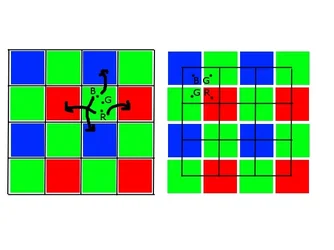
Cartoon:
$bayer.webp
The colored boxes are the individual light sensors in the Bayer array.

the black grid overlaid on it are the pixels that will end up in your interpolated image. Every pixel draws data from multiple sensors to get it's full RGB values. And every sensor contributes information to multiple pixels (in this cartoon example, 4 and 4). They all share and spread around the data and overlap, rather than having dedicated sensors per pixel.

So in the above image, each of those colored boxes would require 12 bits of memory to store its value from a photo (12-bit deep data in one color). Each BLACK box, however, required 24 bits in a jpeg (8 bits green 8 bits red, 8 bits blue).

So for a 12 bit depth camera, the size of an uncompressed file should increase by about 2x when you interpolate from the Bayer array to a jpeg (or an 8 bit PNG).

What Helen was saying was that with a Nikon, you can just set it to uncompressed RAW, and then convert it to an uncompressed 8 bit file in your program of choice, and you can see a similar file size increase for yourself, without having to delve into the guts of the file code.


The actual number of pixels may vary (there are many patterns and ways of combining the data) in different cameras and file types, but there will always be some sort of sharing in a Bayer interpolation, never (I think) dedicated and exclusive sensors for specific pixels
 
Every sensor ---> one pixel, so it's going from 12 bits in the single sensor originally to 8+8+8 in a jpeg or a PNG at the end of the day. It's not 4 sensors to every 1 pixel; they share sensors....m:

Clear as mud. This makes absolutely no sense whatsoever.

However many individual photowell sensors you have, that's how many pixels you will usually have, minus maybe a few for the scraps on the edge of the sensor where the conversion pattern falls apart. So if you have an 18 megapixel camera, you have approximately 18 million photowells on your sensor (and each one is just one color), NOT 76 million (a set of 4 for each pixel),

Cartoon:
View attachment 53788
The colored boxes are the individual light sensors in the Bayer array.

the black grid overlaid on it are the pixels that will end up in your interpolated image. Every pixel draws data from multiple sensors to get it's full RGB values. And every sensor contributes information to multiple pixels (in this cartoon example, 4 and 4). They all share and spread around the data and overlap, rather than having dedicated sensors per pixel.

So in the above image, each of those colored boxes would require 12 bits of memory to store its value from a photo (12-bit deep data in one color). Each BLACK box, however, required 24 bits in a jpeg (8 bits green 8 bits red, 8 bits blue).

So for a 12 bit depth camera, the size of an uncompressed file should increase by about 2x when you interpolate from the Bayer array to a jpeg (or an 8 bit PNG)


The actual number of pixels may vary (there are many patterns and ways of combining the data) in different cameras and file types, but there will always be some sort of sharing in a Bayer interpolation, never (I think) dedicated and exclusive sensors for specific pixels


Yes, each 8-bit JPEG image is created using four 12-bit sensor data inputs, and each raw sensor pixel data gets used by 4 JPEG pixels. So it's almost a 1:1 ratio of the number of sensor pixels compared to the JPEG size. The only discrepancy is created by pixels along the edges of the image... the raw sensor pixel data from those only gets used twice, and the corners just once.

But once again, you're comparing the THREE COLOR CHANNELS (or as you say, 24-bit) of a JPEG pixel to a SINGLE 12-bit raw pixel.

So take a theoretical sensor that measures 100 x 100 pixels. It should create a JPEG that's 99 x 99 pixels. Now, 100 x 100 = 10,000. 99 x 99 = 9,801. See? It's almost a 1:1 ratio, the number of sensor pixels compared to the number of final image pixels. (1:0.9801 if you wanna get technical). As the total number of sensor pixels increase, the ratio gets closer. 500 x 500 = 250,000, with a resulting 499 x 499 = 249,001 final image pixels. That 250,000 : 249,001, or 1:0.996004.

Try the math at 1, 5, 10, or 20, or even 30 megapixels..... the ratio gets closer and closer to 1:1 with every increase in the number of mp.

Therefore: For every 8-bit color channel in the finished JPEG, there's (slightly more than) one 12-bit raw pixel providing the data.
 
10,000. 99 x 99 = 9,801. See? It's almost a 1:1 ratio
Right, I agree....

I'm not talking about number of pixels or number of channels, I'm talking about disk space required to store the whole file.

uncompressed 8-bit interpolated image file: 9,801 pixels * 24 bits per pixel = 28 kilobytes
BAYER (uninterpolated): 10,000 sensors * 12 bits per sensor = 15 kilobytes

Slightly higher than half size for the Bayer. And in the infinite limit, it will approach a perfect 2:1 ratio of file size as you increase sensor size indefinitely.
 
Just compare the size of a raw file with that of an interpolated file,
What is an "interpolated file?" That's not just a thing by itself. To be sure it is interpolated, you have to save in some specific format like jpeg or png or tiff or whatever, all of which have different baggage they come with confounding variables (compression amounts, or overhead data) that makes it difficult to compare the file sizes with certainty. Which format are you choosing to do your comparison with, and how are you solving the ambiguities involved in inherently different formats?

For example, the closest I can come up with would be to convert a RAW to photoshop and then save it as a lossless-ly compressed PNG file. When I do that, the file gets SMALLER by about 1 megabyte. Granted, I am going from 12 bit to 8 bit, but... (three channels 8+8+8 = 24, which should be twice the size of one channel @12)

I would have thought that the obvious, logical way to do this would be to compare uncompressed data, so that the difference in file size caused by compression was removed. Do you need me to walk you though such a comparison? A 14-bit uncompressed raw file from the 12 MP Nikon D3 is about 24 MB. There's not enough room for three channels of uncompressed 14 bit data from a 12 MP camera in 24 MB. They expand to around 36 MB when debayered and converted to uncompressed 8 bits per channel per pixel, as one would expect.


Where did you get the information that raw files are already debayered? Even without a reference, the evidence is there in the file size that they only contain one channel of data.
Where did you get the information that they are NOT already debayered? Your file size evidence is less than convincing (see above). If you have some other reliable reference to how proprietary formats work, then that changes things.

Did you sit down and decompile and reverse engineer them in your free time? Do you work for Adobe or something?

If so, I'm super curious to hear a rare inside scoop on how some of these work exactly. If not, then you're inferring, just like I am.

It's a subject that is frequently discussed in papers on workflow, data storage, image processing, raw converters etc etc. It's all over the place. I don't need to infer, I read discussions about debayering and where and when it happens regularly. I also use RawDigger regularly, and have a fairly good idea how the raw files of the cameras I use are structured. I use both Bayer pattern and Foveon sensors (the DP2 Merrill is an incredible camera for the size and I'm happy to use it, despite its little foibles), and I see the difference in raw file size every day. I use five different raw converters (Sigma DPP, Nikon Capture NX2, ACR, Iridient Developer and DxO Optics) for different purposes.

Next questions for you: When you are in a hole why don't you stop digging? Are you just a troll?

Helen, perhaps this would answer your question: http://digital.olivesoftware.com/Ol...ock&href=TWE/2013/08/04&id=Ar0800200&ext=.png
 
10,000. 99 x 99 = 9,801. See? It's almost a 1:1 ratio
Right, I agree....

I'm not talking about number of pixels or number of channels, I'm talking about disk space required to store the whole file.

uncompressed 8-bit interpolated image file: 9,801 pixels * 24 bits per pixel = 28 kilobytes
BAYER (uninterpolated): 10,000 sensors * 12 bits per sensor = 15 kilobytes


Well, gee. Let's simplify it. One raw pixel contains one number. One JPEG pixel contains three numbers. So why isn't a JPEG file THREE TIMES larger than a raw?

..........And in the infinite limit, it will approach a perfect 2:1 ratio of file size as you increase sensor size indefinitely.

Now I've heard everything.
 
Last edited:
Requesting details instead of just taking somebody at their unsupported word about random facts does not = trolling. :roll:

funny coming from someone that continuously presents completely unsupported thoughts as certain fact. if only you would spend this kind of effort requesting details out of your own BS before spewing it.
 
Last edited:
Well, gee. Let's simplify it. One raw pixel contains one number. One JPEG pixel contains three numbers. So why isn't a JPEG file THREE TIMES larger than a raw?

...because the three numbers are each smaller than the one number is. It's like saying "a loaf of bread is one thing, and three slices of bread are three things, so why aren't the slices of bread three times bigger?"

JPEGS are 8 bit files. That means that every color value ranges from 1 to 256, and it uses 8 bits of computer memory to store.

RAW files are usually at a minimum (and what we have been using in this example) 12 bits. That means that every color value ranges from 1 to 4096, and it uses 12 bits of computer memory to store.


12 x 1 = 12 (12 bits per color x 1 color)
8 x 3 = 24 (8 bits per color x 3 colors)
24 = TWICE as large as 12, not three times.


The fact that the numbers are larger in raw files for each color is precisely the reason, in fact, why shooting in raw gives you more post processing latitude than shooting in jpeg, because those extra 4 (or more) bits give you intermediate tonal values that allow you to stretch and mess around with colors and lightness during conversion without getting posterization.

..........And in the infinite limit, it will approach a perfect 2:1 ratio of file size as you increase sensor size indefinitely.

Now I've heard everything.

Yes, it will. Since 24 is twice as large as 12 per pixel and photosensor respectively, the ratio of file size will approach exactly 2:1 as the sensor gets larger. While the sensor is small, file overhead data and the fact that there are slightly more sensors on the edge will keep the ratio slightly under 2:1. But as the square gets larger and data takes up more of the file, it will become almost perfectly 2:1.


In fact, some RAW files use 14 or even 16 bit depths. If it were 16 bit, then the jpeg would only approach being 50% larger than the uninterpolated file in the limit. (24 / 16 = 1.5)


funny coming from someone that continuously presents completely unsupported thoughts as certain fact. if only you would spend this kind of effort requesting details out of your own BS before spewing it.
If you'll notice, I didn't say Helen was evil or inherently wrong to present facts without support in the first place. I said that she shouldn't be insulted or surprised when people ask for more details or support.

Nor am I insulted or surprised when people ask for more details or support when I do the same thing. For instance, right here right now with the 8 bit vs. 12 bit thing. I'm not calling Sparky names, etc.
 
Last edited:

Create an account or login to comment

You must be a member in order to leave a comment

Create account

Create an account on our community. It's easy!

Log in

Already have an account? Log in here.

New Topics

Back
Top Bottom