What's new

Really struggling with this sunset photo

pauliec

TPF Noob!
Joined
Jan 18, 2009
Messages
88
Reaction score
0
Location
New Jersey
Can others edit my Photos
Photos OK to edit
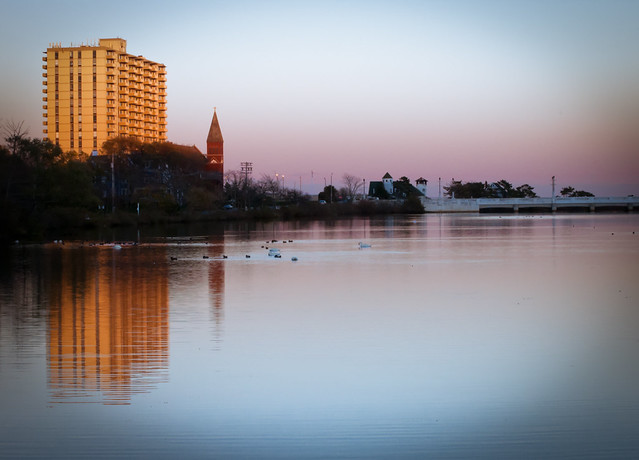
I've been working on this photo for the past hour and a half in lightroom, and I can't figure out what I still don't like about it. It just seems off to me, but I think I've been staring at it for so long that I don't realize what's wrong with it. I'm thinking maybe the sky could pop a little bit more? Not sure. Any suggestions?

5143527369_81d8c4a809_b.jpg
 
I just changed the white balance, maybe this is a bit better --

5144164960_617cdabfec_b.jpg
 
I think you are trying to fix too much photo, how about a crop showcasing the reflection and buildings?

Just a crop, and slight sharpen of the building.

Working with the original will not be as comressed as this one is.

1076503501_oKrtH-L.jpg


Lost some color in translation, I like it warmer as you had.
 
I took a quick shot at it. Is this more what you are looking for?

 
I think you are trying to fix too much photo, how about a crop showcasing the reflection and buildings?

Just a crop, and slight sharpen of the building.

Working with the original will not be as comressed as this one is.

1076503501_oKrtH-L.jpg


Lost some color in translation, I like it warmer as you had.

Hmm.. maybe my crop is off
 
like this?


I was trying to do something like that, but at the same time remove the blue at the bottom. Like use the graduated filter, I guess.
 
graduated filters are more for keeping 2 different exposures set almost equally in this setting it may work if you use one but the reflection and the sky would be 2 different colors/exposures....it might work but idunno... i would almost try a ND filter to open up a stop or 2 to get a smoother water setting. or maybe the sky wasnt in the right timing for the sunset/sunrise whichever you were shooting at.. i would just go back another time and try it again if youre not happy with the results.
 
Last edited:
I was trying to do something like that, but at the same time remove the blue at the bottom. Like use the graduated filter, I guess.

I didn't feel like posting another but using a graduated filter on the bottom lowering the saturation decreased the blue.

I think you are trying to get too much from that shot. There wasn't that much purple in the image. I had to boost it a lot to get that little color. I think it was a tad overexposed to get the color you wanted. What were the settings?
 
Settings were 1/60, f/20, ISO 800

I added a vignette, and I think it looks good now. Probably the best I'll get it. Thanks for the feedback.

5144994382_3e63eb4e81_z.jpg
 

Create an account or login to comment

You must be a member in order to leave a comment

Create account

Create an account on our community. It's easy!

Log in

Already have an account? Log in here.

Back
Top Bottom