What's new

Seeking Critique

elementgs

No longer a newbie, moving up!
Joined
Sep 1, 2013
Messages
136
Reaction score
26
Location
California!
Can others edit my Photos
Photos OK to edit
Thanks. :)

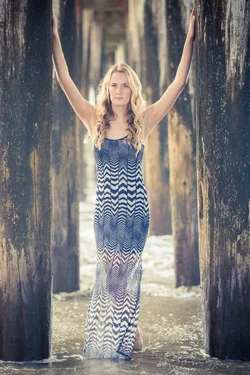
$DSC_0874.webp
 
I ' m on an iPad so I can't edit this but it looks to me as if the lower half is much brighter than the top; not where you want the viewer's eyes to go.
i suggest you burn in the bottom half a bit to make it more luxurious and compelling.
 
As Lew pointed out, there are some exposure issues with the image. The use of supplemental light such as an off-camera speedlight instead of metering would have allowed you to knock the ambient down as well as add a catchlight to her eyes, which as-is are rather lifeless
 
Lots and lots of color noise.
Was this underexposed to start?
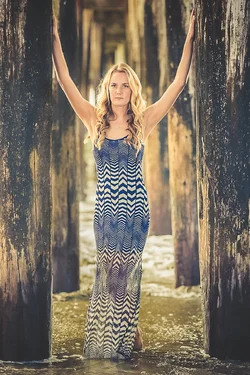
After darkening everything but the figure, I denoised it and then used 'paint daubs' filter to mask some of the noise.
Warmed it up a bit.

6JBKof.jpg
 
Thanks all for the response.

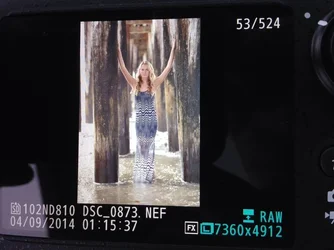
In regards to the exposure issue, unfortunately not. The photo itself was perfect out of the camera.

I am severely concerned at how Lightroom is handling the photos from the compressed lossless out of the D810 right now. The photo looked better RAW...

Very frustrated right now. I of course stylized the color a bit and tweaked it in Lightroom but there shouldn't be that many problems with the photo post Lightroom.


$image-4184501003.webp
 
You cannot use the photo as it is displayed on the rear LCD as a reliable gauge of exposure.
The problem is the variable ambient light used to view the rear LCD and the fact there is only a very crude brightness adjustment for the rear LCD.

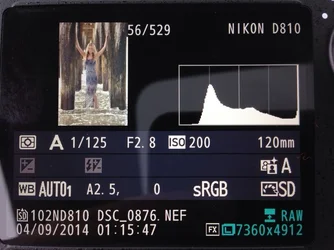
To gauge exposure you have to use the histogram.
But, if you shoot Raw files the histogram (and photo) that is displayed on the rear LCD is a JPEG Basic thumbnail embedded in the Raw file for those purposes.

FWIW - Nikon and other camera makers use marketing mumbo jumbo specifications to make rear LCD resolution seem OMG! wonderful.
In fact the rear LCD has very limited usefulness.

Nikon claims 920,000 dot resolution for their best rear LCDs.
They don't mention that means 306.666 red dots, 306,666 blue dots, and 306,999 green dots.

Nikon more accurately states their rear LCD is - VGA: 640 x 480 x 3 colors = 921,600

What you really have is an equivalent 0.307 MP rear LCD display.
Yep. It's not even 1/2 of 1 whole MP of resolution.

 
Last edited:
Do you use the appropriate raw converter?

Yes. The Camera Raw 8.6 and DNG Converter 8.6 public Release Candidates were just posted to Adobe Labs (labs.adobe.com). They support raw files for the Nikon D810. If you are using Lightroom, for now, you can use ACR 8.6 / DNG Converter 8.6 to convert the D810 raw files to DNG, which can then be read in Lightroom 5.5.
 
I like the image.. think it has a lot of potential just needs a different editing approach.. I played with it also:
$DSC_0874.webp
 
Do you use the appropriate raw converter?

Damn. No. I am not. I will have to download it today and update.

As for DNG, should I convert? I have been hesitant to convert because of a lack of knowledge on the topic. I watched a video from Phlearn though and he insists it's the way to go...


Thanks for the edits, I do really like that one a lot more. I'll be home soon and will be able to play around with it a bit more.

Thanks!
 
You cannot use the photo as it is displayed on the rear LCD as a reliable gauge of exposure.

Thanks for the info KmH. I will read all very soon.

Looking at the histogram I can see I blew a channel out but overall I'm fairly happy with it. I admittedly need to study a bit more though. :(

$image-1271769062.webp
 

Create an account or login to comment

You must be a member in order to leave a comment

Create account

Create an account on our community. It's easy!

Log in

Already have an account? Log in here.

Back
Top Bottom