What's new

Shooting a sma wedding today

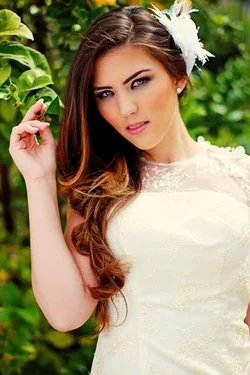
ok so update here is my attempt at editing but i dont now how to exactly edit her cracked lips and or the slight lines under her eyes without it looking obvious any links or advice would be a great

Seeing as how the image is not in focus I would not worry about the lips.
 
ok so update here is my attempt at editing but i dont now how to exactly edit her cracked lips and or the slight lines under her eyes without it looking obvious any links or advice would be a great help...!!!View attachment 71235


Dup layer, gaussian blur, black mask, paint under the eyes over the lines with a white brush. Lips are too out of focus and pic too small for me to see anything that matters.
 
Last edited:
$chantal_lemons resized.webp
 
Lol I'm trying not to take that personal. But are you saying the image isn't worth even editing. Should I not use it in a portfolio or display it as samples of my work :(
 
For the life of me the thread won't let me upload anything over a few hundred pixels by pixels. So the fact the image is small on here you can't see the detail I see
 
Lol I'm trying not to take that personal. But are you saying the image isn't worth even editing. Should I not use it in a portfolio or display it as samples of my work :(

Its worth editing if you feel you need to lean to edit better but I would not use it in a portfolio or as a sample of your work. Portfolios need to show the BEST and honestly an out of focus image is far from best.
 
I agree with most of the issues others have address. Soft focus, blown higlights, Wb is way off (white people arent pink, lol)

Also watch the background and align it well. When the background is off kilter it ruins the whole shot.
 
ok so update here is my attempt at editing but i dont now how to exactly edit her cracked lips and or the slight lines under her eyes without it looking obvious any links or advice would be a great help...!!!View attachment 71235

In photoshop its call the spot tool. But that is a small issue next to how you blew the higlights. Watch how you are setting your exposures. More than likely you are using too wide of an aperture. But the blown highlights are really bugging me here. You lost most of the detail from her dress. The only saving grace here is that the bride looks like a model to begin with so her poses still look good despite some technical flaws.
 
#1 - You cut half the bride off
#2 - You cut the bride's left arm off
#3 - You cut the bride's hands off
#4 - You cut the bride's left hand off
#5 - You cut the groom's left hand off
#6 - You cut the bride's right hand off
#7 - You cut the edge of the bride's hair thing off
#8 - You cut the bride's left foot off and the edge of the ceiling isn't straight
#9 - Just some hair

See a trend here? Watch where you crop things. Leave room around the edges because you don't know ahead of time what aspect ratio they will be printed at.
 
Hi, thanks for sharing such beautiful wedding pics. The couple just look awesome in this wedding shots. Great efforts by the photographer.
 
I think you used your lighting BEAUTIFULLY! Some of the crops were a little off by cutting off body parts but that is such an easy fix. If you want a waist up photo but don't want to cut off a limb, try having her/him move her arm up or position hand and arm where it will be in view in the image. She can leave her arm dangling down if you plan to have it in the image. (just something I've learned along the way)

I actually think your focus is pretty good and I think that they must be pretty happy with your work; I would have been. :) You are better than the photographer I hired at my wedding a while ago.............
 

Create an account or login to comment

You must be a member in order to leave a comment

Create account

Create an account on our community. It's easy!

Log in

Already have an account? Log in here.

New Topics

Back
Top Bottom