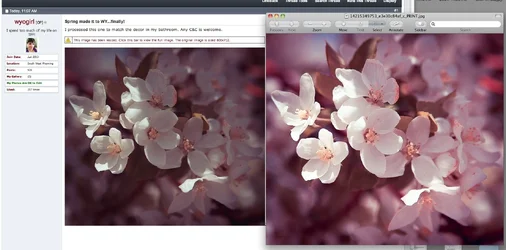
You held really nice detail in the brightest parts of the petals, so congrats on that. My C&C would be that this feels to be in ever-so-slightly a bit off-key. I think it would have more impact if there were more contrast in among all that large shadow area. SInce the shadows are such a large percentage of the image, I want more "yield" out of them. Just a bit more contrast, local contrast, would elevate this shot. I really like the small, subtle bit of blue sky at the upper left edge--a nice touch!
As I see it, this shot really does capture that feeling of sunlight, delicately caressing the very outside edges of a blooming tree's blossoms...and I LOVE that classic tree-in-bloom vibe. To get what I am after, I would apply Unsharp Masking at 10%, 150 pixel radius, 0 threshold [yes, 10 and 150 pixels!] once, fade that, then apply that again; that will increase the feeling of contrast and "realness" of the blossoms in the shadows.
I think it's fundamentally sound, but I am wondering about maybe cropping the right side to make it a perfect square.
Again, back to the "key" I mentioned...this seems like it might also work well made into a much lighter, brighter, higher-key image...but something about it makes me feel that the key is not quite optimal for the content. The difficult thing about shooting flowering trees like this is that one has to make a photo out of perhaps 10,000 almost identical blossoms. And hey--you DID make a successful composition out of all that variation!
I think this would be a lovely bathroom image; my bathroom BTW, has two framed floral images, which I find very tranquil. And everything "goes with" the towels AND the shower curtain and bath mat I bought at Target!!


 20140513-IMG_8137 by Amanda McClure, on Flickr


![[No title]](/data/xfmg/thumbnail/34/34067-9bb852bbf811fde3ef7941f42366412b.jpg?1734164493)
![[No title]](/data/xfmg/thumbnail/33/33362-84aacb865117bf8cba89104b89e9b36c.jpg?1734163304)
![[No title]](/data/xfmg/thumbnail/41/41928-733459df56e3fa2fe957f910305d4e37.jpg?1734176286)


![[No title]](/data/xfmg/thumbnail/41/41930-3f8741ecabbbfd4d67ade3e339078814.jpg?1734176287)