What's new

Suggestions and Tips Please

Kaisa

TPF Noob!
Joined
Apr 22, 2012
Messages
1
Reaction score
0
Location
Texas
Can others edit my Photos
Photos NOT OK to edit
$DSC_0684.webp

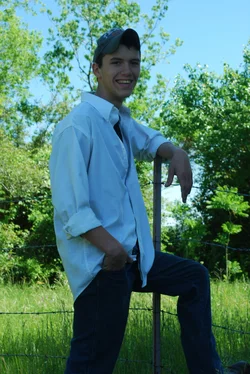
I'm not that happy with the way this photo turned out, but at this point I have no other choice than to try to work with it.
I really have no ideas on how to edit this. I am currently using Photoshop CS5 and still very new to it. I have tried everything I know to do, but it still doesn't turn out good. So any suggestions and tips would be greatly appreciated!! Thanks.
 
First, set the white balance. Then try to bring out the details in the shadows.
 
For the fun of it I edited it. I first brought the highlights and fill light up. Boosted it a little. Sharpened it a touch. Warmed it up some and put some vignette into it.
 
Last edited by a moderator:
For the fun of it I edited it. I first brought the highlights and fill light up. Boosted it a little. Sharpened it a touch. Warmed it up some and put some vignette into it.


Ummmmmmmmmm............

Kaisa [OP]
TPF Noob! Join Date Apr 2012
Location Texas
Posts 3
My Gallery (0)
My Photos Are NOT OK to Edit
Liked 0 times
 
That edit doesn't look so well. You should try and lighten up the subject. The background is well exposed but he looks like he is under a shadow, [which he probably is] but it doesnt look so good.
 
Ok, I gave it a shot.. I need the practice. :)

It would help if I told you what I did.. I warmed him up, brought up the exposure and darkened up the background a bit.
 
Last edited by a moderator:
All you can do is keep trying, Photoshop is such a huge program to get really good at. But working on getting the photos a little more is far more important.
 
You can't fix this image, you can only hope to take it in some artistic direction that mitigates the fact the original image was well off mark.
To fix this in the future, either expose for your subject (background be damned as it's not the focus), or use fill flash.

I would probably take this into LR and convert it to some custom B&W version if I was set on having it.
 
Why can't this image be saved? Apart from being a little soft, This took about 10 seconds in photoshop to get to this point.
 
Last edited by a moderator:
For the fun of it I edited it. I first brought the highlights and fill light up. Boosted it a little. Sharpened it a touch. Warmed it up some and put some vignette into it.


Ummmmmmmmmm............

Kaisa [OP]
TPF Noob! Join Date Apr 2012
Location Texas
Posts 3
My Gallery (0)
My Photos Are NOT OK to Edit
Liked 0 times

Thanks for pointing that out Ken. :thumbup:

Several members in this thread either didn't check the OP's edit preference, or outright ignored the OP's posted edit preference.

I understand it's possible that between 9:08 and 9:11 the OP changed or added an edit preference, but be sure a member has either said it is OK to edit photos, or has not chosen and edit preference.
 

Create an account or login to comment

You must be a member in order to leave a comment

Create account

Create an account on our community. It's easy!

Log in

Already have an account? Log in here.

New Topics

Back
Top Bottom