What's new

Suggestions for improvement; cloudy days

lissthis

TPF Noob!
Joined
May 22, 2012
Messages
23
Reaction score
1
Location
Anchorage, AK
Can others edit my Photos
Photos OK to edit
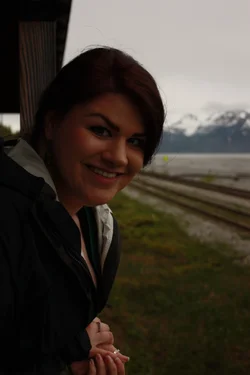
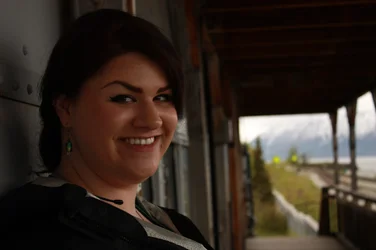
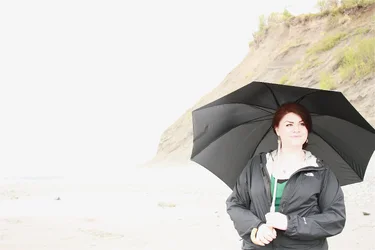
I had a frustrating photo shoot with a friend today because I couldn't get the exposure triangle down. I tried many tweaks and slight (and drastic) adjustments, and the attached photos seemed to be all I could get. Any suggestions for the settings on a cloudy day like this?

$IMG_9150.webp$IMG_9124.webp$IMG_9239.webp
 
I've found that cloudy days are the best for portraits, because the clouds act as a large softbox diffusing the light and softening it.

Were you trying to properly expose both the background and the subject? DSLR sensors don't have enough dynamic range to properly expose both the sky and the subject when the subject is very dark and the sky is very bright. You usually have to sacrifice one or the other.

The first two are SEVERELY underexposed, probably by around 1.5 or 2 stops. Although you have detail in the background, you've lost detail in your subject, because she's so dark. I would consider upping your ISO or opening your aperture. You might not have as much detail in the background (especially if you use a wide aperture), but your subject will be much better exposed. You can also manipulate your shutter speed if you want to try and keep your ISO, and therefore image noise, lower. But be wary of motion blur.

The last one is severely overexposed, but I think that it could work. The very minimalistic background coupled with her very soft expression make this processing look appropriate, I believe. It's not technically correct (again, it's overexposed), but as an artistic decision I think it works. It also helps that this processing is trending right now. ;)
 
It does not get much easier than shooting on a cloudy day but it looks like you we under a shelter the only way to get this shot without blowing the background is with off camera flash
 
I agree with gsgary: Get a flash into the mix.

Get it off camera and bounce it off a cheap white Walmart foamcore board, if nothing else. Set the aperture to get the DOF you want, then expose for the background you like with shutter speed, and finally dial in the light for the subject by adjusting the flash output.
 
I was playing with an open lens, though it was a kit lens and I could only get it as low as f/5.0 on AV mode. (Any idea as to why it wouldn't go lower?) Had I tried to compensate with ISO's and shutter speed. I was aiming for proper exposure of both the subject and background. So, using a flash would help with proper subject and background exposure? Any recommendations for a decent flash for a beginner? Sorry, I'm used to using snow as my flash!
 
On the f/5 thing, it depends on the lens. Assuming the kit lens you used on this was the EF-S 18-55 f/3.5-5.6, the name tells you what's going on. As the lens is zoomed from 18mm to 55mm, the aperture goes from a minimum of f/3.5 to f/5.6. At 18mm, you can get f/3.5, but at 55mm, you can't get lower than f5.6. In between, you'll get something between f3.5 and f/5.6.

The Yongnuo flashes are getting to be pretty popular low-cost flashes, and not just for beginners. I use two of their YN-565EX flashes, along with my two Canon 580EXII flashes, and they work very well. Here's a link to the Yongnuos on Amazon: Amazon.com: yongnuo flash

 
Ultimately a 580EX canon flash would be what you want. However a more budget conscious flash will be the 430EX.
 
lissthis said:
I was playing with an open lens, though it was a kit lens and I could only get it as low as f/5.0 on AV mode. (Any idea as to why it wouldn't go lower?) Had I tried to compensate with ISO's and shutter speed. I was aiming for proper exposure of both the subject and background. So, using a flash would help with proper subject and background exposure? Any recommendations for a decent flash for a beginner? Sorry, I'm used to using snow as my flash!

Imposible to get subject and background exposed correctly you should have uped the iso and had shutter speed about 1/125 to stop camera shake, without flash your only concern should have been correct exposure of the subject by moving her to a better location
 
Cloudy days are the best to take portraits in. 1 trick I use is never get the sky into it unless you have some sort of flash because the sky will always be blown out if you expose for the subject. Use spot metering and meter on the subject. All your shots except for the umbrella one is underexposed. The umbrella one everything is overexposed It doesn't seem like you were even looking at the light meter on that one.
A nice way to shoot that umbrella one would have been to come in closer and just do her shoulders and face. Just my two cents, keep shooting.
 
What metering mode were you using? Your camera likely offers at least 3 different metering modes.

Okay, I see you use a Canon XSi. It has 4 metering modes:
  • spot - which meters just 4% of the viewfinder at the center of teh viewfinder (for spot mode 4% is almost to much)
  • partial - which meters 9% of the viewfinder at the center of the viewfinder
  • center-weighted - which average the entire scene, but puts about 70% of the averaging emphasis on the central 20% or so of the scene in the viewfinder
  • evaluative - which averages the entire scene.
Why is the light on cloudy days soft and shadow edges less sharp?

Because the light source is apparently a lot larger. Instead of a small really bright light source (the sun), the light comes from really big, but dimmer, clouds.

Bigger apparent light sources make softer light that 'wraps around objects' which means the shadow edges are much more diffuse. That is why pro portrait shooters use umbrellas and/or softboxes to modify their small lights. to make them apparently very much larger lights.

On cloudy days we get that soft light, but we have no control over it's direction, and of course the modified sunlight light is coming from overhead. Overhead is ok for use as a hair light, but not for a face.

So even on a cloudy day, some supplimental light is very desirable if you want to get pro quality results. Because there is no direct sunlight, reflectors don't work very good.

So your supplimental light needs to come from a flash unit. A flash unit on the camera hot shoe can be used for fill, but it can't be used for accent lighting. For accent lighting the flash unit has to be off of the camera, which is known as off camera flash or OCF.

To learn more about OCF visit http://strobist.blogspot.com/2006/03/lighting-101.html
http://neilvn.com/tangents/flash-photography-techniques/

Get the books - Light Science and Magic, Fourth Edition: An Introduction to Photographic Lighting
Speedliter's Handbook: Learning to Craft Light with Canon Speedlites
Off-Camera Flash Techniques for Digital Photographers

If there are no clouds, you can put your subject in open shade to again get an apparently large light source, the bright blue sky, without the hard sharp shadow producing sun.

 
Last edited:
What metering mode were you using? Your camera likely offers at least 3 different metering modes.

Okay, I see you use a Canon XSi. It has 4 metering modes:
  • spot - which meters just 4% of the viewfinder at the center of teh viewfinder (for spot mode 4% is almost to much)
  • partial - which meters 9% of the viewfinder at the center of the viewfinder
  • center-weighted - which average the entire scene, but puts about 70% of the averaging emphasis on the central 20% or so of the scene in the viewfinder
  • evaluative - which averages the entire scene.

Thank you for this informaton. I actually don't know what metering I had used, as I just learned about it from you! I will have to further educate myself on this and try it out.
Thank you for the suggestions on flashes to purchase as well.

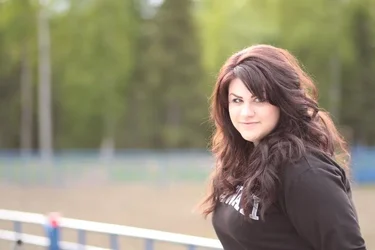
I have gotten a new lens, which has helped me to achieve the effects I was looking for without sacrificing the correct exposure. If you guys have suggestions for improvement, I am always open to them!
1.$306966_3575607941579_1193922722_n.webp
2.$600145_3575602301438_1700342569_n.webp
 
Last edited:
If without flash, spot meter off her skin, increase exposure by 1 to 1.5 EV.
 
You're getting much better, but still having some exposure problems.

Exposure would ideally be set by knowing the true amount of light falling on the subject. The camera can't actually measure that (that's why some photographers carry a dedicate light meter that can measure "incident" light -- basically they hold the meter near the subject's face to see how much light is "falling" on that spot.) Cameras can only measure the light reflected off of a subject -- and this is where it gets tricky. Black fabrics don't reflect much light. White snow reflects a LOT of light. That means the same amount of light (which should have the same exposure) will read differently depending on what you point the camera at when it takes the reading.

To get a pretty good exposure on the face, put the camera into "spot" metering mode, target your subjects facial skin, and give the shutter button a half-press to get the camera to meter and lock the exposure. It should give you a good exposure for your subject and ignore everything else.

If your subject is in shade, you might have a different challenge... the camera may expose correctly for the shade but the background which is NOT in shade will appear to be far too bright. Essentially you have a "mixed" light level situation. You cannot do anything about the light in the background (you can't dim down the sun). But you CAN do something to increase the light int he foreground by using a flash. If you use a flash to increase the amount of light in the foreground so that it's just a tiny bit dimmer than the light in the background, you'll end up with a balanced and natural looking shot.
 

Create an account or login to comment

You must be a member in order to leave a comment

Create account

Create an account on our community. It's easy!

Log in

Already have an account? Log in here.

Back
Top Bottom