What's new

Sunlight photography

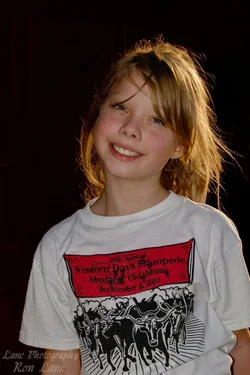
Yep much better Ron Lane! Secret for shooting sun at subjects back in positioning subject and fill flash for best results.

Well done Ron and keep practicing the technique until it's second nature.
.

Thank you. I am practicing and learning, my first picture posted on here, I was crushed but I am honestly trying to learn and ask and apply everything that I can.
 
LOL. I don't have much of an opinion, hair could be burned in some I think. But otherwise it looks good.

Actually, she looks like a sweet kid. Just something about redheads with mischievous grins makes me think "she's gotta have a stash of bottle rockets somewhere"

I ran the two through enfuse:

$enf_.webp
 
Thanks, the hair was very close to being blown out and I did all I could do to fix that on the right side of the picture.
 
It looks good on the darker one, just pull both into PS and mask in the darker version.

Digital is different from film, it's either blown or not, I mean, if all the detail is crammed up into the top 35 levels of the histogram then you won't get much useful detail, but generally speaking, you can push stuff pretty far to the left before loosing data.
 
No, it wouldn't.

The ND filter will cut light from the fill as well as the ambient by equal proportion, you'd see no effect except requiring greater exposure.

Exactly! You have much more control over the output of your flash than the sun.
 
Oh ok. So you're saying you can maintain slower than sync shutter speeds with an ND while compensating fill with flash power.

So if, say, sync is at 1/160 and the sunlit portion is at Zone IX and shadow at Zone III, you can add an ND-3, drop the sunlit portion to Zone VI and boost the strobe by a stop to compensate the shadow to Zone IV, while still being able to shoot at a wide aperture.

That does make sense - I wish you clarified at first. It sounded like you were saying you could just slap an ND on and all is well, like it somehow transmits flash light more than ambient or something.
 
My bad. I should have clarified. Im a slow and lazy typist.

:guilty:
 
Don't underestimate the pop up flash. Try this neat trick in harsh sunlight: Go to Manual mode, adjust your aperture to f/22, ISO 200, and shutter speed to 1/250. Now pop up your flash, go into the menu and adjust the flash exposure compensation to +2 stops. Now get about 4-6 feet from your subject. If it's sunrise or sunset put the sun right behind your subject. Now focus and take the picture. Might be suprised by the results ;-)

..Yeah I don't agree with this at all, because you get results like this:

scorpion_tyr

I got home and tried these settings that you suggested. Here are the two shots that I took. I didn't get the sun directly behind her because I was getting the spots on her face. I cloned out the couple that I got.

Was this what you were talking about or close?


IMG_4942 by Ron_Lane, on Flickr


IMG_4941 by Ron_Lane, on Flickr


Easiest thing to do is just put their backs to the sun and expose for the skintones. That way you don't have any weird shadows across their faces. Let the highlights blow a little bit, they're not important anyway.

Example of just that shot on a 13 year old film camera, not some new-fangled-highfalutin'-digital:
7849329556_7fe9418ee0_b.jpg
 
Last edited:
^^ I see no reason why it shouldn't have worked though. I am thinking the flash was not powerful enough or that the background fooled the meter?


I hate TTL...
 
^^ I see no reason why it shouldn't have worked though. I am thinking the flash was not powerful enough or that the background fooled the meter?


I hate TTL...

Yes it was most likely the camera flash. I only have the built in flash and had it turned up all the way. But I do like the results of the picture after the pp and the wb adjustment. It has a studio look to it.
 
If you opened up the aperture by a stop or two, and decreased exposure time to compensate then you would have had the same results in camera.

What ends up happening is that the flash goes off in about 1/800 - 1/2000 sec, during the first or last (rear curtain) part of the exposure. So the shutter speed doesn't really effect the flash because it's done and over with within a fraction of the total exposure time, so the only way to really control flash is by setting it's power and by setting aperture. However, the ambient light is affected by exposure time as well as aperture.

So if you open up the aperture and decrease the shutter time by the same amount, then the flash-lit portion will brighten up, while the sun-lit portion stays the same. Likewise, you can close down the aperture and increase the shutter time to darken the flash-lit portion.

By the same extension, you can control the brightness of the ambient-lit background. It may seem really complicated, if so it will "click" suddenly one day.
 
Last edited:
Nice thread. I had the same issue and I wanted to ask for help. I have a question too. Can we use the ''white balance'' settings (ex sunny 5.200K etc) for better results in these settings (Manual mode, aperture f/22, ISO 200, and shutter speed to 1/250.), or it wouldn't help much?
And another one: Sir Unpopular, said something about zones III, IX and a ND? What are these?
PS. As you guessed i am a newbie to ''DSLR photography'' .
 
That's zone system annotation, where Zone V is middle grey and each zone above and below represents one stop with ten zones in the scale. This correlates to specific tone and detail amounts, Zone X is white without detail, Zone 0 is clipped shadows, Zone VI-VII caucasian skin, Zone III-V black skin, Zone IV-V hispanic skin, Zone V green grass, blue sky, etc, Zone II deep shadows with limited detail, Zone VIII upper hilights with ample detail, Zone IX-X specular hilights....

It's a way of kind of correlating exposure value with the exposure result.

Zone System - Wikipedia, the free encyclopedia

ND is just a neutral density filter, i.e. ND-2 is a neutral density filter which filters two stops.

As for white balance, it does't make any difference provided you are shooting RAW and not JPEG, WB correction is done at RAW processing and setting it just tells the raw processor what you set. Though if you use the Hi/Lo clip warnings in your preview an accurate white balance may help preview clipping.
 
Last edited:

Create an account or login to comment

You must be a member in order to leave a comment

Create account

Create an account on our community. It's easy!

Log in

Already have an account? Log in here.

Back
Top Bottom