What's new

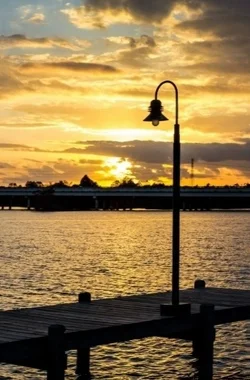
Sunset at the lake - C&C please

rmr1923

TPF Noob!
Joined
Dec 31, 2012
Messages
39
Reaction score
11
Location
Kingwood TX
Can others edit my Photos
Photos OK to edit
This was shot with a Canon 600D, and I believe it was with my 50mm/1.8 lens (I don't recall what the camera settings were), I'm looking for some critiques on this photo.

First things first, I can tell it's not level (lamp post should be straight up and down), other than that, please have at it.

376586_10101213598346148_2101166172_n.jpg
 
It is a little deep in the midtones and you are loosing the bridge and the dock

$376586_10101213598346148_2101166172_n.webp

just a quick edit.... saturation you could adjust to your liking
 
I think your photo is level but the lamp post isn't actually vertical, maybe you could fix it by skewing the image to the right slightly.


Like that.
 

Attachments

  • $Fullscreen capture 06012013 124133.bmp.webp
    $Fullscreen capture 06012013 124133.bmp.webp
    53.4 KB · Views: 119
Last edited:
It is a little deep in the midtones and you are loosing the bridge and the dock

I'm starting to think this may be a monitor calibration issue on my part, when I look at your edit it looks very bright. On a similar note, I had some prints made yesterday of a few photos for comparison and noticed that they came out quite a bit darker than what my monitor is showing me, they all look underexposed. I'm working on a laptop so I'm not sure if I can really get a decent calibration on the monitor, given that if I change my viewing angle even slightly, brightness and contrast look vastly different. I may have to consider investing in a decent monitor.
 
This was shot with a Canon 600D, and I believe it was with my 50mm/1.8 lens (I don't recall what the camera settings were), I'm looking for some critiques on this photo.

First things first, I can tell it's not level (lamp post should be straight up and down), other than that, please have at it.

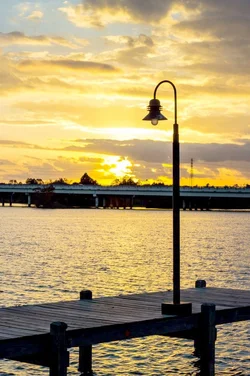
When straightening photos, you should use the most critical element to do your comparing. In this shot, I would probably use the bridge in the background, assuming it to be nearly "horizontal". I probably wouldn't use the water here either, because it is not actually a horizon that is visible.

Never mind the lamp post, as these can sometimes be installed off plumb, or even bent by a traffic accident (or in this case, since it is mounted on a dock, any number of factors could have made it not plumb). I'd use the bridge if it is nearly perpendicular to your line of sight.

I love the color here, but the dock and bridge are underexposed, so this would be a good shot to try a little HDR. Did you bracket the shot?

Mully's edit has improved it, thanks, Mully.
 
I didn't bracket the shot, but it's just a 2 block walk from my house so I can always go out and do it again. I didn't consider trying an HDR look so I may give that a go with my tripod one day this week if I get time.

And the bridge actually increases in elevation as you go from right to left (check the height of the columns). This may not be the best angle for the shot given that the bridge isn't level, but where the bridge levels out there's some unattractive foliage that would be unavoidable, or take a lot of work in PS to get rid of.

Thanks again for the tips, they're much appreciated.
 

Create an account or login to comment

You must be a member in order to leave a comment

Create account

Create an account on our community. It's easy!

Log in

Already have an account? Log in here.

Back
Top Bottom