What's new

Taking pictures of a toddler in front of Christmas tree. Help??

MissK

TPF Noob!
Joined
Dec 5, 2012
Messages
1
Reaction score
0
Location
Louisiana
Can others edit my Photos
Photos OK to edit
Hey everyone. I am hoping someone can tell me what settings to use on my Sony a65 to take GREAT pictures of my toddler in front of our Christmas Tree to use for Christmas cards. I have had the camera for a year. I can take pretty good pictures in manual mode outside, but indoors is a different story. PLEASE HELP!!! Also, I am still learning photography lingo so please dumb down responses :)
 
There are no magic "settings" which is why you have no replies. Settings you would use are all light dependent and objective dependent. Only you can assess your light and desires onsite, we can't. We have no clue about your lighting arrangements, setup, flash, no flash. Etc etc etc.

My advice would be to practice beforehand and see what each settings do and learn why. When shoot time comes, you will know what to use based on your needs.
 
Light the room and have fun with it then you are not tripped up with your lighting
 
Unless you have lighting to add to the scene, get light on the toddler's face somehow so it about 1-2 stops brighter than the lighted tree. If you light the toddler and the tree equally, the lights and the tree get washed out. Having the exposure properly set on the toddler and a little underexposed for the tree will highlight the subject, but leave the background intact for the setting.

Otherwise , go AV mode to control your dof and bracket exposures looking for something that works out.
 
Mess with you aperature, ISO and shutterspeed. Find what YOU like.
 
To get the child and the Christmas tree in focus you will need to use a small enough lens aperture that gives you sufficient depth of field. How small the aperture needs to be will depend on the point of focus distance.

For example, if you want the entire child/Christmas in the shot your point of focus will be further from the camera than if the child and only the lower part of the tree is in the shot.

By using a small enough aperture to get sufficient DoF, your problem is likely going to be that there is not enough light to allow your shutter speed to be fast enough to prevent camera shake or motion blur.

You can compensate for a slow shutter speed by cranking up the ISO setting. A noisy photo is better than a blurry photo.

The ideal solution is to use strobed light (flash). But using strobed light adds a level of complexity which also means a learning curve for you. Of course you could just use your camera's built in flash, and by trial and error likely produce an acceptable strobed light shot.
 
I don't know about you, but my toddler has no desire to sit in front of the Christmas tree so I can take photos. As much as I want those "magical" shots that everyone seems to be putting out there.... I will wait until my toddler is a little older. :P

With that said, search this forum about various topics. There's tons of information on exposure, even indoors. I actually just searched "Christmas tree lighting" the other day and it brought up a TON of topics that helped me to nail down getting the best Christmas tree shot. One day, when I get them without a toddlers foot, a dogs tail or an infants fingers coming through the frame, I'll actually post them. :)
 
With a handheld incident/flash light meter, or the camera's built-in reflected light meter if a constant light is used.
 
With a handheld incident/flash light meter, or the camera's built-in reflected light meter if a constant light is used.

I've got "focal length index" on the display of my Sony nex-5n, which varies between -2.0 and 2.0. Seems like it's happy (not flashing) when that value is zero, which usually can be accomplished by either manipulating shutter speed or aperture. Does "focal length index" relate to the f/stops in a useful way (ie can I use that instead)?

Thanks
 
I'd use a large aperture, and rather than put the child immediately in front of the tree, I'd put quite a distance between the child and the tree. (as a general guideline, I almost never put a subject immediately in front of any background... I want a LOT of space. I make exceptions to this, but more often I find a background looks better if it's "in the background" and not immediately behind the subject.

Here's an example:


Holiday Bokeh by Tim Campbell1, on Flickr

Ok, it's not a child (but that shouldn't matter). This shot was taken with a 70mm focal length at f/2.8 and there's at least 10' (probably closer to 15') between my subject and the tree.

Deliberately de-focused holiday lights create beautiful orbs of soft light. You need a low focal ratio (preferably at least f/4 or lower) and a long-ish focal ratio (this works at 70mm... at 50mm it'd still be pretty good. But if we dropped to, say, 18mm then we would lose most of this effect.)

The result is a sharp subject, but the tree gets soft holiday light bokeh. Not only is it not necessary for the Christmas tree to be sharply focused, being out of focus gives it even more beauty. It's clear to everyone that the background is a Christmas tree.

I also toyed with the white balance and while this is FAR from being correctly white balanced, I decided the "warm" look of tungsten light helped create a warmer holiday look. (I don't always want "accurate" white balance.)

 
Make sure the toddler hasn't had too much sugar prior to taking the pictures. Otherwise, it will require a parent to hold them in one place!
 
1. Shoot the Christmas tree / lights you want to use for the background.
2. Shoot the toddler shot you want to use against a solid background (I used black)
3. Composite them.

Christmas_Baby_0214.jpg
 
Without supplemental lighting, Buckster's method is probably going to produce the best results, but make sure you consider light angles and shadows in both shots, in other words: Don't have full face light on the child and shadows going image left in the tree shot. People may not know what is wrong when they look at it, but they will know something is wrong.
 
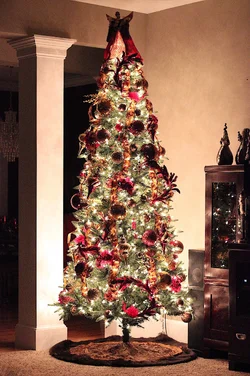
I am really new at photography but did some research online about taking pictures of a tree to see what worked for others. In the attached photo I was going for clarity and sharpness to detail the beautiful job my wife did on the tree this year, however with a subject in front I would want the tree to have some amount of bokeh. That's just my taste but I've also seen photos where both subjects were in focus and it turned out amazing, see "lil blue boo" photo LINK below (not mine, just for example of what I was trying to recreate but without the subjects in front).

http://www.lilblueboo.com/wp-conten...e-photos-of-your-christmas-tree-at-night-.jpg

I shot the following attached picture with my 50mm on a tripod (ISO 6400, f/2.5, 1/50), room/outside was fully dark- only lights were the tree, adjusted white balance and sharpness in PP.
 

Attachments

  • $IMG_0947.webp
    $IMG_0947.webp
    1.6 MB · Views: 224
Last edited:

Create an account or login to comment

You must be a member in order to leave a comment

Create account

Create an account on our community. It's easy!

Log in

Already have an account? Log in here.

New Topics

Back
Top Bottom